Steps to reproduce
- open the sandbox vault.
- paste the following text
> [!Fabric]-
> [[fabric (py)]] seems relevant, running cmd from python
> ```python
> from fabric import Connection
> result = Connection('web1').run('hostname') # web1
> result  # <Result cmd='hostname' exited=0>
> ```
Expected result
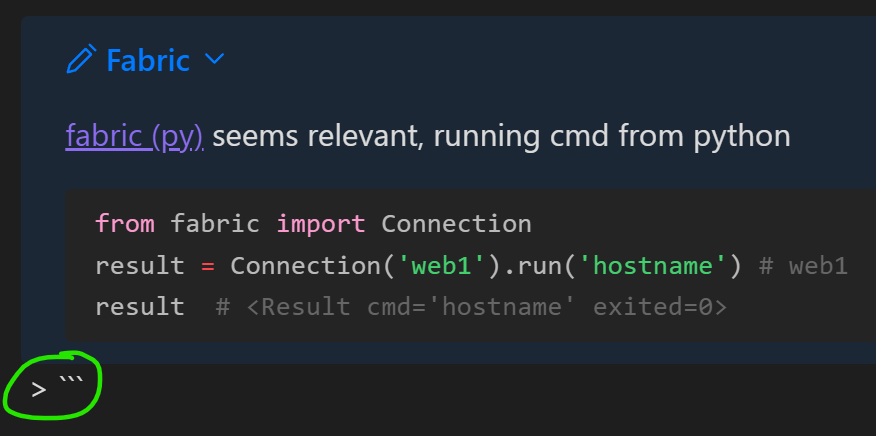
expect the callout to display correctly, without > ''' at the bottom
Actual result
the callout breaks, showing the callout and code > ''' symbols
Environment
- Operating system: Windows 11
- Debug info:
SYSTEM INFO:
	Obsidian version: v1.1.9
	Installer version: v1.0.3
	Operating system: Windows 10 Home 10.0.22621
	Login status: logged in
	Catalyst license: none
	Insider build toggle: off
	Live preview: on
	Legacy editor: off
	Base theme: dark
	Community theme: none
	Snippets enabled: 0
	Restricted mode: on

RECOMMENDATIONS:
	none
Additional information
removing the comment in the code block fixes the callout
# <Result cmd='hostname' exited=0>
in edit mode, the comment is colored as a HTML tag
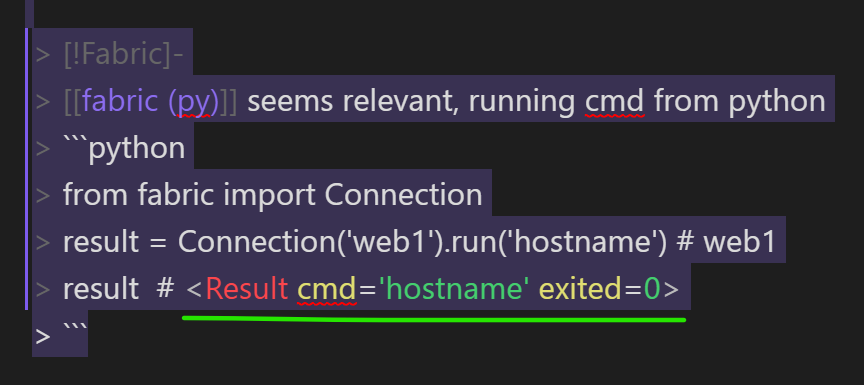
note this only happens in Live Preview, not reading mode.
related issue: callout-codeblocks-incorrectly-escaped