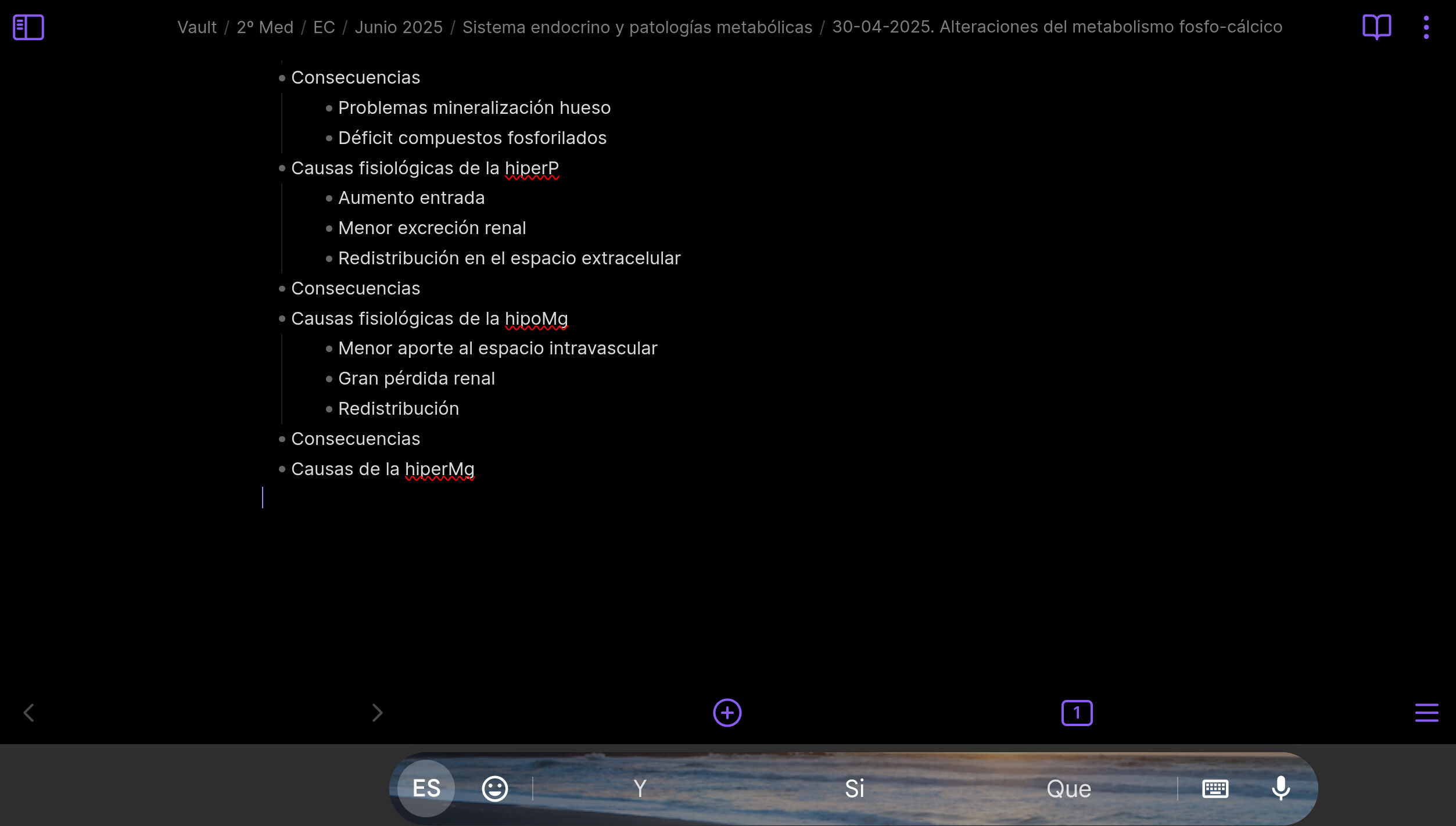
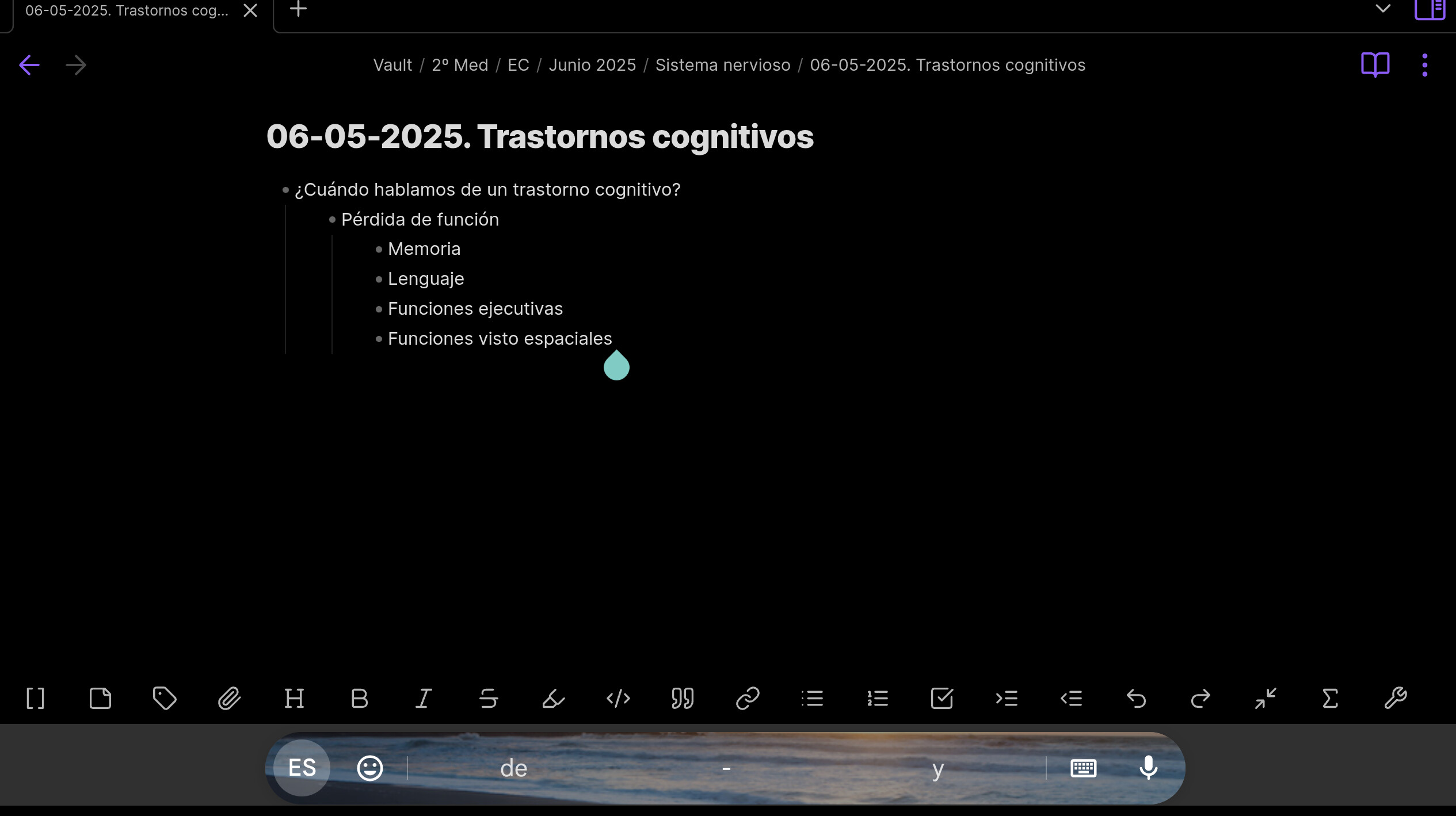
Just opening the app, the mobile toolbar, with all the quick actions doesn’t appear. A time before was working, but now it doesn’t
Followed troubleshooting guide with no results. Since the problem is from mobile app, I couldn’t emulate it on Windows.
Despite following the guide, nothing changed
SYSTEM INFO:
Operating system: android 13 (Xiaomi 21051182G)
Obsidian version: 1.8.10 (197)
API version: v1.8.10
Login status: not logged in
Language: en
Live preview: on
Base theme: adapt to system
Community theme: none
Snippets enabled: 0
Restricted mode: off
Plugins installed: 6
Plugins enabled: 5
1: Advanced Tables v0.22.1
2: Calendar v1.5.10
3: Kanban v2.0.51
4: Natural Language Dates v0.6.2
5: Better Word Count v0.10.1
When I tried to restart the app reinstalling it, I’ve switched off all the community plugins, but it didn’t work.
SYSTEM INFO:
Operating system: android 13 (Xiaomi 21051182G)
Obsidian version: 1.8.10 (197)
API version: v1.8.10
Login status: not logged in
Language: en
Live preview: on
Base theme: adapt to system
Community theme: none
Snippets enabled: 0
Restricted mode: on
Seeing a very similar behaviour on a Lenovo tablet with connected keyboard.
When the keyboard is connected (= display keyboard is disabled), the quick action bar is not visible. Upon disconnecting the keyboard and restarting Obsidian, the quick action bar is shown alongside the quick action bar. When reconnecting the keyboard, the display keyboard vanishes and the quick actions bar stays until I switch to another note.
Enabling or disabling bluetooth does not seem to have any effect on this. (The keyboard is connected via a magnetic connector)
This behaviour changed with the 1.8.10 (197) update.
*the quick action bar is shown alongside the display keyboard.
In short, it seems the quick action bar is now only shown when an on-screen keyboard is shown, which is a drawback on tablet devices with external keyboard, since the quick action bar is very convenient but the on-screen keyboard takes up half the screen which makes editing a pain.
Similar missing toolbar after recent update, but only in a main display in a foldable model, Samsung galaxy z fold 5.
In the small front screen (folded), the toolbar is shown as before.
I have had this problem for at least 6 months. After the latest Obsidian update the mobile toolbar is still missing
Using Obsidian predominantly on mobile tablet, the absence of mobile toolbar in source mode is very debilitating and effects my workflow extremely negatively
Some background:
Lenovo Tab P11 plus, TB-J616F
Android version 12, security update 5 October 2024, Google play system update 1 April 2025, Kernel version 4.14.186-gf49e3fb57266 #1 Wed Oct 16 16:27:22 CST 2024
The problem manifests unfailingly in all of the following scenarios
Tablet with on screen keyboard, clean install obsidian no community plugins
Tablet with onscreen keyboard with community plugins installed and enabled
Tablet with onscreen keyboard with community plugins installed and disabled
Tablet with Bluetooth keyboard, clean install obsidian no community plugins
Tablet with Bluetooth keyboard, with community plugins installed and enabled
Tablet with Bluetooth keyboard, with community plugins installed and disabled
Portrait/landscape orientation seems to do no difference, the toolbar is conspicuous with its absence
I will not bore you with elaborating on the the many hours of experimenting which I did enabling/disabling all the community plugins that I use one by one, or trying different themes, sufficient to now is that the mobile toolbar seems to have vanished forever
I hope to God and all saints that Obsidian would resolve this issue soon. This formidable tool is crippled on mobile without the mobile toolbar, and as much as it pains me I have actually started considering going over to some other solution if this does not get resolved, because I simply cannot complete my research with the tool that hampers my editing and creative writing
I am unfortunately no programmer but if there is anything I can do I’d be happy to help
I’m trying not to lose hope
We have not had this problem (As the one described in this thread) for 6 months. As it was tied to 1.8.10.
Maybe you have a different, similar, problem.
Which version of Obsidian are you currently running exactly?
I discovered that the mobile toolbar is not actually missing entirely, but it fails to appear in certain situations.
For example:
I am using Gboard onscreen keyboard, which has docked and floating modes
When Gboard is in a floating mode the mobile toolbar is not shown. When I dock it at the bottom of the screen or use any other docked on screen keyboard such as Hacker’s keyboard, the mobile toolbar appears as normal.
This behaviour started earlier this year, I don’t really remember which update it was that “broke” the mobile functionality
Before that the mobile toolbar was always visible in editing mode on all of my mobile devices regardless of floating or docked mode of the onscreen keyboard
I can’t attach a screen recording here, but please use this link to see the screen recording demonstrating how the toolbar appears when keyboard is docked and disappears when the keyboard is floating:
In thread
I see that people using Bluetooth keyboards seem to have the same problem with the mobile toolbar failing to appear.
Is there any hope that we will ever get the mobile toolbar back?
I really need this toolbar to be visible all the time in editing mode on mobile.
Is there any advanced setting that I can tweak to make this happen?
Without this toolbar my workflow is totaly ruined, 99% of the time I use mobile tablet.
FYI, my sistem info:
Date Created 2025-07-16 22:30:36
Obsidian version 1.8.10 (197)
API version 1.8.10
Device
Device Name : Lenovo Tab P11 Plus
Model : Lenovo TB-J616F
Manufacturer : LENOVO
Device : TB-J616F
Board : tb8185p3_64
Hardware : mt8185
Brand : Lenovo
Build Fingerprint : Lenovo/TB-J616F_EEA/TB-J616F:12/SP1A.210812.016/TB-J616F_S240253_241016_ROW:user/release-keys
System
Android Version : 12
Version Name : Snow Cone
Released Date : October 04, 2021
Code Name : Android 12
API Level : 31
Security Patch Level : 2024-10-05
Build Number : TB-J616F_S240253_241016_ROW
Baseband : null
Java VM : 2.1.0
Kernel : 4.14.186-gf49e3fb57266
Language : English (en_GB)
OpenGL ES : 3.2
Root Management Apps : No Apps Detected
SELinux : Unable to determine
Google Play Services : 25.25.33 (190400-781214296)
Vulkan : Supported (1.1)
Treble : Supported
Seamless Updates : Supported