Steps to reproduce
The bug is intermittent, so it may take a few attempts.
- Restricted mode on, default theme, no snippets.
- Create a small note with mixed formatting. I’ve attached my 8 KB test note (
Dense 8KB.md, ~10 short sections). Each section has:- headings and sub-headings
- bold, italic, highlight, strikethrough, inline code and inline math
- wikilinks and tags
- nested lists and tasks
- two callouts and a quote
- a table, a code block, a math block, a comment and footnotes
- Close Obsidian fully and reopen it, then open the note in Live Preview. Don’t tap into the text, so the keyboard stays closed.
- Scroll down through the note with your finger, then back up a little.
- If everything renders, repeat from step 3.
In my testing it doesn’t happen every time:
- 10 cold opens of the same 8 KB note in a row rendered fine.
- The next identical run got stuck on the second scroll.
In normal daily use I also see it on very short notes, even two lines. Typically: I close the app, come back after a while, open a note, and it shows as plain source text.
Did you read and follow the Troubleshooting Guide ? [Yes]
Expected result
Live Preview renders the whole note every time, whatever its length:
- headings styled with the
#hidden **and==markers hidden- callouts, tables and math rendered
[[links]]tappable
Actual result
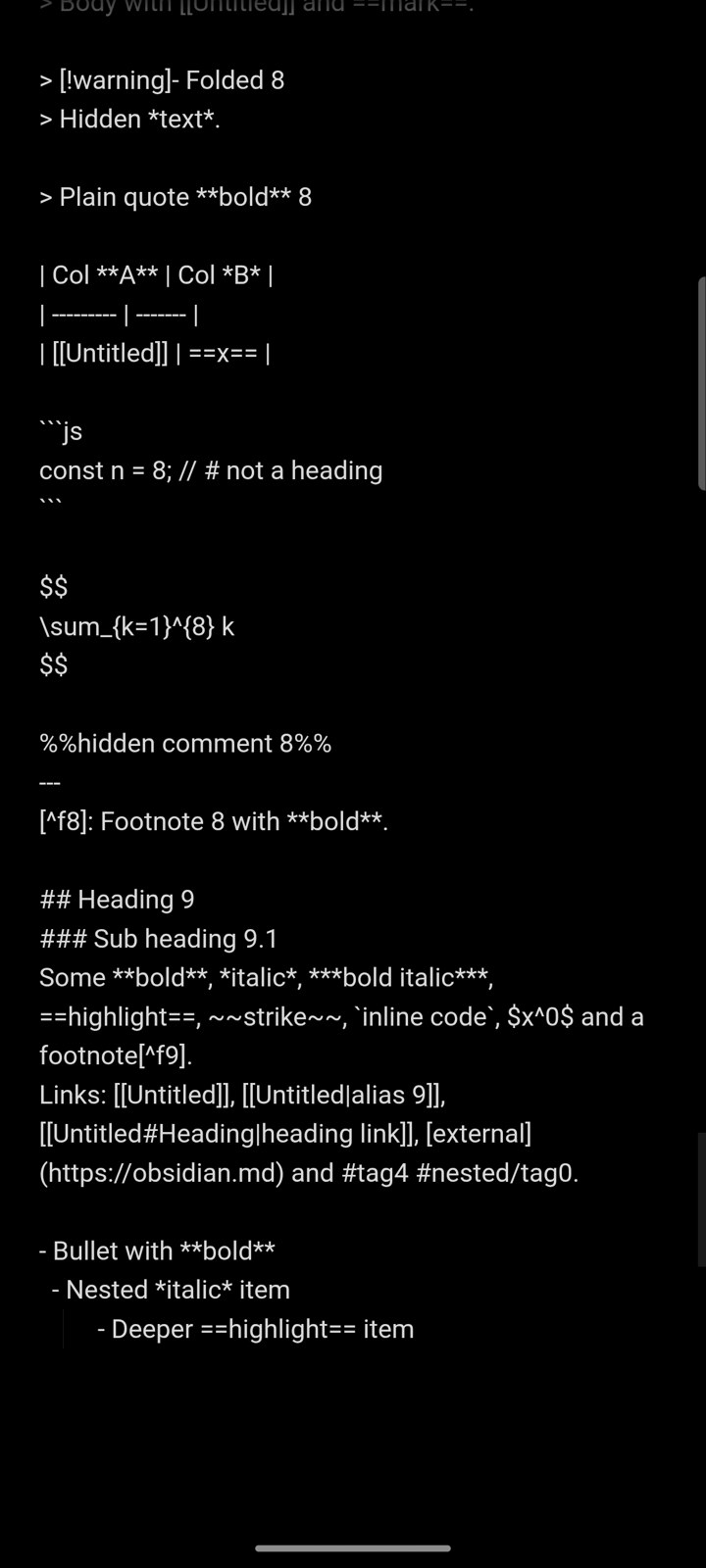
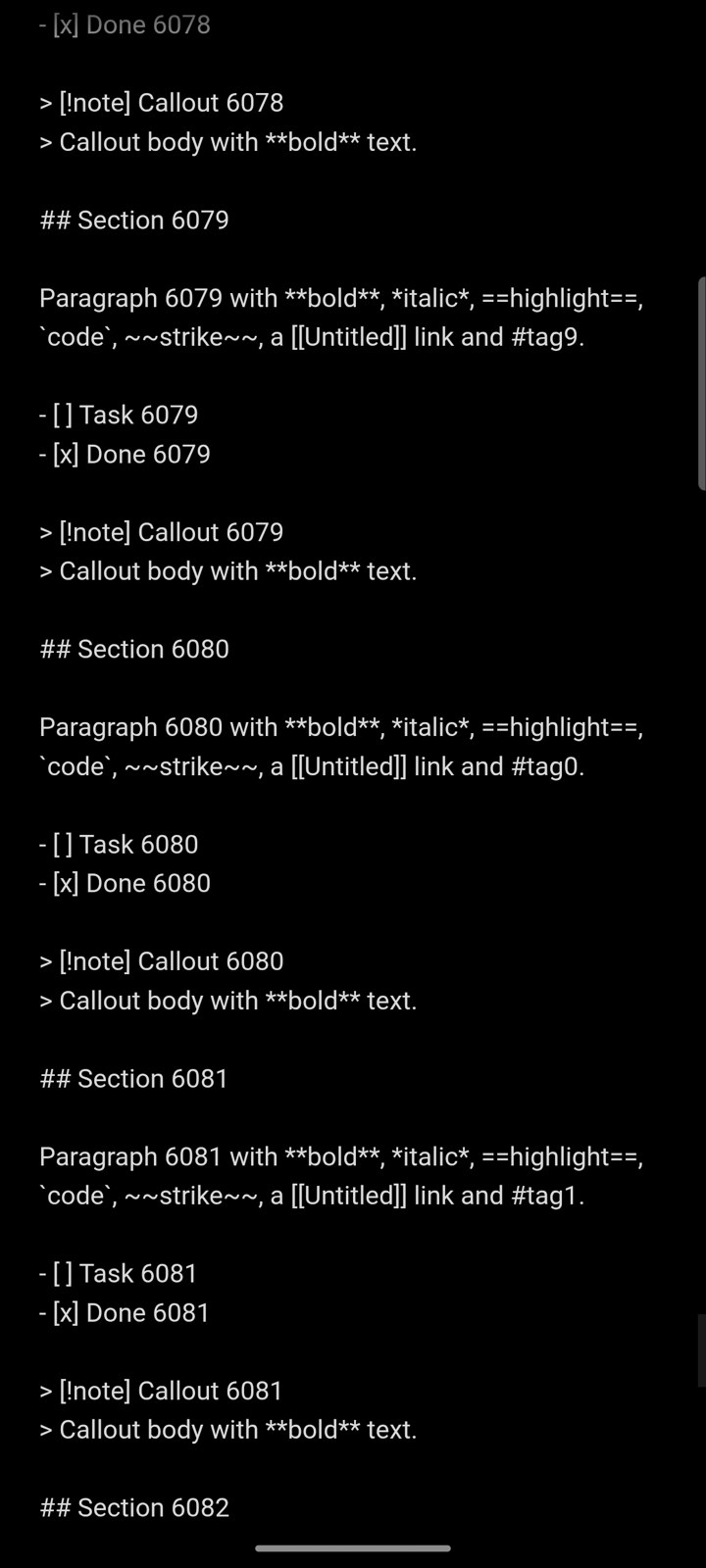
- Part of the note, sometimes all of it, stays in source format:
## Heading 9,**bold**,[[Untitled]],> [!warning]- Folded 8, raw table pipes,$$math. Links can’t be tapped. - It does not fix itself over time. In the 8 KB case it stayed stuck for ~8 minutes, through:
- backgrounding and returning
- switching to another note and back
- typing in another spot and closing the keyboard
- screen off and on
- What fixes it:
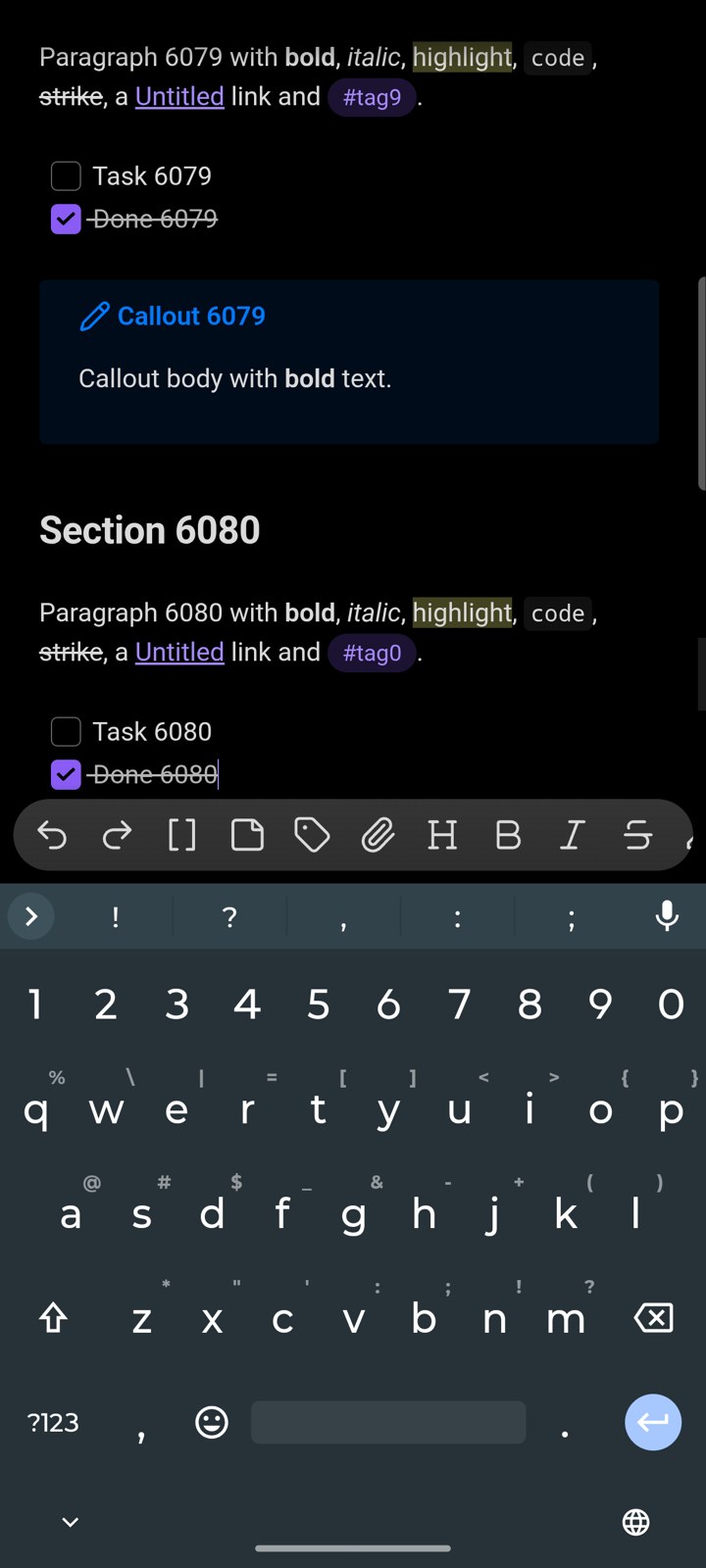
- tapping once into the note sometimes not always
- toggling Reading view sometimes not always
- restarting the app always
- Reading view shows the same note correctly.
Screenshots (Moto G Stylus 2025) Also tested on Samsung s24 ulra:
- Small 8 KB note, stuck: [screenshot-1-small-8KB-note-unrendered.jpg]
- The same behaviour in a longer note: [screenshot-2-long-note-unrendered.jpg]
- The spot from screenshot 2: [screenshot-3-same-spot-after-one-tap.jpg]
Environment
SYSTEM INFO:
	Obsidian version: 1.15.0 (396)
	API version: 1.15.0
	Operating system: Android 16 (motorola moto g stylus - 2025)
	Webview version: 156.0.8078.47
	Login status: not logged in
	Language: en
	Live preview: on
	Base theme: adapt to system
	Community theme: none
	Snippets enabled: 0
	Restricted mode: on
RECOMMENDATIONS:
	none
Installed from Google Play.
Additional information
What the editor’s internal state showed. While it was stuck, I attached Chrome DevTools to the app’s WebView and read CodeMirror’s internal state:
- The CodeMirror parse context had stopped at character 3410 of an 8115-character note.
- The background ParseWorker was idle:
working: false, nothing scheduled. - Its 30-second work window had expired 8+ minutes earlier.
- The editor was unfocused the whole time.
So the parse simply never resumes until something focuses or edits the editor.
Probable cause. This is from reading the minified 1.15.0app.js. Minified names will differ in your source, so the offsets are approximate.
-
Focus-gated parse budget (≈ offset 606360).
- Live Preview relies on
@codemirror/language’s ParseWorker, which gets 3 s of work per 30 s window. - A new window is only granted
if (chunkEnd < 0 || view.hasFocus), and the per-edit bonus is focus-only too. - On mobile you usually read with the keyboard closed, so the editor is unfocused. Backgrounding the app also dispatches
blur. - Once the window lapses, parsing stops for good.
- Live Preview relies on
-
Live Preview doesn’t rebuild past the parsed text.
- The decorator base (≈ offset 2656594) does
syntaxTree.length < viewport.to ? decorations.map(changes) : rebuild. - The block-widget field (≈ offset 2669940) only rebuilds if
ensureSyntaxTree(state, viewport.to + 2000, 20)succeeds. - So text beyond the parsed point keeps empty decorations, and nothing retries later.
- The decorator base (≈ offset 2656594) does
-
Tapping fixes it because focus re-arms the parse budget. A restart fixes it because it creates a fresh
EditorState.
The timing explains why it’s intermittent and not tied to length. A 20 ms / 100 ms parse slice covers less text on a slower or busy phone, for example right after resuming while sync and indexing run. That’s when even a short note can be left partly unparsed.
The CodeMirror forum describes the same parser mechanism and calls the focus gating intended. So it would need handling on Obsidian’s side:
Possible fix. I tested this in a separate CodeMirror 6 editor of my own, not as a patch to Obsidian. It left no unrendered text in any of my tests, including in an Android System WebView with the editor unfocused. -
A small ViewPlugin that runs on viewport change, focus,
visibilitychangeand app resume. IfsyntaxTree(state).length < viewport.to, it callsensureSyntaxTree(state, viewport.to + margin, ~40ms)in arequestAnimationFrame, dispatches, and repeats until the viewport is covered. It then finishes the rest of the note in idle slices. -
Whe
n the tree can’t reach the viewport in time, parse just the visible block range from a safe block boundary and decorate from that, instead of mapping stale decorations.
Related reports that look like the same root cause:
Attachment: Dense 8KB.md (the test note).