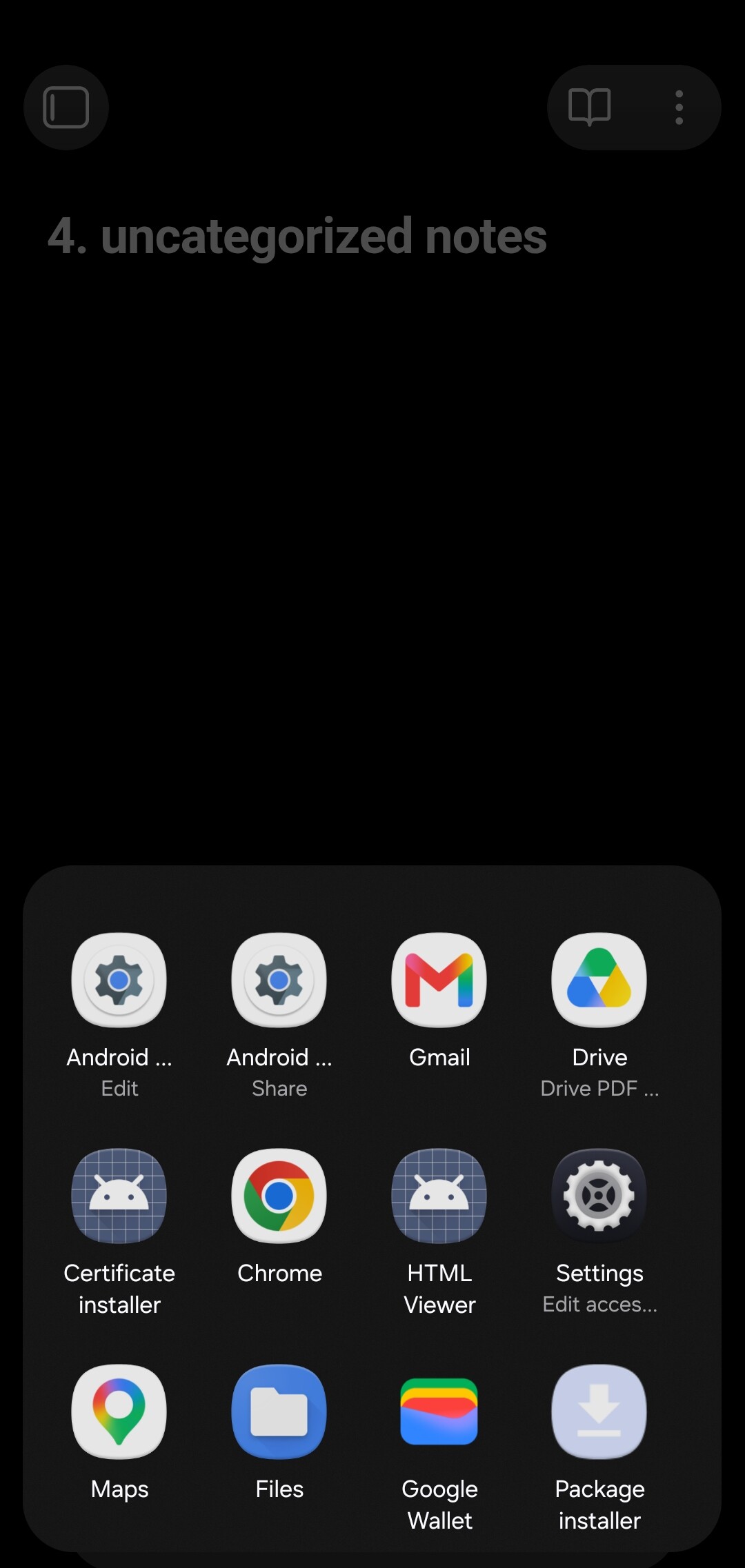
Steps to reproduce
- On Android, go to Settings → Files and links → Default file to open → set to a specific file (happens with any file — tested multiple, including a small plainly-named note with no links)
- Force close Obsidian (swipe away from recents)
- Reopen the app from the launcher
Did you follow the troubleshooting guide? [Y/N]
yes
Expected result
Obsidian opens directly to the specified default file.
Actual result
Immediately after the vault loads, the Android system app chooser (intent resolver) appears over the app. The dialog has **no title/header text** and lists generic file handlers (HTML Viewer, Certificate installer, Package installer, Gmail, Drive PDF viewer, Chrome, Files, etc.), as if an intent with no/unknown MIME type was fired. The open file (last open) does not change to the specified default file.
Environment
SYSTEM INFO:
Obsidian version: 1.12.7 (303)
API version: 1.12.7
Operating system: Android 16 (samsung SM-S918U)
Webview version: 149.0.7827.159
Login status: logged in
Language: en
Catalyst license: none
Live preview: on
Base theme: dark
Community theme: none
Snippets enabled: 0
Restricted mode: on
RECOMMENDATIONS:
none