Readability would benefit greatly from being able to skin paragraphs independently, such as being able to use text-indent, on the first line. This is documented here: Indent the first line in each paragraph in preview mode but cannot be solved at the moment, why is why I’m making it a feature request.
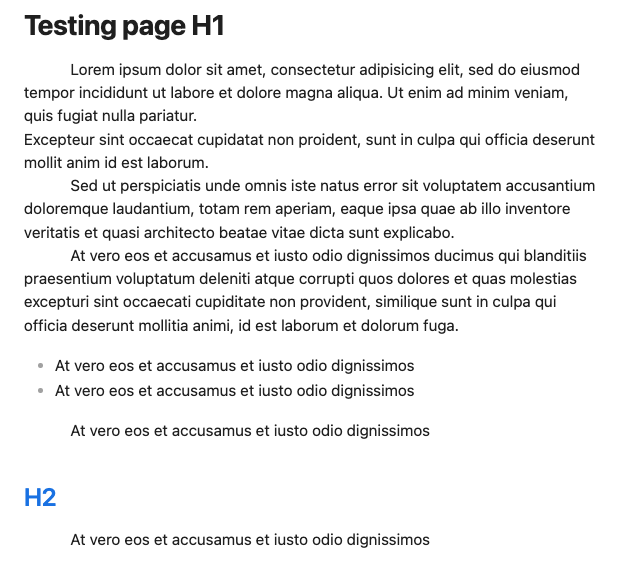
Currently Obsidian only renders paragraphs with p tags when there is a strict markdown line break (two spaces or a blank line). In edit mode, you can skin distinct paragraphs with no strict Markdown line breaks, allowing for greater versatility in writing, and using blank lines for other purposes such as bigger semantic breaks. However this does not translate to preview. Even if you don’t use strict line breaks, paragraphs are rendered as one single p block interspersed with <br> breaks, instead of being different semantic paragraphs.
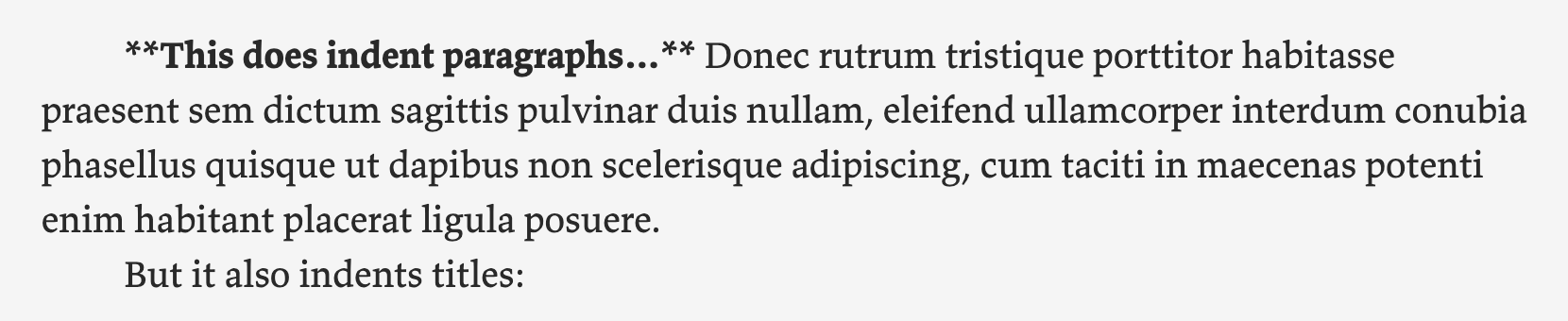
Here I’m using text-indent in source mode, it works fine
Would it be possible to make it so that paragraphs that are only separated by one carriage return (not using strict Markdown line breaks) are identified by their own distinct p tags?
I wonder if it would be possible to put more priority on this feature?
As much as I have read of the problems of implementing the feature, this doesn’t seem to be possible to do as a community plugin, so the only option is for obsidian application to support first line indentation.
To be clear, I would expect the indentation to appear both in preview and in edit mode. It’s such a basic feature of text editing that I’m amazed obsidian doesn’t have it.
It’s like your favorite text editor can do everything you wish, but can’t add a space. Like building a rocket, but don’t have fuel.
The way I would expect this feature to work is that where ever I have pressed the enter-key, it would add an indentation, which can be changed from settings. I don’t expect any html tags to be added by the user.
If Obsidian would have this feature I would be able to delete other writing applications that I use (like Storyist) and just use Obsidian instead. This one missing feature makes it impossible to delete Storyist.
I hope the developers of Obsidian would see the value of this feature. Everything else is already possible with Obsidian.
This only works in reading mode, not in Live preview. In Live preview mode, there are extra "br"s in between paragraphs, so it’s more complicated to remove the spacings.
It will also indent the first paragraph, unfortunately. I don’t see a css solution for this, since in Obsidian every paragraph and heading is wrapped in a div (unlike a normal web page), which makes certain css selections very difficult or impossible. In a plugin using javascript, it would be possible.
Note that Obsidian, as I understand it, is a (very sophisticated) markdown editor, not a true wysiwyg text editor. Maybe that leads to certain limitations, like having to type two line breaks (in the source) in order to create a new paragraph. I may be wrong in this.
If you want more control over this formatting rule, eg. To only indent paragraphs of your choosing, you will need other css rules.
The example above applies to each and every paragraph, no matter how long or short it is
I just spent an hour going through these forum posts trying to figure out what I could and could not do to indent paragraphs. I have come from using Apple notes, where the tab key works very intuitively, and you can use it to indent and not indent paragraphs.
When I am rapidly taking notes in meeting I want the freedom to choose to indent or not indent text, without having to type HTML, or CSS. This is because sometimes lines can become pseudo headings or lists, or I just want text on a certain part of the page, like to separate a thought from what a speaker said. Sure those features exist but using them increases cognitive load which makes it harder to take notes. And given many of these notes only need to exist for a day or two and then be forgotten about, high quality formatting is not important.
I also agree with the original poster, wanting to use Obsidian for writing long form text, really liking vim support, but without this type of control I’m not sure I would be able to use it for that.
The simplest and most straightforward solution, that is going to cover 99% of use cases is to just let people use the tab character like they expect. The tab character at the start of a line normally indicates the start of a code block, so why don’t we just allow people to escape the tab character like we do with every other control character. AKA backslash, tab character equals regular tab character. You would also need to render render the tab as a series of no break spaces, which is a change from how markdown normally works but a small and beneficial one in my view.
I recognize there are issues with this approach first you are not actually using tab stops, just fix sized tabs. I’m not sure how hard that is to do in HTML, and it also might require configuration that we don’t want to do. 99% of people who want to type tabs in prose just want to indent the first paragraph. It can also cause unwanted behavior mainly any time backslash is used prior to the tab character, but I fell like this almost never happens in actual code or prose, and you can always escape the backslash to fix the problem, if you really need it to. Or this behavior could be made optional under a setting.
Addendum for anyone who find this via Google. The Simple Tab Indent Community Plug-in very nearly does exactly this. The main downside being that it does not effect Reader View.