Ive done up the custom javascript to do this, along side a handful of plugins, but want to see if there is interest in somthing like this before going through and making a plugin for it.
The idea is that you can create nested Note Types. A note type defines:
The files path
The properties a file should have
Its relationship to other types - adding links to a note to related types, in one direction unless specified. Specifically links that show in graph view, backlinks, and outgoing links.
Apply a template based on type
Create index notes with bases listing the notes of that type
The type of a note could be determined via tags, or custom set properties.
Types also can follow a custom set heirchy.
For example: a user selects the properties “Area”, “Category”, and “Purpose”, to be the Type identifying properties.
Then they can define a “Media” type, with subtypes of “book”,”video”, “article”. Each of which can have their own subtypes.
When a new file is created, they can add the Area: Media, Category: book. And then run a command, to have it apply a template.
Other features would be things like:
Run a command that gives a list of files with empty values on a required property
Run a command to update links on a given file
Run a command to update All files of a specific type.
Define set values for properties (for other plugins, or css snippets)
I know, and have used things like AutoMover, Metadata menu, dataview, etc to accomplish similar actions, but some things I wasnt able to accomplish, hence the Custom javascript, and my question.
I’m still learning what I can and can’t do in Obsidian, but this potentially sounds like something I might be interested in, as I’m currently making a fairly large database of stuff with a lot of different subcategories, where some properties on said subcategories need to be the same (while others differ).
I’m currently using templates for this, but if I’m understanding correctly, your plugin would potentially speed this up?
I also really like this part:
as that sounds way easier/faster than my current method of checking for this, which is clicking each property in the set of files and scanning the list of results for any that might have incorrect values (i’m not even sure whether or not notes that have missing values show up in those results atm?)
Thank you! that’s helpful info. If you don’t mind, How do you currently “classify” your database entries? e.g. Do you use folders, and all notes in a folder are the same type? or a tagging system?
I want to check I’m incorporating how people already organize things, so there’s less of a “set up” process.
I’m still setting up my vault, and it varies depending on the specific type of note/category, but I use a combo of folders, tags, and properties.
Folders are my “top level” organization, so big categories (one for templates, one for reference–which can be web clips, ebooks, any sort of reference material I might want to save, and then I have a daily notes folder and a couple folders dedicated to specific projects).
I’m still trying to work out when to use tags vs. properties so at the moment my tags are a bit redundant, but I’m trying to think “how would I want to narrow down a filtered search?” and setting tags based on that (but I might not be doing it the ideal way, not sure yet).
Properties are what vary the most depending on the type/category of note.
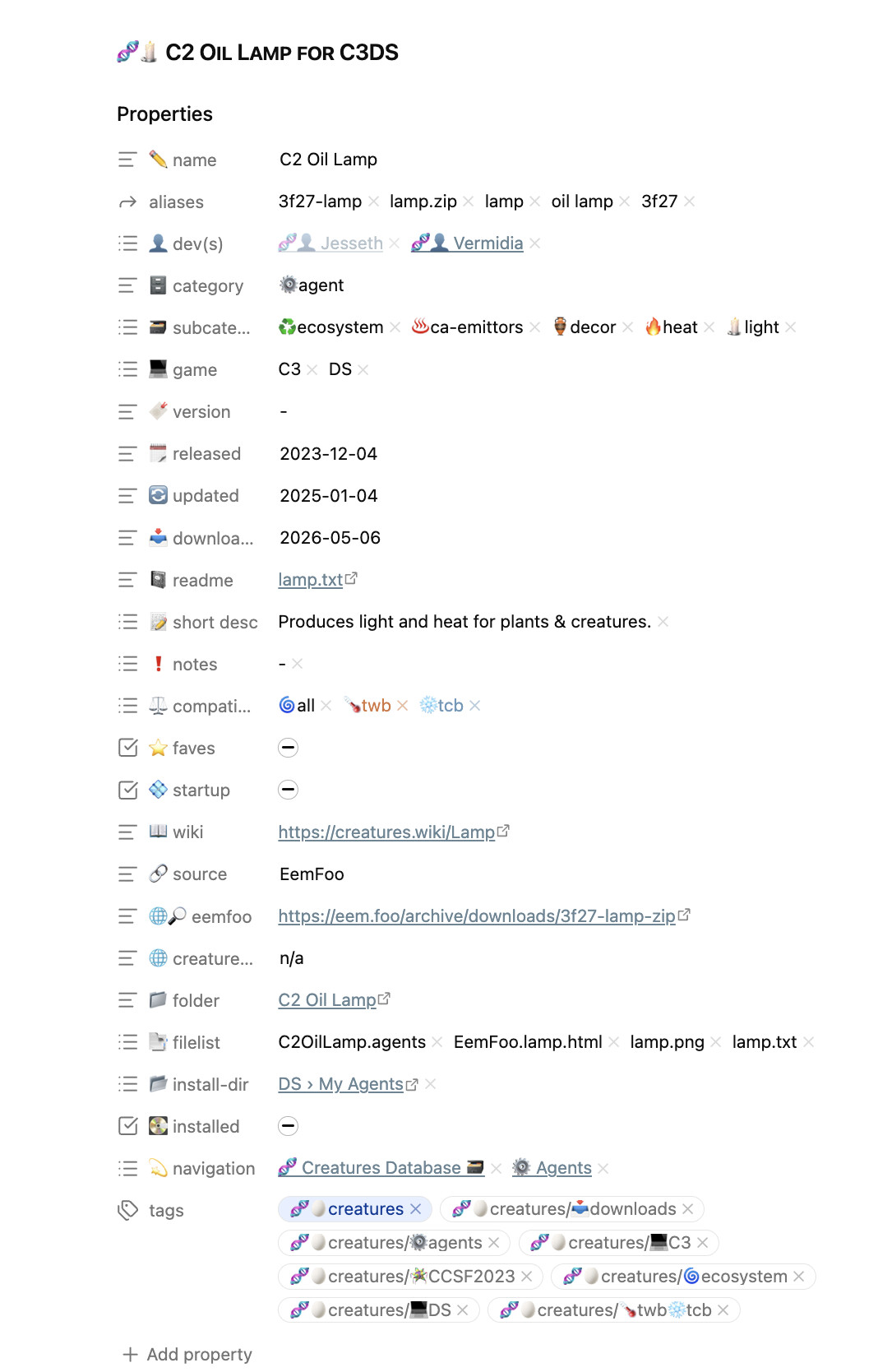
Most of my notes have “tags” and a custom property I made called “navigation” which is where I stick key backlinks (usually just 1-2 levels up if it’s a note with hierarchy above it) so I can easily see them at the top of the note.
But the rest of the properties vary a lot. Some don’t have anything more than “navigation” and “tags” at the moment, while other sets of notes have 10+ properties (stuff I’m categorizing and sorting heavily in a database-type fashion).
You can see an example of one of those (many-property) note types here (I’m building a database of addons/mods I’ve collected for an old series of pc games as a way to easily sort through them and find one I want to install):