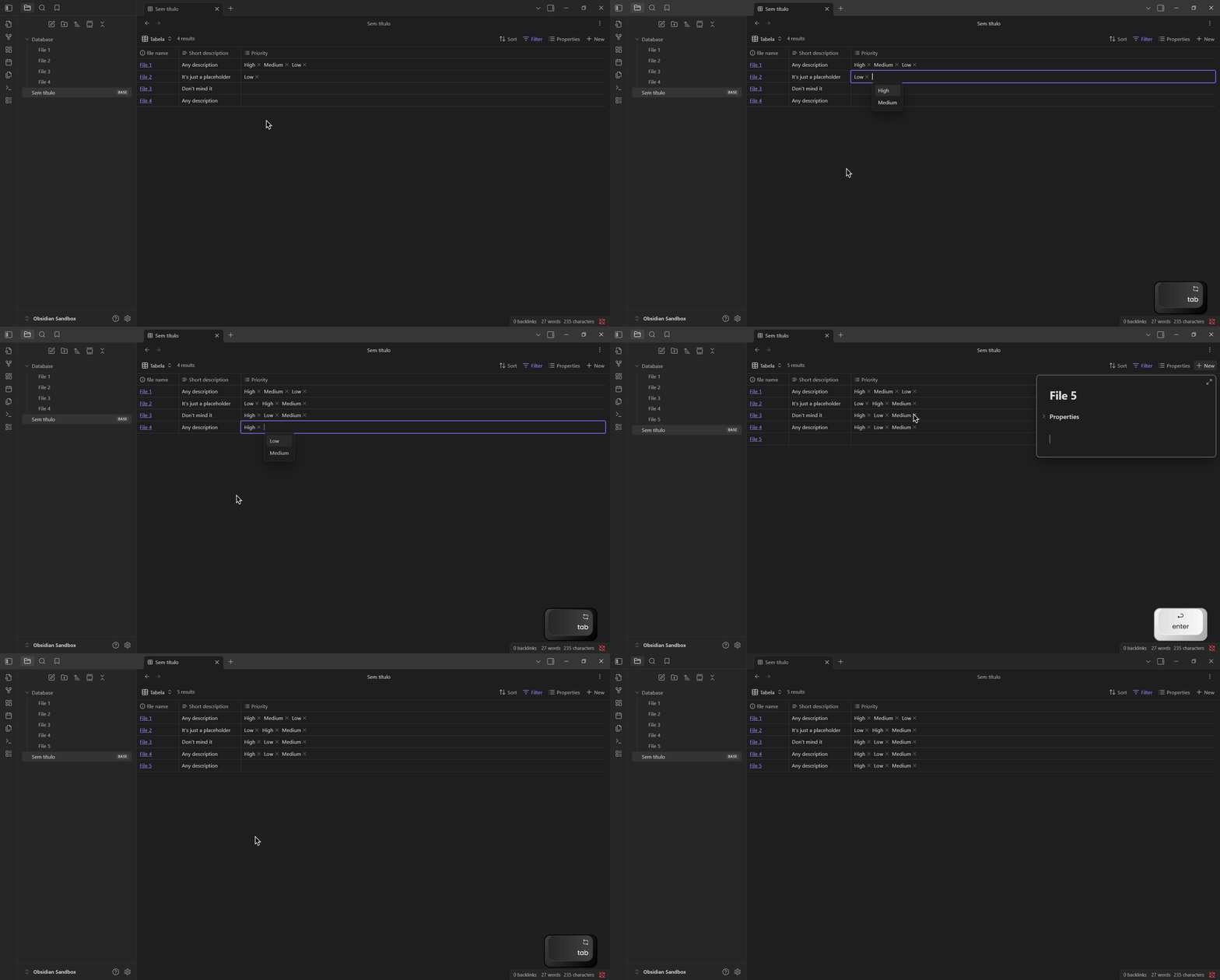
Whenever moving between cells with TAB in bases on table view, it will select the suggested option instead of moving to the next field.
Steps to reproduce
- Create a base example
- Create two placeholder notes
- In the first note, create an option property with any display name (for example, classification)
- Now select the first note in the first field to move the selection cursor.
- And press TAB until it reaches the end of 2nd note you made.
Did you follow the troubleshooting guide? [Y/N]
This bug is reproducible in sandbox mode, without any plugins installed or themes.
Expected result
Pressing TAB should move to the next field or line if it’s the last item. And pressing SPACE should open the dropdown menu with the list of possible values.
Actual result
Pressing TAB while in the option field will select and insert the next option until all properties have been added.
Environment
Windows 10, 22H2
Obsidian v1.9.10
Additional information
For better bug visualization, I created a GIF of how the problem occurs.
The keyboard shown in right bottom is from a program called “Keyviz”