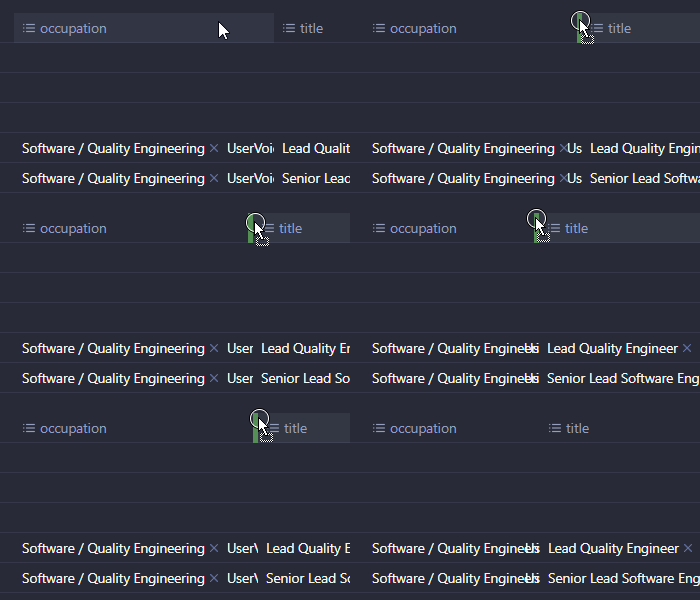
Steps to reproduce
- Create a base
- Create some notes to populate the base with several list type properties
- Make sure each property has several values
- Make the base to have the columns for these properties
- Resize the first column for the first property (the second after the ‘file name’)
Did you follow the troubleshooting guide? [Y/N]
Yes, I tried this with the default theme, in the restricted mode with no plugins, with all the snippets disabled.
Expected result
The edge dragged should hide the content of the column.
Actual result
The second value in the resized column gets truncated after the first two characters and start covering the one before it, sliding along the edge, without getting hidden — just like the attached GIF demonstrates below (behaves the same in the vanilla).
Environment
SYSTEM INFO:
Obsidian version: v1.10.6
Installer version: v1.6.5
Operating system: Windows 10 Pro 10.0.19045
Login status: logged in
Language: en
Catalyst license: supporter
Insider build toggle: on
Live preview: on
Base theme: dark
Community theme: none
Snippets enabled: 0
Restricted mode: on
RECOMMENDATIONS:
none
Additional information