Here’s a nifty little database template to keep your projects on track or wrangle your tasks. Think of it as your personal project sidekick—tweak it to fit your style, and you’re good to go!

Track your projects/tasks
Basically, this Base has three rockstar types of properties:
 Red “Data Sources”: These pull straight from your note properties, like status or progress (we’ll dive into that soon).,
 Green “Display Data”: This jazzes things up for easy reading, turning numbers into emojis, progress bars, or snazzy countdown text.,
 Blue “Sorting Data”: Converts info into numbers for slick sorting—perfect for when you need to prioritize like a boss.,
You can build on this by adding filters for custom views or tweaking attributes to match your note format. For instance, toss in images and use Card View to turn it into a gallery—instant eye candy!
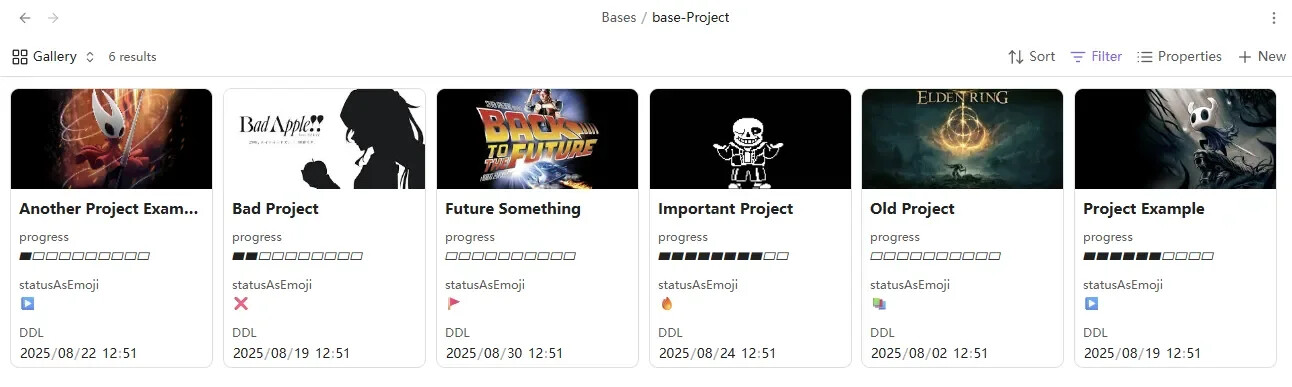
Base file:
A Bases Template for Project Tracking or Task Management’
Core Properties
---
status: In Progress
passion: 5
deadline: 2025-08-19T12:51:00
progress: 60
---
status(text) is your project’s mood ring, showing its current vibe. Sortable.- Default options:
To Do, In Progress, Focus, On Hold, Cancelled, Completed., - Psst: Swap these to your own terms—just do a bulk replace in the base file!,
- Default options:
passion(number 1-5) measures your hype level (or priority). Think of it as your “how much coffee do I need?” scale.progress(number 0-100) is your completion meter—it auto-magically turns into a progress bar.deadline(date) is the due date countdown, complete with flashy icons. Sortable.
Why This Rocks
- Use
if()to transform data based on values—like turning a number into a celebratory emoji when progress hits 100%., - Convert text to numbers for custom sorting (e.g., make “High Priority” sort higher than “Meh”).,
- Dynamically whip dates into readable text, like “Due in 3 days!” with matching icons.,
Pro Tip: Embed Images
Grab the first embedded file in a note with file.embeds[0]—use it in a formula to create cover images for Card View. Voilà, instant project gallery!
Pro Tip: Custom Views
Link directly to views like ![[base-Projects-Template.base#Ongoing]] to show only active projects. All views can be shared this way—because who doesn’t love shortcuts?