Hi there,
my procedure for dealing for key terms and their definitions is to add them in the body of the same note where the term is mentioned. What I do is something like this:
term:: DNA
definition:: Deoxyribonucleic Acid
this is just one term, but you can add as many as you want in the same note using the term/definition pair convention.
Then, what I do to collect all of the key terms is using a datavaviewjs script to scan all the notes and create a table with the terms and their definitions. Here is the script:
function getLinkToDoc(key) {
	// return the file path of the selected note
	let pagePath = app.plugins.plugins.dataview.api
		.pages(`"/"`)
		.where(p => !p.file.name.includes("Research"))
		.where(p => !p.file.name.includes("dummy"))
		.where(page => {
			if (page.file.name === key) {
				return page.file.name;
			}
		}).file.path
	return pagePath[0]
}


const flattened = [];

// load the arrays with name of note, terms and definitons
dv.pages('"/"')
	.where(b => b.term)
	//.where(p => !p.file.name.includes("Research"))
	//.where(p => !p.file.name.includes("dummy"))
	.map(p => {
		// create arrays
		p.term = dv.array(p.term)
		p.definition = dv.array(p.definition)

		for (let i = 0; i < p.term.length; i++) {
			// push values to array. p.file.name is the name of the note
			flattened.push(
				{term: p.term[i],
				 definition: p.definition[i],
				 filename: p.file.name
				 }
			)
		}
		}
	);

let dataArray = [];
let matched = [];

// convert array to a dataview data array
dataArray = dv.array(flattened)
// Group by title and sorted ascending alphabetically
let dataGroups = dataArray
	.groupBy(p => p.filename)
	.sort(p => p.filename, 'asc')

// console.log(dataGroups)

for (let g of dataGroups) {
	// iterate through groups
	// convert note name  from g.key to a file link
	const linkToDoc = dv.fileLink(getLinkToDoc(g.key), false, [g.key])
	dv.header(6, linkToDoc)
	// match the page title in g.key to the page title in the array
	matched = dataArray.where(p => p.filename == g.key)
		dv.table(['Term', 'Definition'], matched
			 .map(a => [a.term, a.definition])
			)
}
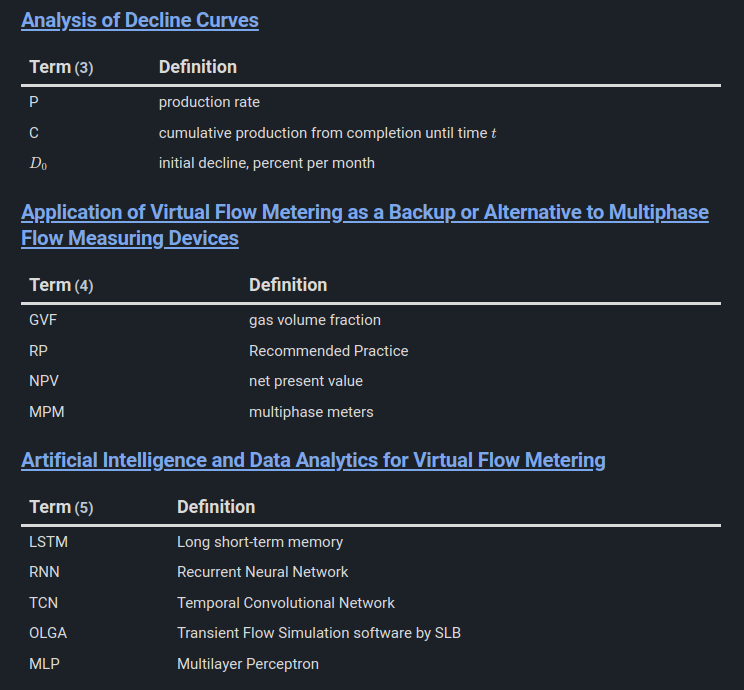
The output would look to something like this. I use this script in particular for collecting research papers terms in only one place, like a glossary. I love that I can even use Latex equations there.
I borrowed the idea from this post.
Because this script generates a view I put it together with other similar scripts in notes under the folder “Views”, but you could really put it anywhere in your vault folder structure.
Hope this is what you are looking for.