doesn’t work for me as of now, pressing o just enters insert mode instead. any idea how to fix?
I also had the same issue initially - you need to install the code editor shortcuts plugin that pseudometa mentioned earlier, then it will work.
Hi, it seems like this workaround has been broken on v1.7.4.
When pressing o or O, the command blankAbovei or blankBelowi appears on the vim command bar.
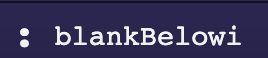

It seems like Obsidian changed the way of interpreting multiple vim commands, and the o and i commands are concatenated together, which cannot be recognized.
Does anyone have some further workarounds for anychance?
thank you so much for that; it’s fixed
For fellow vimrc noobs / lazy people such as myself, the fix for 1.7.4 (removed the 2 intermediate mappings as well):
  exmap blankBelow obcommand obsidian-editor-shortcuts:insertLineBelow
  exmap blankAbove obcommand obsidian-editor-shortcuts:insertLineAbove
  nmap o :blankBelow<CR>i
  nmap O :blankAbove<CR>i
And for the fellow lazy scroll-to-the-bottom-ers. You’ll need two plugins:
- Code Editor Shortcuts - you can just install this, no need to configure
- Vimrc Support - read the docs about where your .obsidian.vimrc goes and put Michael’s lines there