It works perfectly, thank you so much!
Hello again! Your theme is beautiful, and it makes my site look so nice. The only hitch I’m bumping up against is that I can’t seem to find a way to hide the titles of notes when I embed them. This is default behavior—nothing wrong with your theme at all—but the way I hide them in the native app is using Embed Adjustments - SlRvb's Documentation - Obsidian Publish. I thought I might be able to copy the relevant CSS to the end of the publish.css file, but it doesn’t appear to produce the desired result. I was wondering if the CSS elements @SlRvb uses to classify embedded titles might be different from the way Typomagical handles them.
Here are the relevant lines from the snippet—are you able to tell what I’m doing wrong?
/*Title Hide/Show*/

.internal-embed:is([alt~=no-t],

[alt~=no-title]) .markdown-embed-title,

.file-embed-title {

display: none;

}


.internal-embed:is([alt~=no-inline-title],

[alt~=no-it]) .inline-title,

.file-embed-title {

display: none;

}


.internal-embed:is([alt~=ttl],

[alt~=title]) .markdown-embed-title,

.file-embed-title {

display: block;

}
Hi there!
If SIRvb’s snippet works on your local Obsidian, but does not work on Obsidian Publish, it’s much more likely that Obsidian Publish is discarding information. It is extremely unlikely that Typomagical is overriding SIRvb.
I think I will have to see your site to see what’s happening. If you could share a link here, or in a private message, I can take a closer look
Wow, somehow just talking to you fixed it! I refreshed the site just now and saw that the titles were omitted just as I wanted using the above snippet, so I guess Obsidian Publish just took longer than I expected to synchronize the changes? Anyway, the site is www.ianlhayes.com if you want to see it in action. Thanks again for the theme
1 Like
Hi Hungsu! I want to say I love this theme - after trying out so many, I found I like it best of all. I have one kink I’d like to work out. in editor view, email addresses and URLs render in smaller font than other body text. Is there a way to fix that? I tried making a CSS snippet using Gemini but it’s not working for me. Any suggestion would be wonderful. Thanks for all your great work, and your website is really neat also!

1 Like
To clarify, the reason I don’t like emails and URLs being smaller is I take notes on client meetings and it can make reading/copying the emails and addresses for later use difficult. I’d prefer they be the same size as other text.
1 Like
Hi @berdanlaw ! I think I agree with you, we can probably make links the same size. I don’t know if there’s a quick CSS fix for you but I’ll see about making the change on my end. Glad you enjoy the theme!
While this may be too broad, the following should work as a temporary measure. Do note though that it resizes ALL links. Be it external or internal. Just replace 16px with whatever size you want the links to be.
a {
 font-size: 16px
}
Unfortunately, as I never use external links I am not sure how to target them specifically. But hopefully this solves your problem for now. Size differences like that can be such a pain.
Hi there, see if update 2.1.4 resolves this for you
Hey, does anyone else have the problem that the accent color from the Obsidian Appearance menu is not applied in Typomagical? (Hyperlinks color etc.) in the high contrast theme variant. It works in Dark mode, but not in Light mode…
Thanks for spotting that! It should be fixed now, in version 3.0.1.
1 Like
Awesome theme! Works great on a publish site, but you have to add some JS to append the proper styles to the body tag, based on what you customized in app.
I’m glad you’re enjoying the theme! I really like how you’ve made use of my special quotation style, that is something I was very proud to make.
Some other Typomagical fans have requested some more themes so I will hopefully have some more offerings soon.
Your implementation of Typomagical looks so much cleaner than my implementation! Could I just crib your publish.css, or do you have it set up with the Typomagical.css I see in the source? I have like no experience with web design, so some of these terms/tools are unfamiliar to me.
This may be unrelated, but why might the embeds take on the first form in Obsidian Publish (with the vertical rule on the left butting right up against the page) when the second form is what appears in the in-app Reading view?
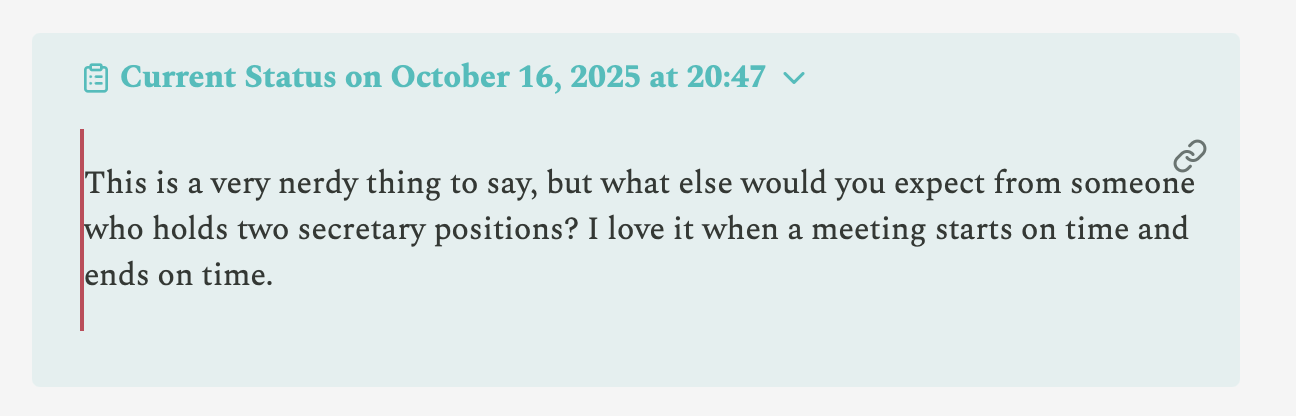
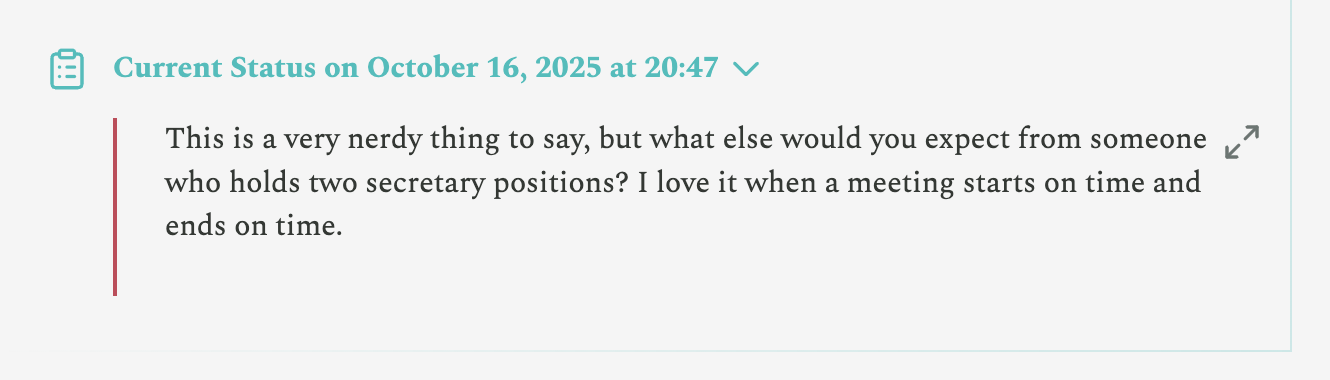
Could this be something that’s normally handled by the Style Settings plugin, and I would need to manually adjust it for use in Publish?
Looks like you’ve removed Typomagical already, and @metaphist doesn’t have the same problem so I don’t have anything to go off of. If you switch back to typomagical I can take a look
Thank you for offering to take a look! I saved versions of my typomagical css and js files for future troubleshooting, but while I was stumped, I switched to a different theme. It turns out I just don’t know enough about CSS or Javascript to make much headway in figuring out why the vertical rule is so close on the page in the block quote, and the link icon kept encroaching on my text—a typographical enthusiast like yourself must understand the irritation!
I have returned my site’s theme to Typomagical if you’d like to glance over the code and point me in the direction of the fix, but I must reiterate that it is still a marvelous theme in my daily usage of Obsidian, and I completely understand that it’s not necessarily designed for Obsidian’s Publish feature.
Looks like both you and @metaphist might be having the same problem, and the problem seems to come from Obsidian Publish rather than Typomagical.
I may try to add a fix within Typomagical, but for now, could you try adding this to your publish.css?
.markdown-embed {
  padding-left: 1em;
}
Thank you, that did it! I’ll have to wait on Obsidian to fix the issues with how Publish renders links to embedded content.
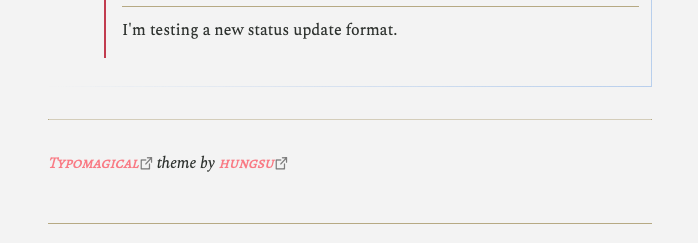
Also, I added a little plug for the theme at the bottom of my home page. Thanks again!
1 Like
Sorry, been away for a while. To get some of the missing styles into a publish site, you will need something like this in your publish.js:
document.body.classList.add(
    'heading-ligatures',
    'body-ligatures',
    'vileplume',
    'callout-default',
    'callout-quote-style',
    'circled-ol'
);
These are all classes from the theme that need to be on the body tag. In the Obsidian app, different options you select get added as classes to the body, but a publish site does not detect what you’ve customized in the app, so the body on the site does not have them. So, you must examine what the app has added to the body tag, and add it yourself with some code like the above.
You can see what has been added to the body by hitting ctrl+shift+i to bring up the dev console. On the elements tab, find body - there will be a long list of stuff probably, but you have to use some detective skills to determine what is probably related to your theme (or just take them all, it wouldn’t really hurt).