Your suggestion has given a nice idea for a improvement to this feature. Instead of keeping it specifically for ‘Note’s tag’, I think it will be better to make it more dynamic so user can specify the [property, value] pair. So, only notes which contains this YAML property and with the specific value will be only scanned for tasks, or will be ignored from scanning based on the option selected.
Thank you for this suggestion. Feel free to create a new FR on GitHub, explaining this in further details. Will help to discuss it better !
I’m having a problem where the TaskBoard UI disappears completely after showing up for a split second. I’m not sure what could be causing this issue but it makes the plugin not usable unfortunately. I’ve tried this on multiple machines, both using Mac Desktop Obsidian, latest version. 1.8.9 with very few community plugins on the AnupPuccin theme. I disabled many community plugins and still have the issue. I also tried the Default and Minimal themes and still experiencing the issue.
We can take forward the discussion for the same in this respective issue on GitHub, or you can even DM me with some dummy tasks for which the plugin fails to load the tasks because they have ‘#’ symbols in them which are not tags. The plugin right now couldnt able to figure out whether its a normal tag or not and hence fails. Will fix this issue soon.
At first, I didn’t thought I will be making this plugin available for small screens, because it is supposed to be a dashboard, so I assumed user will be watching it on big screens. But over time, with many users requests, and also after started using various synching plugins, to sync my vault across devices. I realized, it will be very helpful to be able to get all this plugin features from phones as well to make quick changes on the go.
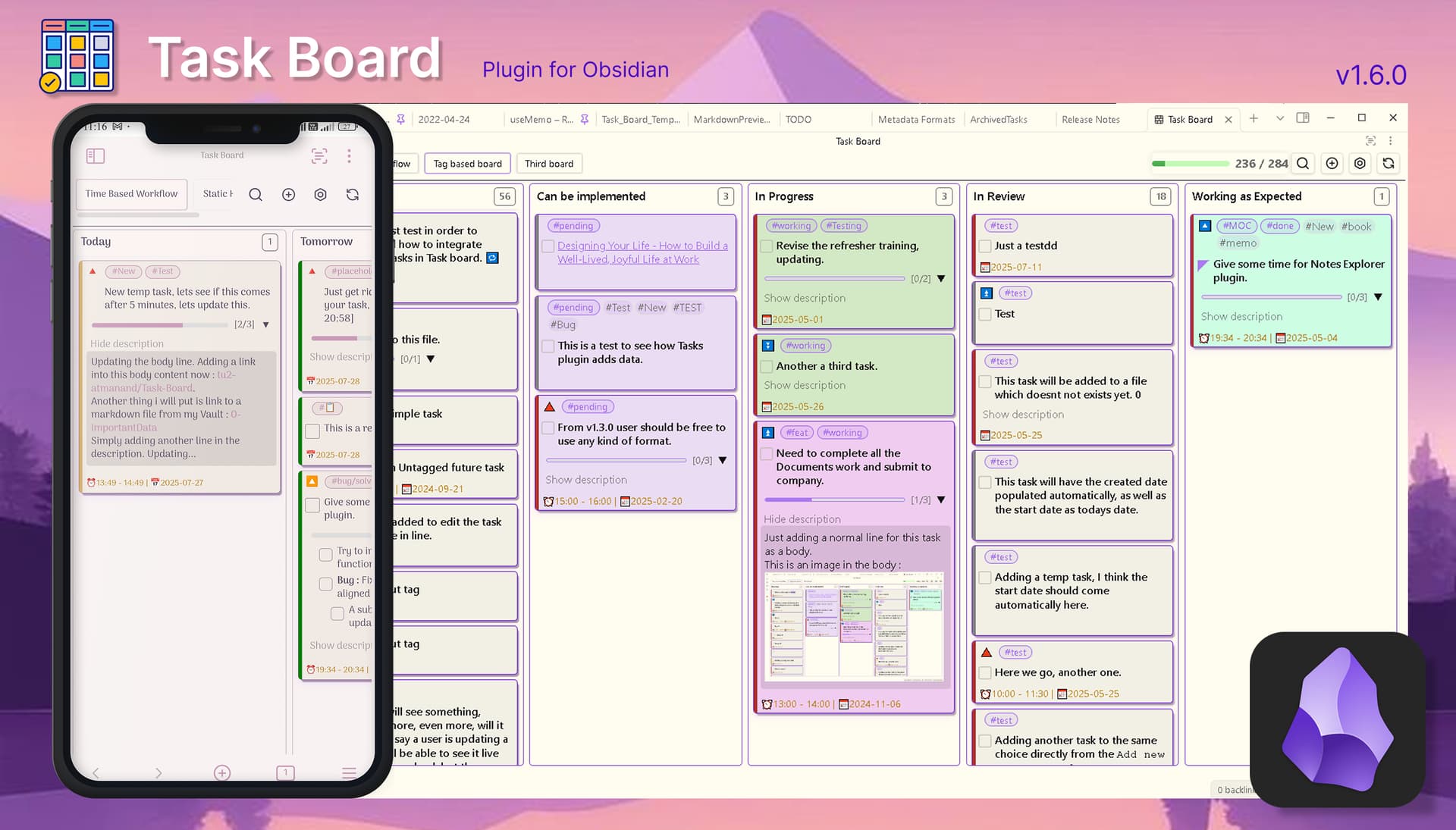
Hence, I have started the development and as of now, I am able to achieve a quite good development on achieving this full support for mobile devices. The only challenge, when it comes to small devices, is how the UI will look and secondly how the user experience(UX) will be while using this plugin. I am not an expert in UI, but I have at least tried to have the best UX practices. The following is one such example : Mobile version development · tu2-atmanand/Task-Board · Discussion #177 · GitHub
Testers are more than welcome
I have released a beta version for this same, so any beta-testers who would be willing to help and test it out are more than welcome. I would be eagerly waiting for the feedback.
How to test
Install the BRAT plugin from the Obsidian Community plugins.
Navigate to the BRAT plugin settings. Open Obsidian settings > BRAT > Add Beta plugin with frozen version button > Enter the below values > Click on Add plugin button.
Link :
https://github.com/tu2-atmanand/Task-Board/
Version:
1.4.0-beta-3
When new beta will be released, simply replace the ‘3’ with the latest number.
Finally! After a long wait, the mobile support is here. Few major UI/UX changes were required to give the best experience for mobile users. Mainly, in the two modals, AddOrEditTaskModal and the BoardConfigModal, the metadata properties section and tab navigation bar has been converted as a slide over to keep the unnecessary things hidden when not required.
Besides this main achievement, here are some highlighted new features in this release :
Reminder plugin compatibility : Easily add a reminder to any plugin using the same due date and scheduled time values.
Highlightr plugin compatibility : Now users can add highlighting HTML tags, such as <mark> and <font> to style their tasks.
Card background color based on tag : A new way to using your tag color to locate the tasks easily using their background color.
The due indicator bar color will now going to also consider the scheduled time to change its color. A new color, ‘blue’, has been added to indicate the start of the task.
Task Board will now use pickr package to provide a better color picker and sortablejs for giving priority changing option for tag colors.
@AzHousePro extremely sorry for providing the wrong link in my previous comment. I saw it just now. I have updated the link and you do not have to install the Hover Editor plugin that was a mistake from my end to provide the wrong link and misunderstanding your last comment.
But still I am not sure if that’s the original problem your are facing. I feel the real problem here is with the date offset issue by 1, maybe. Where few users from certain timzones are experiencing a offset in their columns. Like today’s tasks are shown in yesterday(overdue) column or tomorrow tasks are shown on today’s column.
This is a one feature on the roadmap which is even I am excited to have in this plugin. Since it will make it a lot easier to change the properties of the tasks by simply moving them from one column to another. But because this plugin has a lot of automation features (a lot more planned in the future), it’s a little complicated to implement it in this plugin, compared to say the Kanban plugin, which is pretty static board. And I also want to have the smoothness just like the Kanban plugin as they have implemented it perfectly.
I have recently got some amazing contributions for this feature so I think I’ll proceed with this feature and you might see it soon in the upcoming releases.
This version is primarily focused on bringing the most essential integrations from Tasks plugin for the various properties such as Created, Start, Schedule and Cancelled date and most importantly the Recurring tasks property. With the feature for adding task from anywhere to any file has been implemented. And with the integration of QuickAdd plugin this feature can be upgraded to next level. Go through the below biggest new features this release has brought.
New Features
Live Embedded Editor inside Add or Edit task modal.
Bug Reporter : A new modal to get better error information and collect bug report faster.
Add task from anywhere, any note : Set a default note to add new task from anywhere or choose the file directly from the modal using file suggester.
QuickAdd plugin integration : Create different QuickAdd choices and select any one from the modal to add your task wherever you want.
Created date, Start date, Scheduled date and Cancelled date properties has been added for better Tasks plugin integration.
Recurring tasks integration using Tasks plugin API.
A very first Task Board API for accessing the Add or Edit task modal.
Re-scan vault indicator will be shown on plugin update.
Strike-out styling for completed sub-tasks in the Task Item Card.
Automatically hide columns with no tasks.
Archive tasks instead of deleting them by commenting out the complete task content. Or move them to a separate archive note.
Scroll to the exact location of the tasks in the note and highlight the first line of the task.
New type of column to filter out tasks with similar task status.
New type of column to filter out all the tasks with same task priority value.
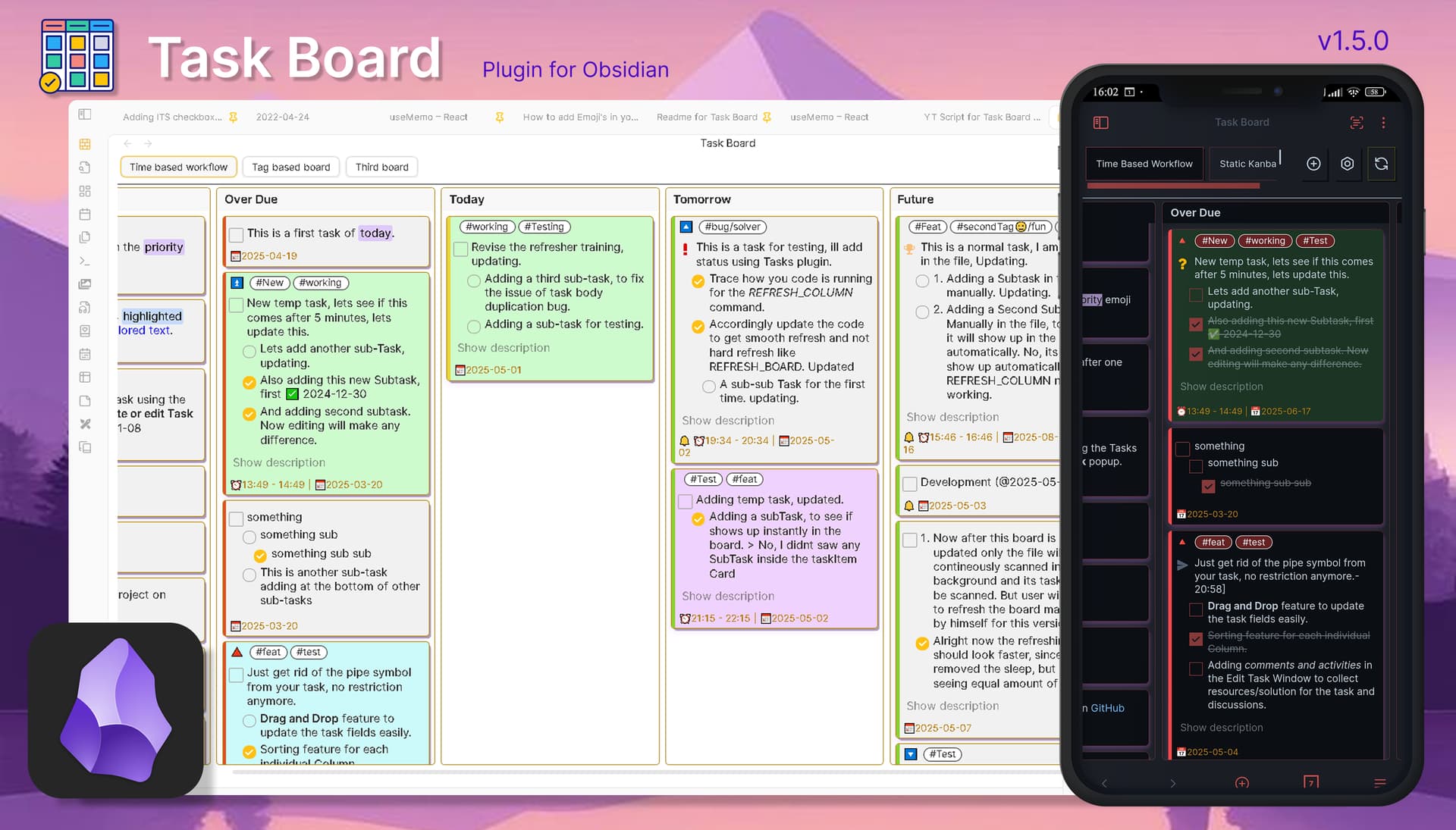
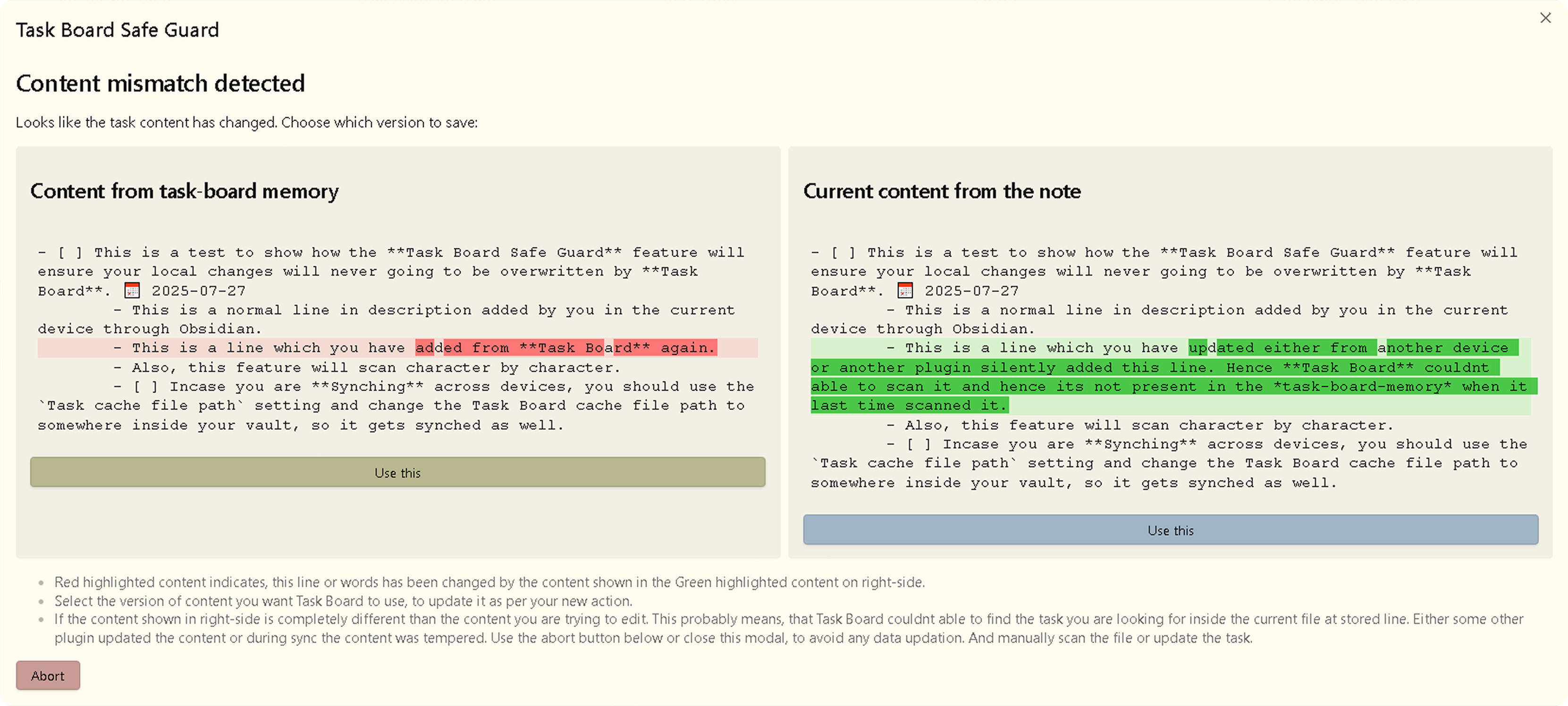
There are various new features which has been released in this version. But the most highlighted feature is the Task Board Safe Guard, which ensures that the current content in your notes and the scanned content by Task Board is always consistent so Task Board do not accidentally overwrite your updated content. This was required, because, Obsidian is getting more and more complicated with so many plugins and workflows released everyday. Hence this comparison mechanism will give you warning to not overwrite your old content. If you sync you vault, there is also a setting to sync the cache. Other than this you will find various new features which are mostly UI focused and more.
New Features
Huge improvement in load time : Now download/update the language translation files on demand. No more bundling all the language files within the package. Plugin bundle size has been reduced by a great factor to improve the load time.
Safe Guard : Never loose your content. Proper content match will be done before updating your content. A new Content Compare modal to see the changes.
Path filtered column : A new type of column to filter out all the tasks from a specific file in the column.
Re-order boards : Now change the order of the boards inside Board Configure modal. Move default board on top.
Frontmatter tags inheritance : Get your notes frontmatter tags applied to the tasks within the notes. ( also known as Virtual tags).
Search tasks : A new search bar to search your tasks on the board for content only. (filters coming soon)
A new setting to select the notification service you want to use, and get the same formatting while adding reminder property.
Task count statistics : Get tasks count in the whole board with a progress bar and task count for each column in column header.
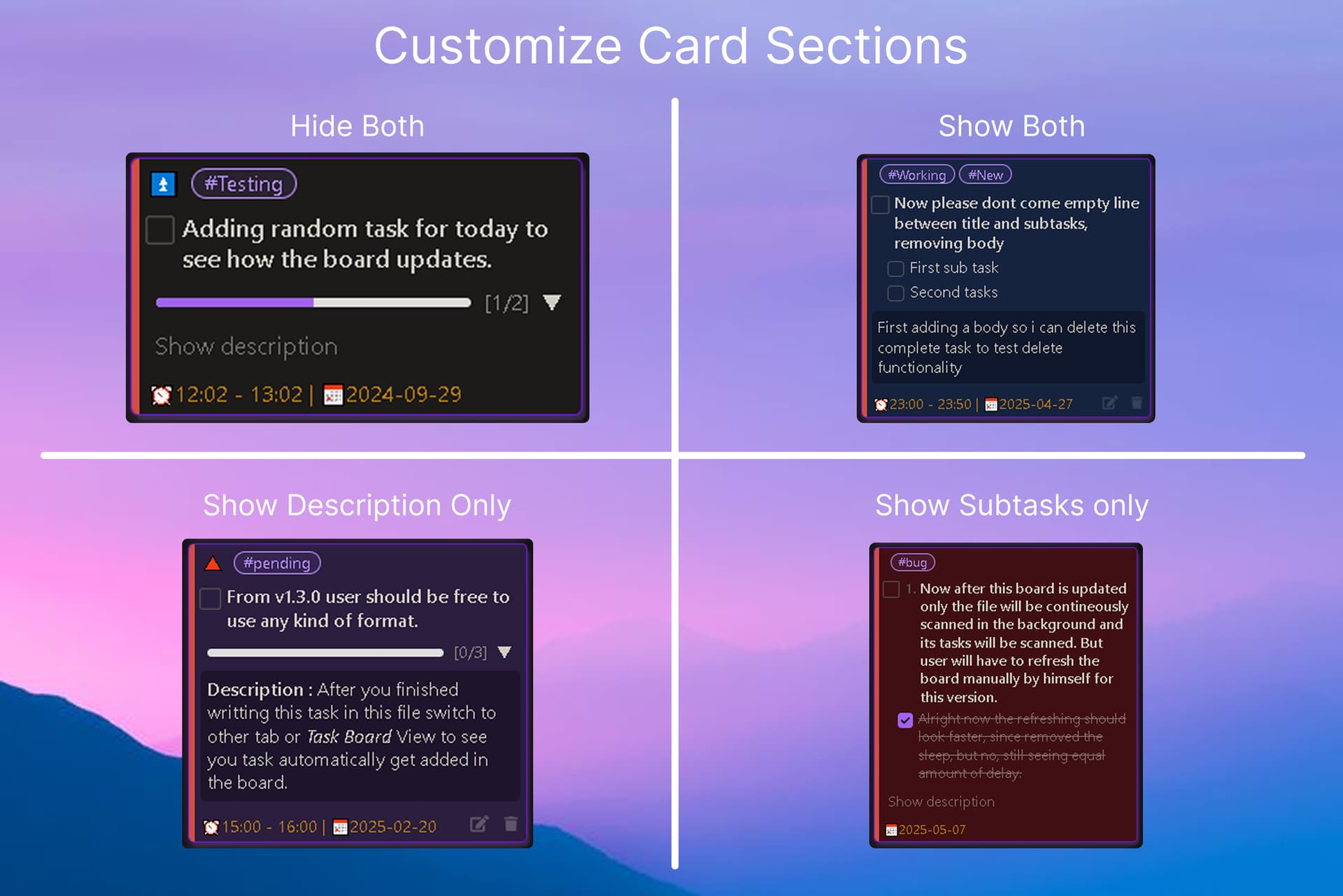
Card UI : More card customizations to show and hide sub-tasks and description sections by default and with sub-tasks progress bar when hidden.
Change the tasks cache file location, task-board-cache-file, from the plugin configuration folder to anywhere inside the vault. Very helpful and essential in case you sync your vault on multiple devices.
Add the task property at the cursor position, instead of always appending it at the end of the task.
Here are some more images which gives the demonstration of card’s UI customization using the new Customize card sections setting and the Safe Guard Feature.
I couldnt able to keep my words for the Drag and drop feature, which I said ill be releasing in version 1.7.0. There were various other functionalities this feature depends on hence, I need to make sure it works as expected without any issues. So, I have planned to release this feature in the version 1.10.0. By then it will give me enough time to test it properly.
In past few releases I took some time out for specifically fixing the bugs and few optimizations instead of proceeding with more feature implementations. All known bugs have been fixed and also few nice optimizations techniques has been used in the latest versions : Release 1.6.11 · tu2-atmanand/Task-Board · GitHub
Please update the plugin to the latest version if you haven’t done it already.
There might be some rare case handling which I might have not yet encountered and may have not handled yet. So, if you do found any issue in your workflow, kindly report it, as it will help a lot to make this plugin completely bug free and work in any scenario.
Now, that the plugin is in stable state, I am moving forward with working on the next release, which has planned some interesting and useful features. Checkout the planned features here : Task Board planned features for version 1.7.0.
Task Board v1.7.0 | All task formats and Parent-Child tasks
This version of Task Board has a lot of QOL features to improve the usability of this plugin as well as some exciting new features, some of which has been released as experimental features for the first time. With features such as adding dependOn and id properties, this plugin is getting more compatible with Tasks plugin. And the most requested feature, almost all formats supported by Tasks plugin will be now supported in Task Board.
New Features
More task formats support : Almost all task formats such as indented tasks and tasks in callouts are now supported.
Parent-Child linking : Add child-tasks to your parent-task as a dependency property and restrictions.
A new setting to restrict completion of parent-task when child-tasks/sub-tasks are incomplete.
Hide properties : Hide selective task properties Reading as well as Live editor mode.
Config Import/Export : Now users can export their setting to take a backup and import again easily.
Auto add unique-id : The plugin will automatically add unique Id to your tasks. Necessary for various other features.
Store last view : Now the plugin will remeber your last viewed board and the view type (Kanban or Map view).
Double click card actions : A new setting to select the action you want for card double click.
All wildcards for tag setting wherever applicable to improve usability for nested tags.
QMD files support : Tasks from QMD files will be now supported.
Use Tasks plugin’s edit task modal through the edit button of task item card.
A reload Obsidian notice with a button will be shown whenever applicable setting has been changed.
Experimental Features 🕵🏻♀️
Although these features has been completely developed, still I am trying to be extra careful so users dont have to face any inconvenience while using new features. Hence, I have released the following features as an experimental features, so that interested users/testers can try these features out in their testing environment and share suggestion about the same and report bugs if they have faced any. Different users have different environments and setups, so testing is very crucial in such kinds of environments. After thorough testing and required enhancements, ill release these features for normal use, probably in the next version, 1.8.0.
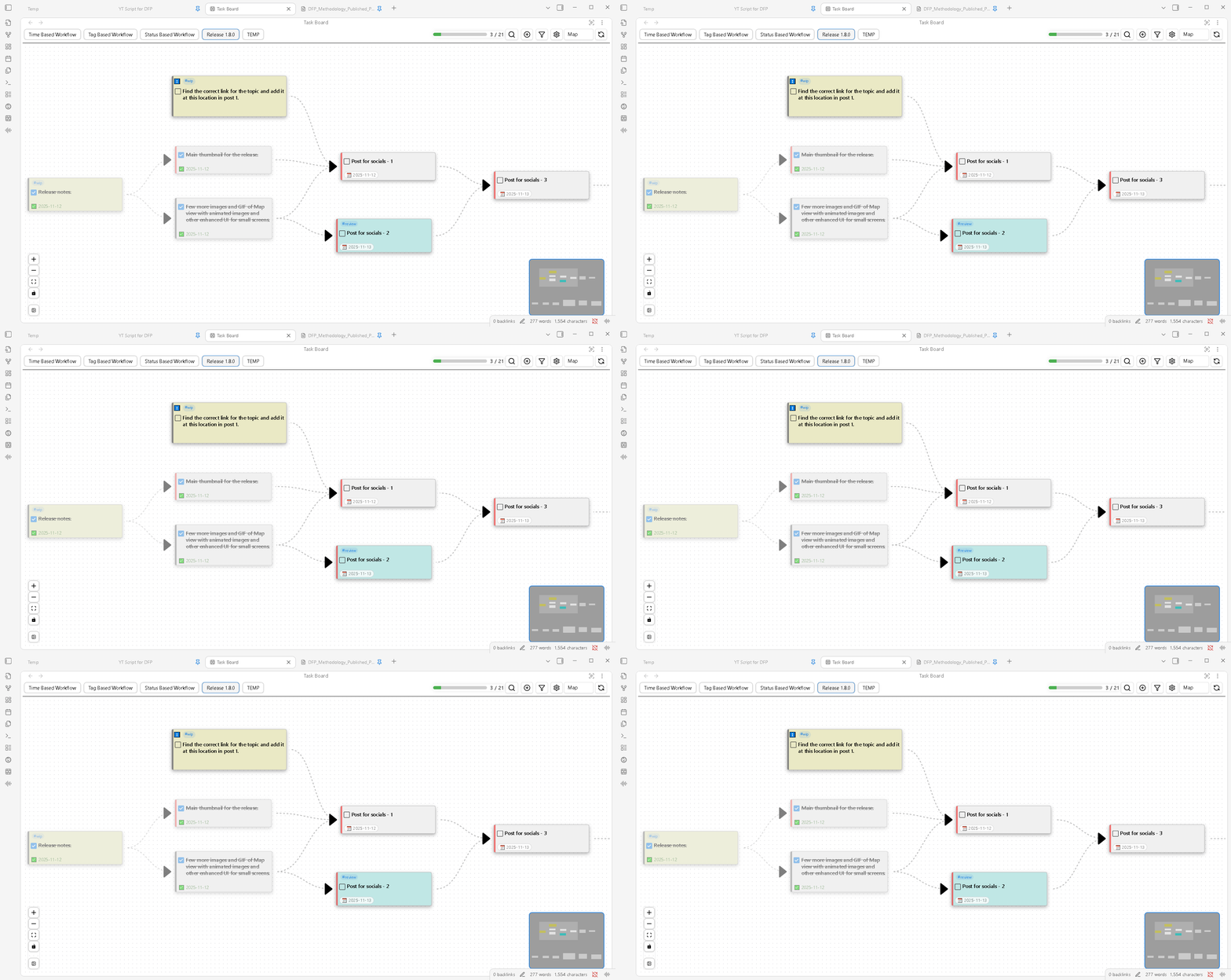
Map view : Spread out your tasks on a canvas and connect parent-child tasks to create a chain of tasks to manage your complex projects with ease.
Task Notes : Show your simple notes as tasks on Task Board as cards. Task properties will be added as frontmatter properties to the note.
NOTE : Although the Task Notes feature name sounds similar to the recently released TaskNotes plugin. The two are not entirely same. This feature is only meant to show your normal notes as Task cards, and manage them directly from the Task Board. Task Board havent tried the integration with TaskNotes plugin yet, so it will be recommended not to use the notes created by TaskNotes inside Task Board until a complete compatibility has been implemented. Please go through the following post to understand how these two are different from one another : https://github.com/tu2-atmanand/Task-Board/discussions/377#discussioncomment-14425061.
(Still you are free to test it in your test vaults, and let me know your experience or suggestions to improve it )
Task Board now have a proper integration with most of the common features. Contineously working to build an complete integration with the TaskNotes plugin by @callumalpass.
I have published few early articles on this new task management & planning methodology implemented in Task Board with the name Map View feature. Read the following articles to understand the benefits of this new visual methodology and how it can help you in managing your small to large projects.
Task Board v1.8.0 | Advanced Filtering and Sorting
Watch the YouTube video to learn more about all the features.
The second most requested feature, which may have the potential to use boards as different projects is here, advanced filter for boards as well as for columns. This version is loaded with a lot of more features but mainly its aimed at improving the UI and providing better UI/UX feature, specially for small screens. And the two experimental features from previous versions are now available for normal use after thorough testing.
New Features
Map view : Manage, plan, map and visualize all the connected and sequential tasks within a project using a canvas for your task cards. Based on a new methodology, Dependency Flow Planning (DPF).
Task Notes : Show normal notes as task cards to add a reminder to your notes and track them on the Kanban board. Integration with TaskNotes plugin.
Advanced board filters : Apply board specific filters to get a personalized-filtered view for your different board. Manage different projects as boards with ease.
Advanced column filters : Similar to the board filters, you can apply to the column filters to further narrow down the filtering within the board.
Column sorting criteria : Apply multiple sorting criteria to individual columns to see important tasks on top of the column.
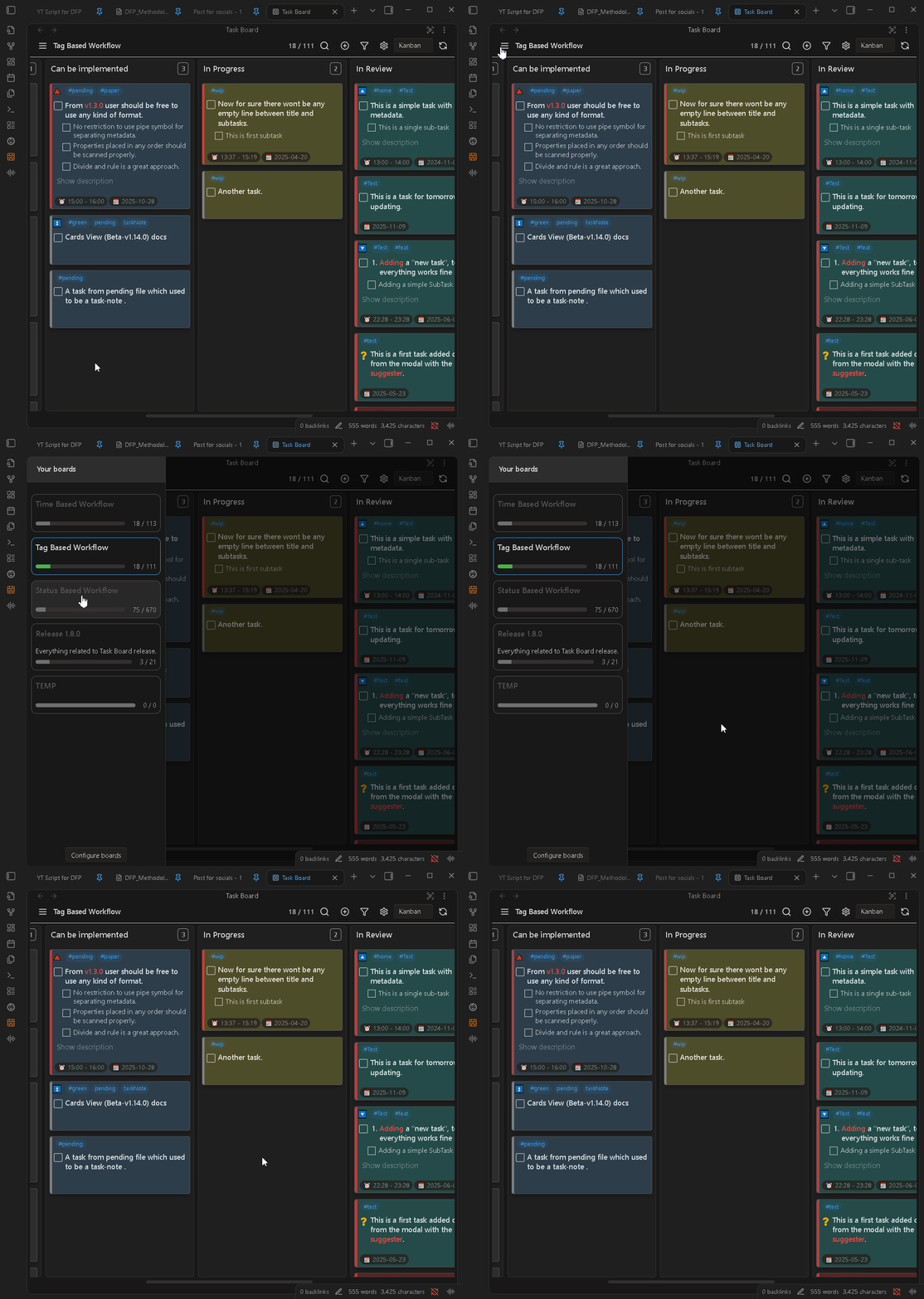
A ton of UI/UX improvements : From switching boards to adjusting the font size of labels, a lot of UI/UX changes has been done to get better experience on small screens and to reduce visual noise and distraction and focus better on the content.
Minimize columns : Using the column menu option, easily minimize a particular column temporarily. Maximize again by clicking on name.
Add or Edit Task window can now work as modal as well as a tab, so it can be now opened inside a new window to have multiple views opened at the same time.
A file filter has been added inside the search bar to find tasks from a particular file faster.
Regular Expression support for Files and Folders in scanning filters.
Default start time setting has been added, if user would like to have a default start time for tasks with universal date. Helpful for sorting.
A new field to enter board description, to see it inside the board cards.
Refresh button will now going to scan any pending updated notes and then refresh the board.
Thats exactly the goal. And yes, just want to mention that the “Activity tracking of tasks” feature is under development. That is the one feature this project is trying to achieve asap, so that it can finally fulfill the true vision of this plugin.
Also, as we know Obsidian is working towards bringing another revolutionary feature, which is Multiplayer. So, if users are collaborating in live environment, this is where the Task Board’s activity tracking feature will shine. Where users will exactly know who modified which property of the task. And see the live changes in Task Board.
And about the second point, I feel this plugin might need a little of your time for setting up the board and filters initially. But I dont feel it might seem overwhelming. As on fresh install, there are pre-configured board already present, where user will directly able to see their tasks. And, after researching a bit on the Projects plugin, I tried to keep this plugin simpler. As, I have seen in a lot of videos on YouTube, people struggle initially to setup their projects using the Projects plugin. So, comparatively, Task Board should feel more intuitive to setup.
My goal with this plugin is to keep it minimal and straightforward, instead of simply keep adding features. So, I take some time in brainstorming properly, what kind of Quality Of Life features can bring the experience to easily manage tasks and small to large projects and spend more time in actually working on the projects rather than spending hours in simply configuring the plugin.
Hence, I try to provide integration with other plugins, so feature like Calender and all can be used from the other plugin. In this version, TaskNotes plugin integration has been achieved.
I wanted to implement these big optimizations in the next version, 1.9.0. But the Kanban view was really struggling with even 1000 task cards. Hence, implemented some of the biggest planned optimizations in this release. One such technique is lazy loading of task cards and this has been tested with 50,000+ task cards. The performance should be same even for task-notes.
Big Optimizations
Kanban Lazy loading : Task cards will be rendered on demand when user will interact with the columns. Drastically improved the performance.
Map view on phone : Few UX enhancements for map view on phone.
Small Features
Native Obsidian menu to easily delete any link on map view.
Store the map view last location data for each board separately.
Show color indicator for the columns with active filters.
A delete confirmation modal while deleting columns.
 | Mobile Support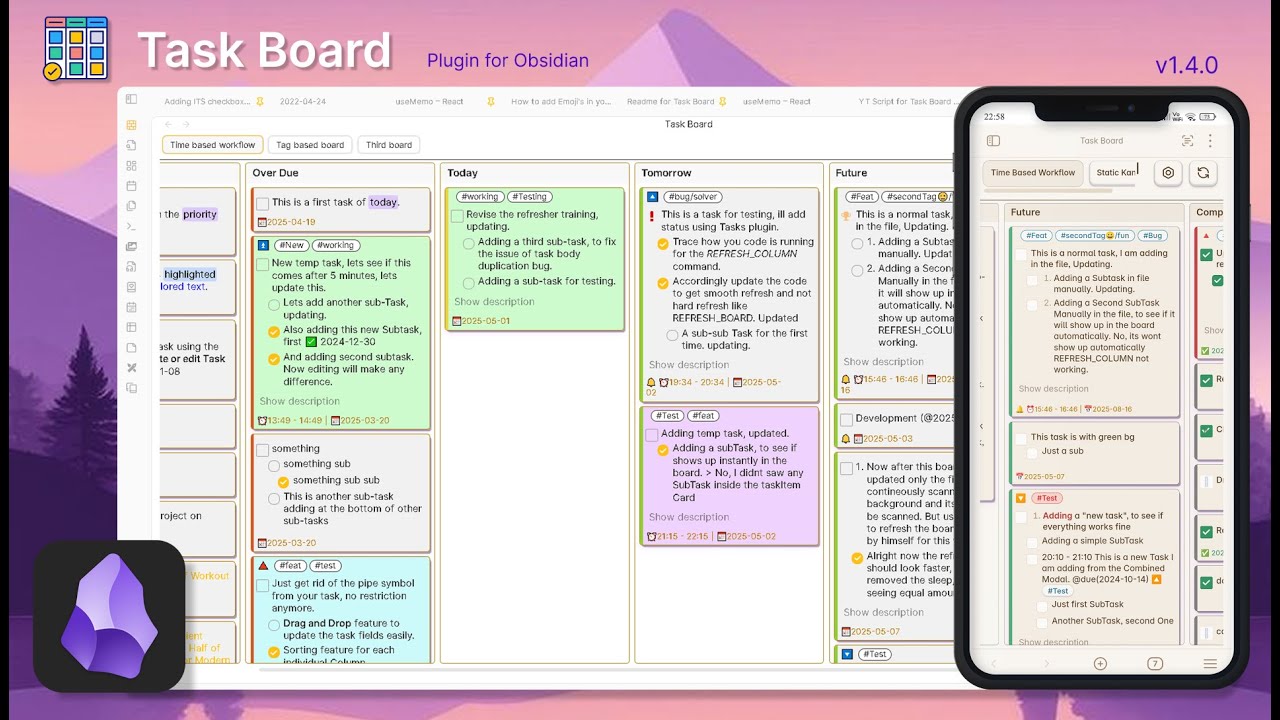

 )
)