Tag Graph: a graph view for Bases where tags are the nodes, and you tag by dragging

Disclaimer

Is this plugin open source? Yes (MIT)
Is this plugin completely free? Yes
Is this plugin vibe-coded beyond the author’s ability to comprehend how it works? No
Community Directory: Tag Graph


Hi everyone,

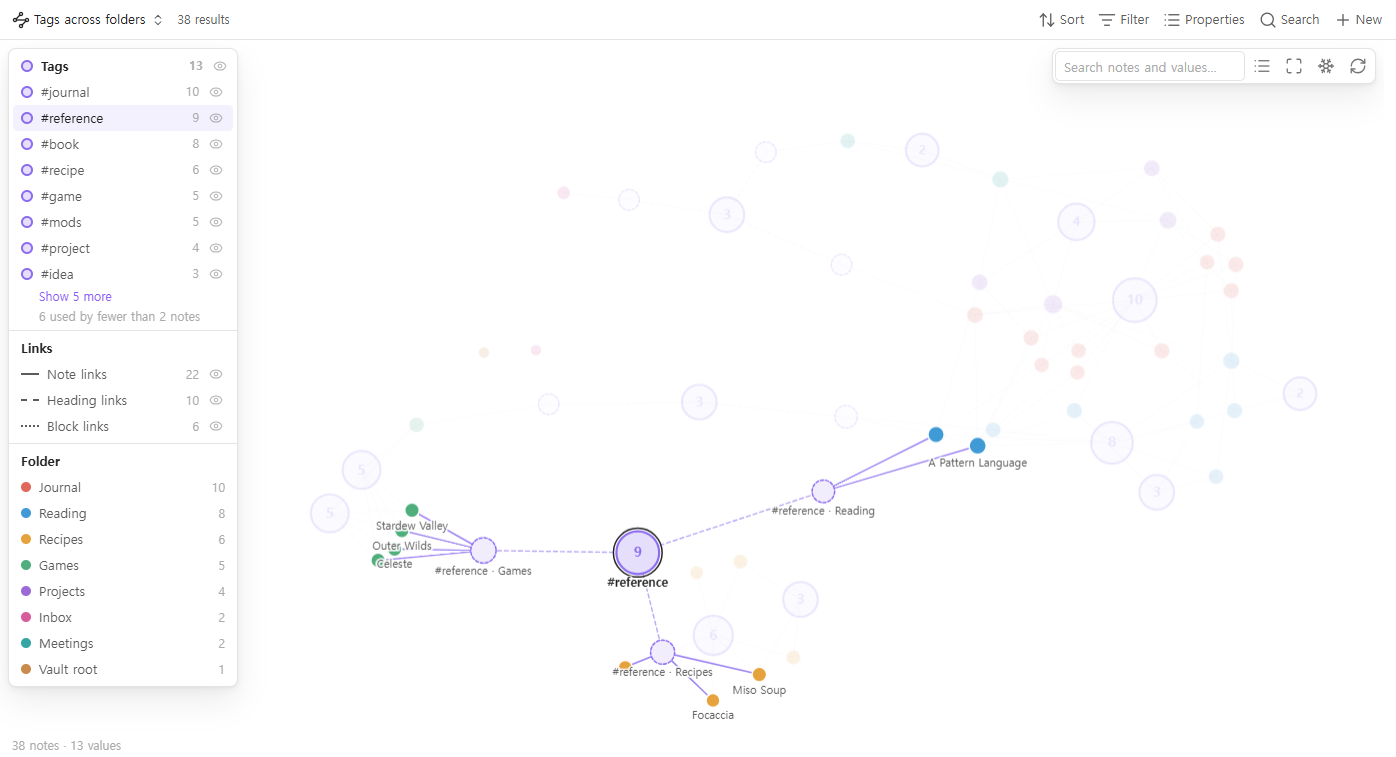
Tag Graph adds a graph view to Bases where tags, folders and properties are the nodes. Every tag becomes a hub, and the notes that share it gather round it. Notes that never link to each other still sit side by side when they share a tag.

I built it from open requests in Feature requests. These are things people asked for that the core graph doesn’t do yet:

  • hide tags used only once, so typo tags stop cluttering the graph
  • see which folder a reused tag like #toread was used in, without typing #games/toread
  • toggle tags and properties on and off from the legend
  • multi-coloured nodes for notes with several tags
  • tell note, heading, block and frontmatter links apart, and hide each kind
  • search that highlights matches instead of hiding everything else
  • a layout that doesn’t reshuffle itself (plus a Freeze button)
  • use Bases filters instead of graph search syntax

The part I like most is that you can work in the graph, not only look at it. Drag a note onto a tag to tag it, onto done to set its status, or onto a folder to move it. Drop one tag on another to merge them, or right-click to rename a tag across the base, including #tags in the note text. Every edit has an Undo.

drag

It works on desktop and mobile. It only writes to the notes the base returns, and it makes no network requests.

Limits: it’s a Bases view, so it doesn’t change the core graph. Undo covers the last edit only.

  • use Bases filters instead of graph search syntax

The part I like most is that you can work in the graph, not only look at it. Drag a note onto a tag to tag it, onto done to set its status, or onto a folder to move it. Drop one tag on another to merge them, or right-click to rename a tag across the base, including #tags in the note text. Every edit has an Undo.
It works on desktop and mobile. It only writes to the notes the base returns, and it makes no network requests.

Limits: it’s a Bases view, so it doesn’t change the core graph. Undo covers the last edit only.

Install: Settings → Community plugins → Browse → “Tag Graph”
Source & issues: GitHub

If you asked for one of the features above, I’d love to know whether this is what you had in mind.

Update: 1.1.0 is out.

  • Graph settings: a gear button opens the same controls as Obsidian’s graph view: filters (each hub property, orphans, rare values), display (arrows, text fade, node size, link thickness) and forces (center, repel, link force, link distance). Changes apply live and are saved with the view.
  • Hover a legend row to preview its notes on the graph; double-click it to zoom to them.
  • Hovering a node fades its connections in and the rest out, and note names fade in as you zoom instead of popping.
  • Double-clicking a tag keeps it highlighted after zooming.

Full notes: Releases · elliott-json-park/obsidian-tag-graph · GitHub

Thanks to everyone who tried it, and please keep the feedback coming.

Update: 1.2.0 is out.

  • Move folders by dragging: turn on the new setting (it is off by default, so nothing moves by accident), then drop a folder hub on another folder hub to move the folder, with everything in it, into the other one. It asks first when “Confirm before moving files” is on, and Undo puts the folder back.

Full notes: Releases · elliott-json-park/obsidian-tag-graph · GitHub

Thanks to everyone who tried it, and please keep the feedback coming.

Update: 1.3.0 is out.

  • Details panel: click a tag or value to see how many notes have it and what share of the base that is, which folders it is used in, the values it is most often used with, its notes (by name or most recently edited), when it was last edited, and look-alike values such as #recipes next to #recipe, with a Merge button.
  • Overview: the ⓘ button with nothing selected shows the whole base at a glance: how many notes have each property (and a button that lights up the untagged ones), the most used values, look-alike pairs, rare values and notes with no connections.
  • Note details: right-click a note and choose Details for its values, links in and out, and the notes most like it.
  • Search lists results as you type, and arrow keys walk the graph from value to value.
  • Motion that says what changed: the graph blooms in hubs first, a highlight spreads out from what you click, a drop draws the links it will make before you let go, and new nodes pop in. It all stays still with “Animate the layout” off or your system’s reduced-motion setting.

Full notes: Releases · elliott-json-park/obsidian-tag-graph · GitHub

Thanks to everyone who tried it, and please keep the feedback coming.

Update: 1.3.1 is out.

  • Linking a note to a note now needs Alt or Ctrl (Option or Cmd on a Mac) held as you drop, so a note you pass over on the way is never linked by accident. Without the key the badge says which key to hold. Drops on tags, values, folders and project notes work as before, and on a phone or tablet no key is needed.
  • Drop targets hold still: the note you carry no longer pushes others away and whatever is near the pointer stays put while you drag, so a small note no longer drifts off before you can drop on it.

Full notes: Releases · elliott-json-park/obsidian-tag-graph · GitHub

Thanks to everyone who tried it, and please keep the feedback coming.

Update: 1.4.0 is out.

  • Folder trees: a new view option links each folder to its parent folder, so your folder hierarchy is drawn as a tree. Folders can also show just their name instead of the full path.
  • Right-click to create and rename: a new note from empty space or inside a folder, and rename notes and folders from the graph (with Undo).
  • Right-click to remove and delete: remove a tag or value from all notes (with Undo), move a note to the vault root, and delete notes or folders (always asks first, goes to your trash).

Full notes: https://github.com/elliott-json-park/obsidian-tag-graph/releases
Thanks to everyone who tried it, and please keep the feedback coming.

Update: 1.6.0 is out.

  • Remove and delete from the keyboard: click a node, then run “Remove the selected tag or property from all notes” (with Undo) or “Delete the selected note or folder” (always asks first). Neither has a default hotkey, so bind them to Delete or anything you like under Settings → Hotkeys.
  • From 1.5.0: the whole interface is in Chinese too, with a Language setting (Follow Obsidian, English, 한국어, 中文).

Full notes: https://github.com/elliott-json-park/obsidian-tag-graph/releases
Thanks to everyone who tried it, and please keep the feedback coming.

Update: 1.7.0 is out.

  • Notes by folder: click a tag and switch its notes list to Folder. You get one heading per folder in alphabetical order, each with its note count, its top-level folder’s colour and a fold arrow.
  • If the Bases core plugin is off, Tag Graph now tells you instead of opening an empty tab. Once you turn Bases on, the graph appears without restarting Obsidian.

Full notes: https://github.com/elliott-json-park/obsidian-tag-graph/releases
Thanks to everyone who tried it, and please keep the feedback coming.