This isn’t possible with Markdown code, this is only possible with pure HTML code, which unfortunately Obsidian doesn’t allow mixing with Markdown code, so whatever goes in your table rows/cells will have to be pure HTML as well, not Markdown.
Here’s an example of HTML table with multiple headers:
<table>

<thead>
<tr><th>H1</th><th>H2</th></tr>
</thead>

<tr><td>C1</td><td>C2</td></tr>

<thead>
<tr><th>H3</th><th>H4</th></tr>
</thead>

<tr><td>C3</td><td>C4</td></tr>

</table>
Result in Obsidian:
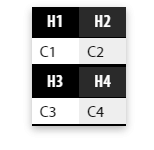
But again, if you put markdown code in those cells it will simply not render as markdown and will be considered plain text (so if you want to use bold text, you have to use <strong>bold text</strong>, NOT **bold text**
P.S. or you could just create 2 markdown tables one after the other to emulate something similar, and remove the spacing between them using a CSS snippet.