I think what OP describes is now possible with Bases.
I created a base that lists all notes with tags that match the note that’s currently in focus.
Base file
Matching tags.base.zip (1.1 KB)
filters:
  and:
    - file.path != this.file.path
    - this.file.tags.length > 0
formulas:
  images: |-
    if (cover, cover,
    if(file.embeds[0].containsAny("jpg",
    "gif", "webp", "jpeg", "avif"), file. embeds[0]))
views:
  - type: table
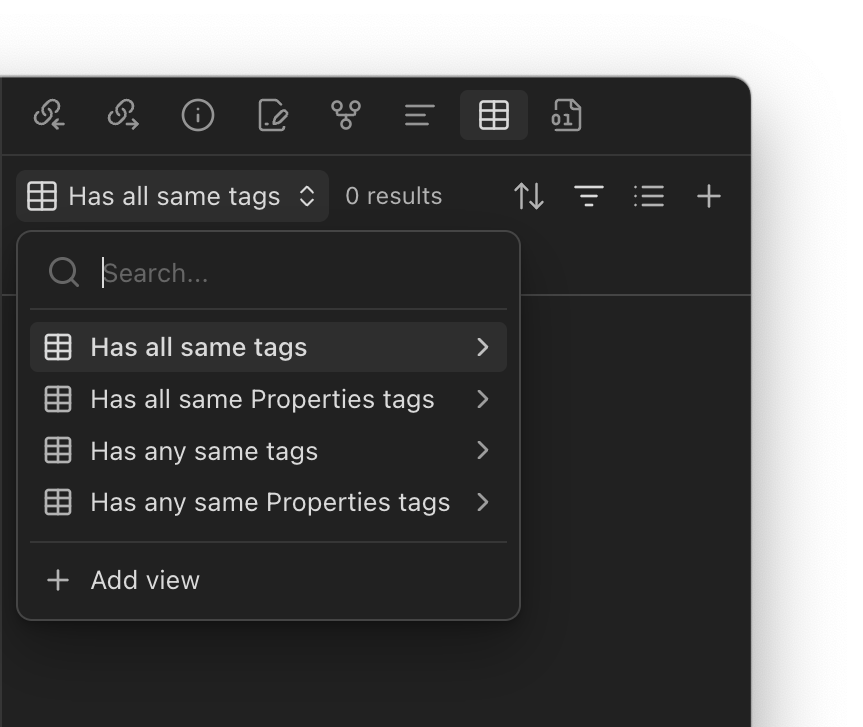
    name: Has all same tags
    filters:
      and:
        - list(file.tags).containsAll(this.file.tags)
  - type: table
    name: Has all same Properties tags
    filters:
      and:
        - list(tags).containsAll(this.tags)
  - type: table
    name: Has any same tags
    filters:
      and:
        - list(file.tags).containsAny(this.file.tags)
  - type: table
    name: Has any same Properties tags
    filters:
      and:
        - list(tags).containsAny(this.tags)
It allows to choose between full vs partial tag match, and can match tags in Properties only vs both in Properties and tags inline:
To use this base, there are four options:
- Open it in split view.
- Drag it to a sidebar.
- Embed it in-note.
- Configure it to be shown in notes with the Virtual Content plugin.
This is rather basic, and could be improved to better match OP’s vision.
I first shared this on Discord. If you have thoughts on this, please leave a comment there.