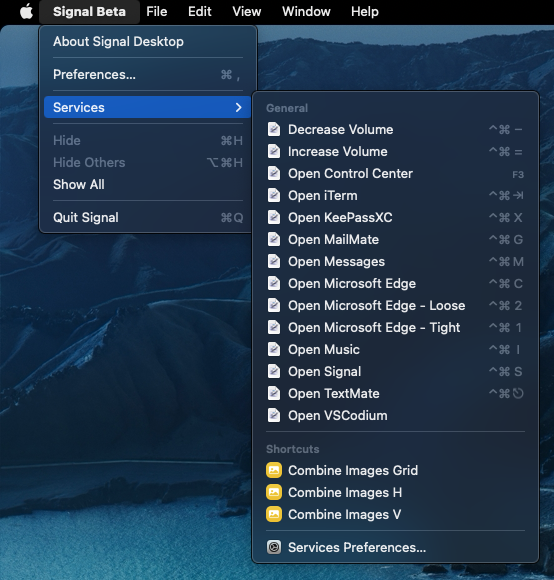
After hours of getting know Obsidian (fantastic!) then customising and adjusting to my needs, I hit that wall too! What a sad disappointment…
It is absolutely a must for serious daily research routines (including of course the celebrated ZotPick)
But, wait a moment , I said to myself, I developed several electron apps, and AFAIR all of them had that menu item! In fact, it is as easy as including this line:
No, not that simple. Obsidian offers its own context menu. This is what allows e.g., plugins to offer custom right-click options depending on the context of the click.
See Services in Apple’s Human Interface Guidelines.
I’m surprised it would ever not be available in any app, because it’s such an essential, system-wide function. Obsidian is the only app I’ve ever seen that doesn’t have a Services menu.
Sorry, I was specifically commenting on the idea of having a right-click available Services menu, as demonstrated by a screenshot earlier in this thread:
I was under the impression that accessing Services via the menu bar was not the same thing as accessing Services via the context menu. Is that not true?
@ryanjamurphy I haven’t used electron, but the documentation seems to suggest that the MenuItem class is used for both application menus and context menus. However, there are some macOs only roles that limit their implementation to the application menu.
services - The submenu is a “Services” menu. This is only intended for use in the Application Menu and is not the same as the “Services” submenu used in context menus in macOS apps, which is not implemented in Electron.
At the very least, is it possible for the Obsidian team to enable the application menu services option using the provided electron MenuItem class? This should enable hotkeys that use services to perform actions (i.e. I use services with automator scripts to quick-switch to my primary applications) while avoiding the question of services within the context menu for now.
After that quick fix, maybe it would be possible to implement services to the context menu by looking at how the electron-context-menu plugin achieves it (looks like a just adding the aforementioned MenuItem to the custom context options).

 , I said to myself, I developed several electron apps, and AFAIR all of them had that menu item! In fact, it is as easy as including this line: