ariehen
September 24, 2025, 5:08am
5
For item two (tags in the editor), these two posts helped me understanding them when I was starting out:
for tags in editing view (live preview/source mode), you would have to use a different css selector i.e. .cm-s-obsidian span.cm-hashtag-begin { } and .cm-s-obsidian span.cm-hashtag-end { }
/* for background, font color. apply to live preview and reading view */
/* change the span.cm-tag-[label] and href=[tag] accordingly */
.cm-s-obsidian span.cm-tag-S,
.tag[href="#S"] {
color: ... ;
background-color: ... ;
}
/* for hash (#) part of the tag in live preview */
/* use it for padding, and borde…
first off, i forgot to mention how to target specific tag in editing view so the previous example require a bit more edit. on how to choose which selector, u r on the right track (by using dev console there).
just rule of thumb, when u select the element you want to format, make sure u have as many classes specified in your snippet. in picture below, i select tag with #obsidian tag and by default the app (evident by app.css:2522 notation) already formatted with .cm-s-obsidian span.cm-hashtag, s…
Here’s an example of a custom tag (from a while ago):
Not sure what theme you are using (the default and Minimal themes have more rounded and pill shaped tags as the default shape), but something like this should work with some adjustments on your end.
/*------- reading mode tag -------*/
.tag[href="#Google"] {
background: #fff !important;
color: #176bef !important;
border: 2px solid #176bef;
line-height: 2em;
font-weight: 500;
padding-top: 1.5px;
padding-bottom: 3px;
}
/*------- source+live preview tag -------*/
.cm-t…
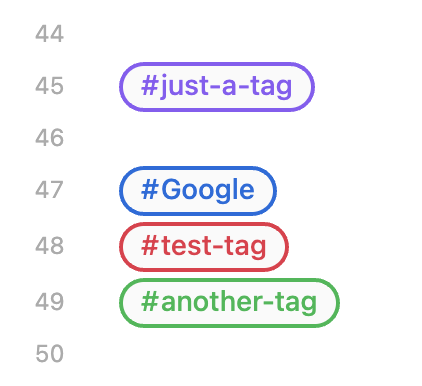
I don’t see it posted on the forum (was in Discord ), but here’s one take via FireIsGood for styling tags universally and giving colors to specific ones:
/*------- Tag formatting -------*/
.markdown-source-view .cm-hashtag {
  background: var(--color-base-10);
  color: var(--tag-color);
  border-top: 2px solid;
  border-bottom: 2px solid;
  line-height: 2em;
  font-weight: 500;
}
.markdown-source-view .cm-hashtag-begin {
  border-left: 2px solid;
  padding-top: 1px;
  padding-right: 1px;
  padding-bottom: 3.5px;
}
.markdown-source-view .cm-hashtag-end {
  border-right: 2px solid;
  padding-top: 1px;
  padding-bottom: 3.5px;
}
.markdown-preview-view .tag {
  background: var(--color-base-10);
  color: var(--tag-color);
  border: 2px solid;
  line-height: 2em;
  font-weight: 500;
}

/*------- Tag colors -------*/
.cm-tag-Google, [href="#Google"] {--tag-color: var(--color-blue)}
.cm-tag-test-tag, [href="#test-tag"] {--tag-color: var(--color-red)}
.cm-tag-another-tag, [href="#another-tag"] {--tag-color: var(--color-green)}
Lots of options depending on what you’d like to exactly do.