That was so fast!! Thank you so much
I want to add a warning, that after Obsidian 1.10.0 goes public I am planning to remove the support of progress bars in bases from the plugin. That is because you will be able to create them without the plugin, just with a formula.
If you are an insider and already on 1.10.0, I recommend you to switch already. Just change you base progress formulas to this:
if( note["maxProperty"], html("<progress max='" +
note["maxProperty"] + "' value='" +
if(note["valueProperty"], note["valueProperty"], 0) +
"' aria-label='" +
if(note["maxProperty"], (if(note["valueProperty"], note["valueProperty"], 0) / note["maxProperty"] * 100).round(), " ") + " %" +
"' data-tooltip-position='top' data-tooltip-delay='500'>"), "")
Replace “maxProperty” and “valueProperty” to your own properties. You can also remove “aria-label” and data-tooltip options it you don’t care about tooltip.
Here is also the formula for the circle progress:
if(note["maxProperty"], html("<div  style='background: radial-gradient(closest-side, var(--background-primary) 64%, transparent 65% 100%), conic-gradient(var(--color-accent-1) " + if(note["maxProperty"], (if(note["valueProperty"], note["valueProperty"], 0) / note["maxProperty"] * 100).round(), 0) + "%" + ", var(--background-secondary) 0); height: 22px; aspect-ratio: 1; border-radius: 50%' aria-label='" +
if(note["maxProperty"], (if(note["valueProperty"], note["valueProperty"], 0) / note["maxProperty"] * 100).round(), " ") + " %" +
"' data-tooltip-position='top' data-tooltip-delay='500'></div>"), "")
I am also planning a big performance update, so keep tuned.
3 Likes
Good thing, we can add that formula easily in any data table.
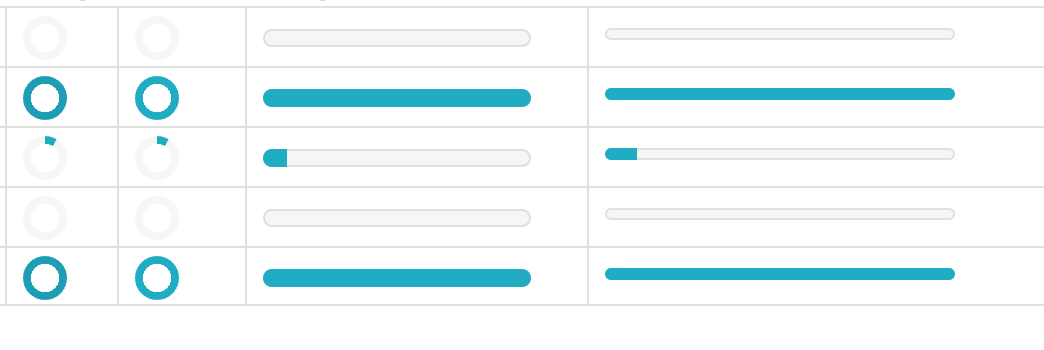
Round progress are same. But the progress bar made according to the new formula is a bit thin. How can we increase its thickness?
Bad thing, auto task calculation will be gone. I liked that very much.
I am not good at coding. I wish wanna copy that part and make a plugin for that auto task checking function. 
I am not planning to remove task calculation, only progress bar rendering in bases.
1 Like
To make progress bar thicker you need to use some css. You can add your own, or you can add “class=‘metadata-progress’” to the html element to use css from Pretty properties.
Like this:
if( note["maxProperty"], html("<progress class=‘metadata-progress’ max='" +
note["maxProperty"] + "' value='" +
if(note["valueProperty"], note["valueProperty"], 0) +
"' aria-label='" +
if(note["maxProperty"], (if(note["valueProperty"], note["valueProperty"], 0) / note["maxProperty"] * 100).round(), " ") + " %" +
"' data-tooltip-position='top' data-tooltip-delay='500'>"), "")
Why I understood it like “All task page will be gone from Pretty Properties”. I dont know. 
I am glad to hear that. That automation is very good. I am using it with Tasks plugin. And its integrated in few workflows.
Thx for the css tip. 
On the 1.10.0, are formulas be visible on the top of the note (on the property area)? If not, would it be possible to keep the bar on the property area? (no problem if not)
Inside the note progress bar will be working as before. I only going to remove it in bases, because:
- it can be added without plugin;
- adding it with plugin affects bases performance.
1 Like
I added the new update, no new features, but performance should be better now. I switched from using mutationObserver to patching internal API, which makes everything work faster and more reliable.
I am especially proud that banners now are loaded immediately with the view, without any delay. That moment when a note was already loaded and banner did not, which led to blinking and text jumping, annoyed me to no end.
Beautiful job!
Pretty properties is finally approved and now is available in official community plugin store!
By tha way, I added to option to the cover settings to allow you to show covers on the right from the properties instead of the left.
1 Like
Hello, good evening, (me again, sorry) I have 2 questions about the plugin:
-
I have a main page for a course (with a banner + icon / category: course) and in it I embedded a base with the course modules (each note per module, they don’t have a banner or icon / category: module).
When i click on the module from my course note, the module note “inherits” the banner and icon (in some cases the cover picture) from the course note (it doesn’t happen when I enter the module note from the search bar).
I wanted to know if it is a bug? or if it is part of the plugin (and if there is a way to disable it?) -
This one is about properties.
I’ve noticed that in the property area, text and list (not numeric) properties move a bit to the right when the plugin is active. And in Bases Card View, the title is aligned to the left (this ok for me), but the text and list properties under it are moved a bit to the right.
I’ve been trying to make a css snippet force them to align to the left. I’ve tried using this two snippets, but found very little success:
.bases-cards-item-content {
align-items: flex-start !important;
justify-content: flex-start !important;
text-align: left !important;
}
.bases-cards-property:not(.mod-title),
.book-cover .bases-cards-property:not(.mod-title) .bases-cards-line {
width: 100% !important;
text-align: left !important;
justify-content: flex-start !important;
align-items: flex-start !important;
}
What I wanted to ask is which are the CSS selectors and rules that I should target to override the alignment of the property values.
For the properties you should check the settings, there is the option to remove the extra padding.
With the banner seems like a bug, but I can not reproduce it…
1 Like
I fixed the bug with banners in new update.
1 Like
Is there a limit on the number of images (for the cover) shown in the selector modal? It doesn’t show all of my images in the folder I have designated for covers? Can this be adjusted?
The limit is based on the way Obsidian suggester modal renders. You should try to type the image file name to be able to see more results.
Hi! Thanks for your amazing plugin. It has a much cleaner look and better compatibility with other plugins than Iconize. Though I have a question: would it be possible to show the icon and/or cover image in the file viewer and in inline links before the file name? Similar to how Iconize sets the Icons. That would be amazing and I could ditch Iconize for good 
I am afraid icons in links would be beyond the scope of this plugin, especially if you want to completely replace such complex plugin as Iconize. It would be a lot of work and I’m not ready to do this right now. There is nothing in Pretty properties existing code that could be reused for dealing with links anyway.
i believe that the math rendering in Bases was broken with a recent update, can you confirm?
if it’s too much trouble to add back, i’ve found alternatives in the meantime (including a plugin i’m trying to develop…). but you might want to change the settings text.