[Plugin] Modal form - integrate forms into QuickAdd, templater, etc

New feature released in 1.41.0 !

Support for asynchronous results in dataviewquery and document-block fields!
Now you can await your results and run any other async operation you may need.
Because what I updated is the functionality that runs the sandboxed snippets of code, this feature is not only available in dataview input, but also dataview source for multi input and the document-block input.

Hope people enjoy this, and really excited to see what you came up with!

2 Likes

Yep, I figured TaskEither was the proper way to go after looking through the documentation, though it was beyond me. I was not counting on you to have such a quick turnaround on this, and I am super happy with your plugin, so thank you! I’m glad my pr was still able to help. It’s also pretty neat you can call fetch in there now, you’ve given me many new ideas. I just got the new update and its working great. At some point when I iron out the completion of some of my systems I will revisit this thread and post some of things I’ve built. Modal Forms will definitely play an integral part in what I am building.

1 Like

some showcase examples are long overdue on this thread because it sounds like an important plugin but only a limited number of people know how to use it, i think

1 Like

Someone recently published an excellent walkthrough video: https://youtu.be/L4vxdBGTk_M?si=CYpo32GpHvsQdrhk
Maybe that is what was missing.
That said, will love to know what parts you consider hard, or what you tried to do and we’re not able to do

1 Like

Yeah, it is a different mindset. I have a year of experience with the library and sometimes I still have to think about how to do things.

Hope this enables cool workflows that you share with the community. I’m really curious

hey danny,

i saw somewhere holroy’s solution to get the tags from cache and add them to the templater js script
also, i saw zachatoo/feralflora’s solution to add topic items in a loop
(sorry i cannot find them now and my self teaching vault is out of reach currently to check)

so i was thinking some practical solution could be shown with a templater js, calling modal form api and making use of dataview api to add in custom forms other existing values from metadata cache, e.g. in a media or moviedb setting to add nationality of actor so the user don’t need to input property values by heart - only if the country has not been registered in the cache

Message:

Hello Danielo,

I hope this message finds you well. I am currently using your Modal Form plugin in Obsidian and I have encountered a persistent issue that I hope you can help me with.

Issue Description: When I use the Modal Form plugin and cancel the form (by pressing ESC or otherwise closing the form without submitting), Obsidian automatically creates an empty “Untitled” file in the root directory. This happens every time the form is canceled, and I have been unable to prevent or automatically delete this file through scripting.

Attempts to Resolve: I have tried using Templater scripts to detect when the form is canceled and to then delete any “Untitled” files that appear. I even added delays in the script to handle potential timing issues between the file creation and the cleanup operation. Here is a brief example of what I’ve implemented:

javascript

Copy code

<%*
const modalForm = app.plugins.plugins.modalforms.api;
const result = await modalForm.openForm('Newcontactint');

if (result === null || result.asFrontmatterString() === null) {
    setTimeout(async () => {
        const files = app.vault.getFiles();
        files.forEach(async (file) => {
            if (file.name.startsWith("Untitled")) {
                await app.vault.trash(file, true);
            }
        });
    }, 5000); // Delay to catch the file post-creation
}
-%>
---
name: "<%result.asString('{{name}}')%>"
family_name: "<%result.asString('{{family_name}}')%>"
company: "AGRATI GROUP"
location: "<%result.asString('{{location}}')%>"
mobile: "<%result.asString('{{mobile}}')%>"
email: "<%result.asString('{{email}}')%>"
title: "<%result.asString('{{title}}')%>"
tag: <%result.asString('{{tag}}')%>
company_logo: Logo-Agrati.png
website: www.agrati.com
picture: <%result.asString('{{family_name}}')%>-<%result.asString('{{name}}')%>.png
type: nominativo 
aliases: 
cssclasses:
  - whiteRed-rounded
  - wideTable
  - customname
---

Result after i have pres “esc” from the form :
image

The Untitled.md is completed empty!

Despite these efforts, the “Untitled” file continues to be created each time the form is canceled.

Questions:

  1. Is there a specific configuration or setting within the Modal Form plugin that might be causing this automatic creation of “Untitled” files when a form is canceled?
  2. Do you have any suggestions on how I might modify my script or Obsidian settings to prevent this issue?
  3. Are there any plans to address this behavior in upcoming updates of the plugin?

I appreciate any guidance you can provide, as this issue has been quite challenging to resolve. Thank you very much for your time and for developing such a useful plugin for the Obsidian community.

Best regards,

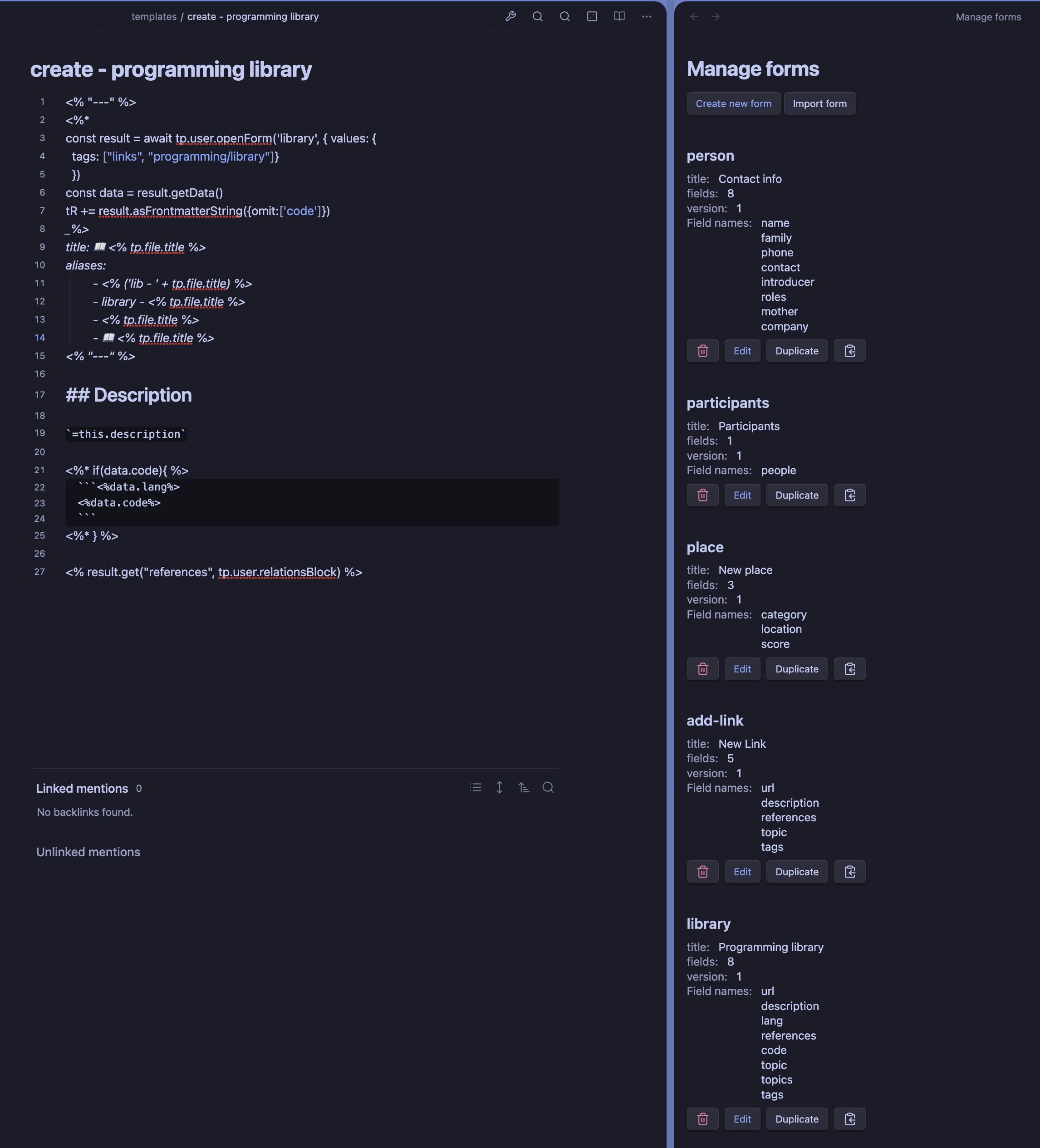
Here is an screenshot of my workflow in case anyone is interested. In one side the template I’m working on, and in the other side, the list of forms with their fields for my reference. That is one of the reasons why I like having the form settings be part of the main UI and not be hidden deep in the settings of obsidian.

3 Likes

Hey @glvercellone , yes this is a known issue.
Honestly, I never cancelled a form submit in my use daily, so I never implemented ways of cancelling.
However, I paved the road to add it in a future. If you notice, the result has a status field, that tells you if the form was submitted or cancelled. Currently, there is no ‘cance’ scenario, but I am already working in a fix, so before you do anything you can check the submit status and then you will know what to do.
In the initial version, only the cancel button will be probably handled. If you accidentally close the modal form that will be handled in the next release (not sure how, re-opening the form, or doing a deeper integration with obsidian)

Hey @glvercellone

Release 1.42.0

just released version 1.42.0, which closes the form and resolves the value to a form result with the status of cancelled if you click the cancel button or hit the esc key. Directly closing the modal in the X at the top right does not have this safety mechanism, that is a future improvement. This was more a hot-fix.

1 Like

danielo515,
first of all, thank you for addressing my request.
Indeed, your update in version 1.42.0 does exactly what you described.
However, there is an issue I’d like to resolve: I would like to make it possible to intercept the pressing of the ESC key or a “null” input in general to exit the form.
Currently, the script fails to intercept a “null” return signal and consequently creates the file in the specified directory and path as outlined in the script below:

<%*
const file = app.vault.getAbstractFileByPath("New_Contact-Int1.md");
const now = tp.date.now("YYYY-MM-DD");
const modalForm = app.plugins.plugins.modalforms.api;
const result = await modalForm.openForm('Newcontactint');
if (result.asFrontmatterString() === null) {
    await app.vault.trash(file, true);
    return;
}
await tp.file.move("000-Agrati_CRM/Agenda/Nominativi-Interni/" + result.asString('{{name}}_{{family_name}}'));
-%>

Particularly with this code, I am attempting to identify when the result is null… but it is not working:

if (result.asFrontmatterString() === null) {
    await app.vault.trash(file, true);
   return;
}

What do you mean by a null input?
To handle the esc/cancel what you need to do is check the result status:

<%*
const file = app.vault.getAbstractFileByPath("New_Contact-Int1.md");
const now = tp.date.now("YYYY-MM-DD");
const modalForm = app.plugins.plugins.modalforms.api;
const result = await modalForm.openForm('Newcontactint');
if (result.status === 'cancelled') {
    await app.vault.trash(file, true);
    return;
}
await tp.file.move("000-Agrati_CRM/Agenda/Nominativi-Interni/" + result.asString('{{name}}_{{family_name}}'));
-%>

That will ensure that pressing the esc key or cancelling the form submission will go to the cancelled route.
asFrontmatterString will never return null because that will break compatibility. It can return an empty string though.

All is perfect, now thankyou.

Hi everyone,

I’m trying to use Dataview setting in the Modal-forms input cell, to get a unique list of companies (company) from all notes in a specific folder in my vault.

Here’s the code I’m currently using to get all companies:

dv.list(dv.pages('"000-XXX_CRM/Agenda/Nominativi-Esterni"').company);

This lists all companies, including duplicates. I want to modify the code so each company appears only once.

I tried using Set to remove duplicates, but encountered the error “cannot read properties of undefined (reading ‘company’)”. Here’s the code I tried:

const companies = dv.pages('"000-Agrati_CRM/Agenda/Nominativi-Esterni"').company;
const uniqueCompanies = Array.from(new Set(companies));
dv.list(uniqueCompanies);

Can anyone help me correct this code or suggest an alternative method to get a unique list of companies from a specific folder?

Thank you!

Just add .distinct() at the end. Yu don’t need any additional list wrrapper or anything:

dv.pages('"000-XXX_CRM/Agenda/Nominativi-Esterni"').company.distinct()

some dataview use case mentioned here (but not what i originally had in mind):

i mentioned a bug there as well

great plugin, btw - i try to popularize it :))

Hey I’m happy to anounce a new release:

Release notes for 1.46.0

This release contains one little change that was easy to make, but I think that it unlocks a very interesting use case for modal forms.
There is a not very well documented feature in the FormEditor that allows to define a specific (and simple) template linked to that form.
I implemented it partially for fun, because I love coding parsers but also partially because many times I only need very basic templating
functionality and I don’t want to have to write another templater template.
Also, I find very appealing the idea of having both the form and the template visible and linked in the same place, which is not the case when you use templater templates.
Up until now, the only thing you can use this templates for was for creating new notes from that template.
You trigger a command, select the form to use, fill it and the template is used to create the note.

But I find myself many times defining a very simple for for easier the insertion of certain data in an existing note.
However, for that I was forced to first create the form then create a templater template that uses that form (whith all the boilerplate it entails)
and then either tell templater to create a command for that template or use the insert template from templater command.
When I saw how easy is to create commands that insert text in the current note I thought it was a no brainer to not take advantage of that with the form templates.

So that is the little but big improvement in this release. You can now use the form templates to insert text in the current note at the cursor position.

To give an example, I have a very simple form for inserting an external link.
While the experience of doing this in the Obsidian desktop app is fine, it is a bit tedious to do on mobile.

My form looks as simple as this:

And the template is also very simple, just:

[{{title}}]({{url}})

Now, I can trigger a command that will insert the template in the current note at the cursor position after filling and submitting the form.

Hope you find this useful. I’m already using it a lot.

2 Likes

Release notes for 1.47.0

This is mostly a technical release that also includes some minor improvements.

The technical part of it is that now the fields of the form are rendered using svelte rather than manually calling DOM manipulation methods
or the obsidian Setting class.
I made this because it simplifies the creation of the view, it will be more maintainable, but the most important reason is that it will
make much much easier to implement functionalities that require atomic re-renders of the form.
The most important and requested feature this will enable is the ability to have dynamic fields that depend on the value of other fields.
This is not implemented yet, but it will be much easier to do now and I will start working on it soon.

For the minor improvements, I added some more color to the form fields, so now the stars that indicate required fields are colorful.

I also improved the error messages when submitting a form with errors.
Now the error message appears below the field in red color:

Also related to errors, the notifications that appear when submitting a form with errors are now grouped in a single notification containing all the errors:

Screenshot 2024-06-22 at 13.41.42

Statement of intent

When I started this project, I had not much experience with Obsidian and absolute no experience with Obsidian plugin development.
Also, my initial idea was to create a very simple plugin, basically something wrapping some basic existing Obsidian functionality and glueing it with some other tools I like to use (templater mainly) while making the process streamlined and more user friendly.
Since then, the plugin has gained a lot of popularity, it has some thousand of installs, making it my most popular project by far.
Coming from a web development background, I was imposing myself some limitations that I learned that do not make any sense in Obsidian.
For example, at first I was very worried about the bundle size of the plugin (which is still very small) and I was trying to avoid using external libraries as much as possible.
However, some of the most popular plugins weight several MBs and nobody seems to care.
Also, many plugins diverge significantly from the Obsidian default appearance, and that is not a problem at all.
What does that mean for modal form? That I will try to build better functionalities, always trying to keep the plugin simple and focused, but I will no longer
limit myself to what Obsidian offers out of the box, and I will not be afraid of using external libraries if they make sense.

Hope you like the direction I’m taking with the plugin. I’m very excited about the future of it.

4 Likes

Thanks for the detailed explanation and the passion!

2 Likes

Thanks!

Release notes for 1.48.0

This is a very exciting release for me, because it includes one of the features that I have been wanting to implement for a long time, and also one of the most requested features. But it also includes some minor improvements, so let’s take those first:

Now the big feature:

Conditional fields

As with every new feature, I like to start small, so this first version is very simple.
It just settles the basic foundation and works only with the most basic field types.
This will allow me to gather feedback and improve it in the next releases after making sure that the basic functionality is working as expected.

In this first approach there are not many safeguards either, so you can end up in forms that don’t show any field, for example because of fields that are excluding each other. I don’t think this is going to be a big problem in practice, but I will be monitoring the feedback to see if it is necessary to add some kind of validation, or at least some kind of warning.
The reason I am not adding it any limitations in this first version is because flexibility: forms can be called with parameters to omit fields, default values, etc. and I don’t want to limit that flexibility.

Here are some screenshots of the feature in action.

Form builder:
Boolean/toogle condition


Text condition starts with

Form in preview mode with the condition met

with the condition not met

This first iteration is purely visual: just because a field is hidden it does not mean that, if it has a value, is not going to be included in the result. If you fill a field, and then do something that makes it hidden, the value will still be included in the result. I think in practice most people just needs a way to start with several fields hidden, and then show them based on the value of other fields, so I think this is a good first approach.

The wording of the feature is not final, I’m not very satisfied with the current wording, so I’m open to suggestions.
I hope you like it, that it does not introduce too many inconveniences and that it is useful to you.

Please let me know your thoughts and suggestions.

1 Like