How can you enhance your note-taking system in Obsidian to better connect thematic concepts and Remez references across different passages of the Text?
I just started using the Bible study tools in obsidian, and the only thing I notice that is really missing that would be helpful is a chapter index for each book of the Bible. If you look at any of the ESV digital Bibles, at the beginning of each book there will be a link to each chapter. And the chapter title of each book is a link back to the book index of chapters. That would make navigating the Bible infinitely easier.
Another similar example of what I mean can be found on my website, where I made a sort of minimal reader KJV. Salvasean.com - One man's thoughts on life and faith I generated all of these pages using a text version of the Bible and running regex commands to and custom tags around the verses and verse numbers and such, and then I was able to manipulate them how I wanted with the resultant HTML code.
So perhaps this would be possible with markdown using similar code to generate an index with links to each markdown file?
I found another approach to make Bible in Obsidian.
Before I want to use the title of the notes as verses of the Bible- the crucial problem was: long text verses of the Bible is not supported not by OS, not by Obsidian app.
- Now the idea is to use property “aliases” as the place for Bible verse.
For example if we want to implement Bible verse for Exodus 1:1
- the title of the note will be: exodus 1⁚1 or shorthanded version. In title you can’t use symbol “:”, so you can use picture of symbol like “⁚”
- in property aliases: Now these are the names of the children of Israel, which came into Egypt; every man and his household came with Jacob.
So you can find this note in obsidian using link system easily like typing:
- “[[” or using shortcut to make a link
- “exodus”
- “1”
- space
- “1”
- tab
- and if you want the verse not the link on [[exodus 1⁚1]] you can type “|” to use alias for this file.
- tab and voila
In content part of exodus 1:1 you can type the verse one more time and after you can use some cross references to another verses of the Bible
@SotS I’m not sure if you’re still interested in this, but I finally found a spare moment to share how I laid out my Obsidian vault using MT in OT and SBL GNT in NT, for you or whomever else might be interested.
Two part video demo:
- [https://youtu.be/6C4bkwUjvqQ](Part One: Constraints and Features)
- [https://youtu.be/agr9s68aWdw](Part Two: Required Standardizations and Integrations)
** Disclaimer: Unfortunately I only realized after the fact that the software I used to record my screen doesn’t switch to other applications, so you can’t follow along when I switch to my browser or WSL Terminal (for coding). If there’s something there that someone is interested in, I can send a screenshot or more information.
Some features that I demo include:
- Can add text of any verse arbitrarily (
ctrl+shift+p) - Autopopulate notes by script, based on filename
- Auto-tagging script (batch script -
ctrl+alt+t) - Create links to file from highlight (
ctrl+[)- Also creates link to header
- Feature: Refactor note based on section headers (H1s only) (
ctrl+alt+shift+1) - Color in graph based on tagging
- Vim Regex:
- Turn copied in Greek/Hebrew into h2 + bulleted text
- Split at Atnach (can be modified for any arbitrary Hebrew accent)
If anyone has any suggestions on improvements or optimizations I would be interested to hear that as well!
While I’m at it, I thought I would share a screenshot of the color groups.
Graph Groups organized by Book of Bible

Here is the JSON for the graph.json that produces these colors in case anyone’s curious.
1 Like
Hi all, a user @BibleStudy was active on the forum a year ago. Since then they’ve been quiet. They set up their bible study in a very interesting way, but I can’t for the life of me work out something they suggested. Perhaps someone here might be able to help. Here’s the post:
forum.obsidian.md/t/my-bible-study-workflow/39044/41?u=generalmidi
and here’s the image:
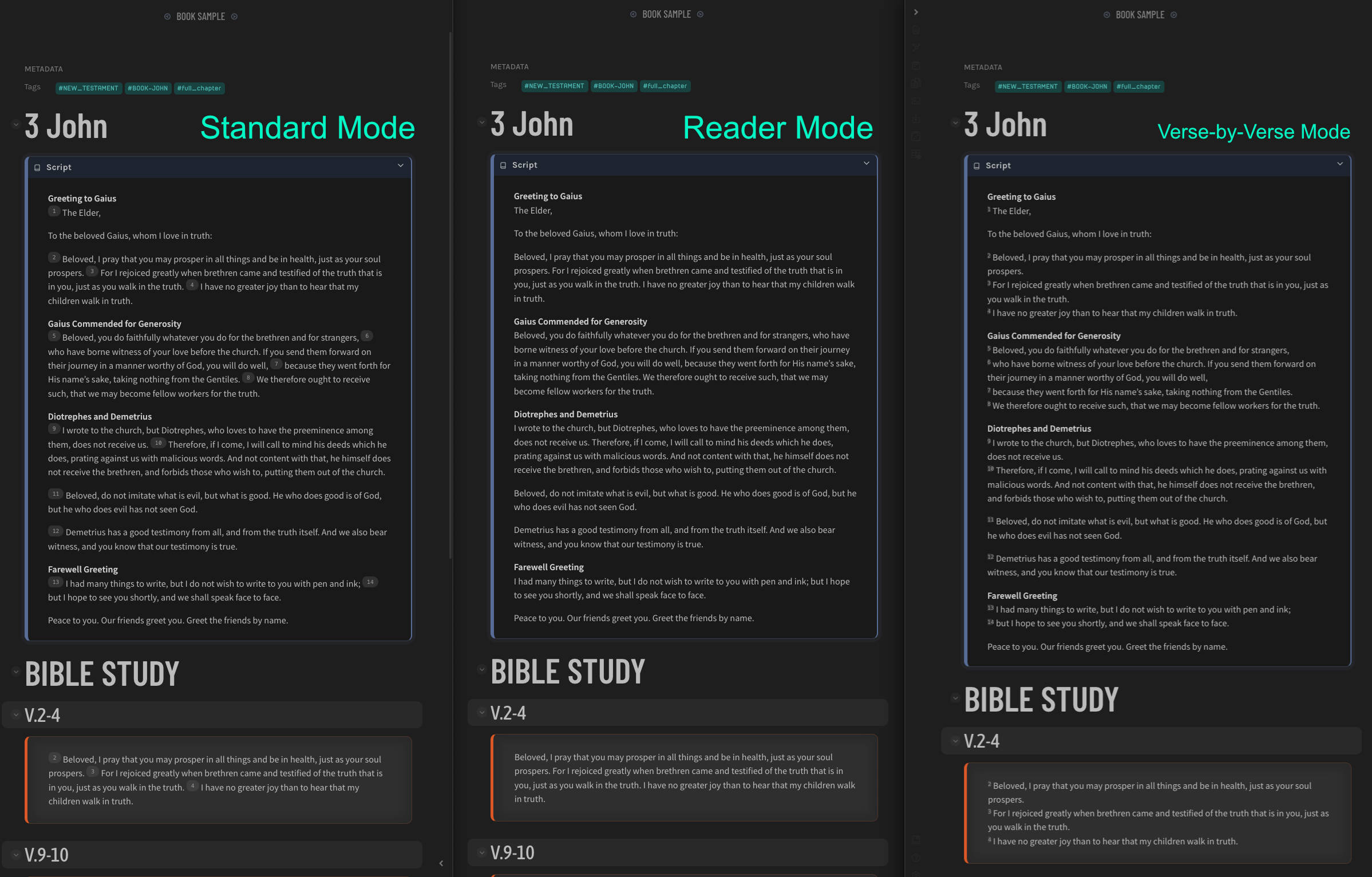
The user said
when properly setup, you can switch between all three modes without touching the actual file. That is made possible via markup and css.
Can anyone explain how this might be possible, to choose on the fly which mode you feel like viewing? there can’t be 3 seperate versions of the file for each mode, right? And 3 different callouts for each formatting option? That can’t be right either.
Appreciate anyone’s help.
I believe examples are great for inspiration, but from experience I can tell, the easier the system, the better.
The best way to organize and arrange notes is imo, very personal. The goal of note making and styling is, to make reading and studying easy, enjoyable and proficient - but for your use case.
Try to look around for themes and bible plugins, this might help you to setup a favourable environment to study, learn better.
In my case, I’ve organized books in blocks of 20 verses per note and on top I added back and forward wiki links to switch comfortably to the previous / next note. And for the overview, you can put all your notes in a Moc (table of notes), dividing OT and NT.
Could you please give an example of your Bible study that could inspire us?
I am wanting to reach out to the community and give them a project that I am currently working on. It is a version of the “second brain” but with the intentions of working on bible study and learning. I truly want to be involved with this community and would enjoy it if I can get the good and the bad of my project.
It is called, MOC-CMZ and it is built to not only connect notes to each other but make it where your thoughts can connect to each. So if you are doing a topical study then it will be able to connect to various thoughts even though you may have started out working on just a few verses or a chapter for something else.
Here is my YouTube playlist:
Please let me know what you all think and what I can do to improve or modfiy it.
This was literally the first thing I thought of doing when I first opened Obsidian, well done, m8
1 Like