There is no “new note” icon directly in the menu bar - if you click the file explorer icon (the blue one in the following picture), you will find the “new note” icon beneath (the one with the pen):
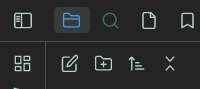
The icon you are clicking is the one for “starred files”. This native plugin doesn’t exist anymore as it has been replaced by the bookmarks plugin. Right-click the icon and close it - you don’t need it anymore.