Disclaimer
Is this project open source? Yes (MIT, GitHub - Dimagious/dashsidian: Dashboards in Obsidian from small YAML blocks: tiles, number cards, progress bars, a day row, countdowns, a year heatmap and charts. A habit tracker without Dataview or JavaScript. · GitHub)
Is this project completely free? Yes
Is this project made with AI beyond the author’s ability to comprehend how it works? Yes/No
My vault’s front page used to be a list of links. The numbers I cared about (sleep, runs, books, how many days in a row I meditated) sat in the properties of my daily notes, and I never looked at them, because looking meant writing a dataviewjs query first.
This is where I ended up: one home note with a tile per area, and behind the tiles, pages that read those properties. The first picture is my real home note; the pages behind it are shown on sample data, so nobody gets my lab results. Each section has the blocks so you can copy them and swap in your folder names.
I wrote Dashy, the plugin that draws these blocks. The data part works the same if you draw it with Bases or Dataview, so start there whatever you use.
The data
Daily notes are named with the date first (2026-10-05.md; 2026-10-05 Monday.md works too). One property per thing I track:
---
gym: true
read: false
meditate: true
sleep: 7h 38min
run_km: 8.5
---
- Habits are checkboxes. A ticked box counts as 1.
- Durations stay the way the watch exports them:
7h 38min,1h30m,7:30,188m. They are read as minutes. - Things that are not days get a note each. A book has
date_read: 2026-03-14; a race note is named2026-05-10 Riga half.mdand holdstime: "1:38:12".
1. The home note
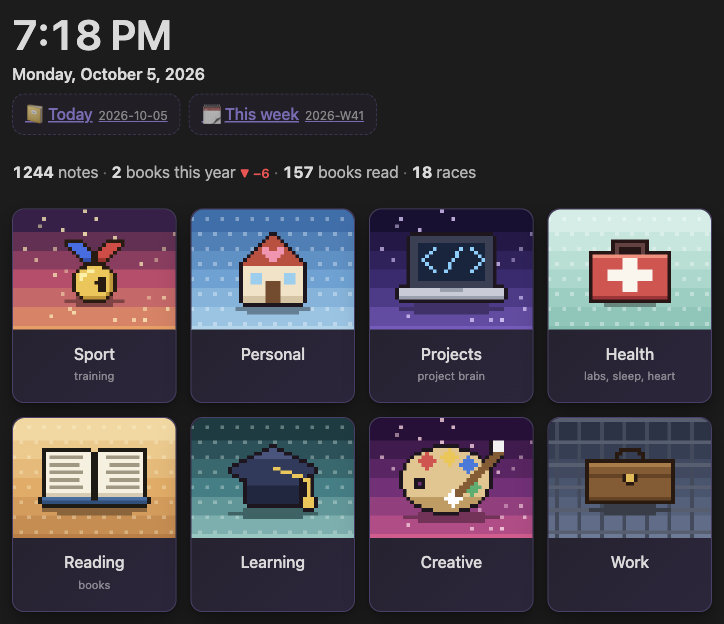
clock: true
daily: true
weekly: true
layout: inline
items:
  - { label: notes, agg: count }
  - { label: books this year, source: Reading, date_field: date_read, period: year, agg: count, compare: true, better: up }
  - { label: books read, source: Reading, where: "status = done", agg: count }
  - { label: races, source: Sport/Races, agg: count }
columns: 4
items:
  - { label: Sport, path: Sport/Training-Log, image: Attachments/covers/sport.png, sub: training }
  - { label: Health, path: Health/Health-MOC, image: Attachments/covers/health.png, sub: "labs, sleep, heart" }
  - { label: Reading, path: Reading/Reading, image: Attachments/covers/reading.png, sub: books }
  - { label: Projects, path: Projects/Projects-MOC, image: Attachments/covers/projects.png }
My tiles open the area’s main note. A tile can also open a folder or a Bases view (path: "Books.base#Top rated"), and on a folder badge: count shows how many notes are in it, kept up to date as notes come and go. image takes a vault path, a [[wikilink]] or an https:// link; my covers are pixel art I generate with a small script, one per area.
2. Habits
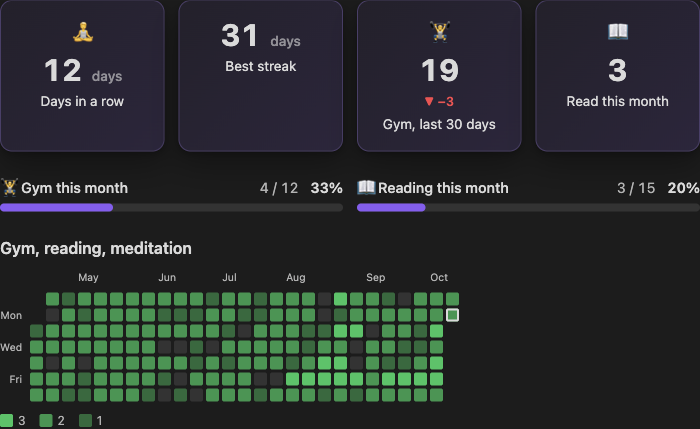
columns: 4
source: Diary
items:
  - { label: Days in a row, field: meditate, agg: current_streak, unit: days, icon: 🧘 }
  - { label: Best streak, field: meditate, agg: streak, unit: days }
  - { label: "Gym, last 30 days", field: gym, agg: sum, period: 30d, compare: true, better: up, icon: 🏋️ }
  - { label: Read this month, field: read, agg: sum, period: month, icon: 📖 }
columns: 2
source: Diary
period: month
items:
  - { label: Gym this month, field: gym, agg: sum, goal: 12, icon: 🏋️ }
  - { label: Reading this month, field: read, agg: sum, goal: 15, icon: 📖 }
source: Diary
field: [gym, read, meditate]
color: green
range: 182d
title: Gym, reading, meditation
Diaryis the daily notes folder. Written once aboveitems, it applies to every card.current_streakis the run going on now;streakis the best one on record. A day you haven’t filled in yet leaves the run counted up to yesterday, so the morning doesn’t reset it.compare: truesets the last 30 days against the 30 before them.better: updecides the colour: fewer gym days than last month shows red.- With three checkboxes in
field, a day with all three ticked is full colour and a day with one is pale.
Step by step: a habit tracker without Dataview.
3. A streak that survives weekends and holidays
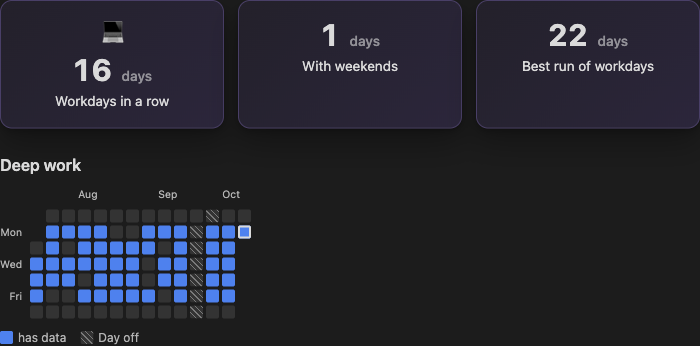
columns: 3
source: Diary
items:
  - { label: Workdays in a row, field: deep_work, agg: current_streak, days: weekdays, skip_field: vacation, unit: days, icon: 💻 }
  - { label: With weekends, field: deep_work, agg: current_streak, unit: days }
  - { label: Best run of workdays, field: deep_work, agg: streak, days: weekdays, skip_field: vacation, unit: days }
source: Diary
field: deep_work
skip_field: vacation
color: blue
range: 91d
title: Deep work
days: weekdays lets Saturday and Sunday pass without breaking or extending the run. skip_field: vacation does the same for any day whose note has vacation: true, and the heatmap hatches those days. The middle card is the same habit counted the plain way, for contrast.
Step by step: a habit streak that skips weekends
4. Training and sleep
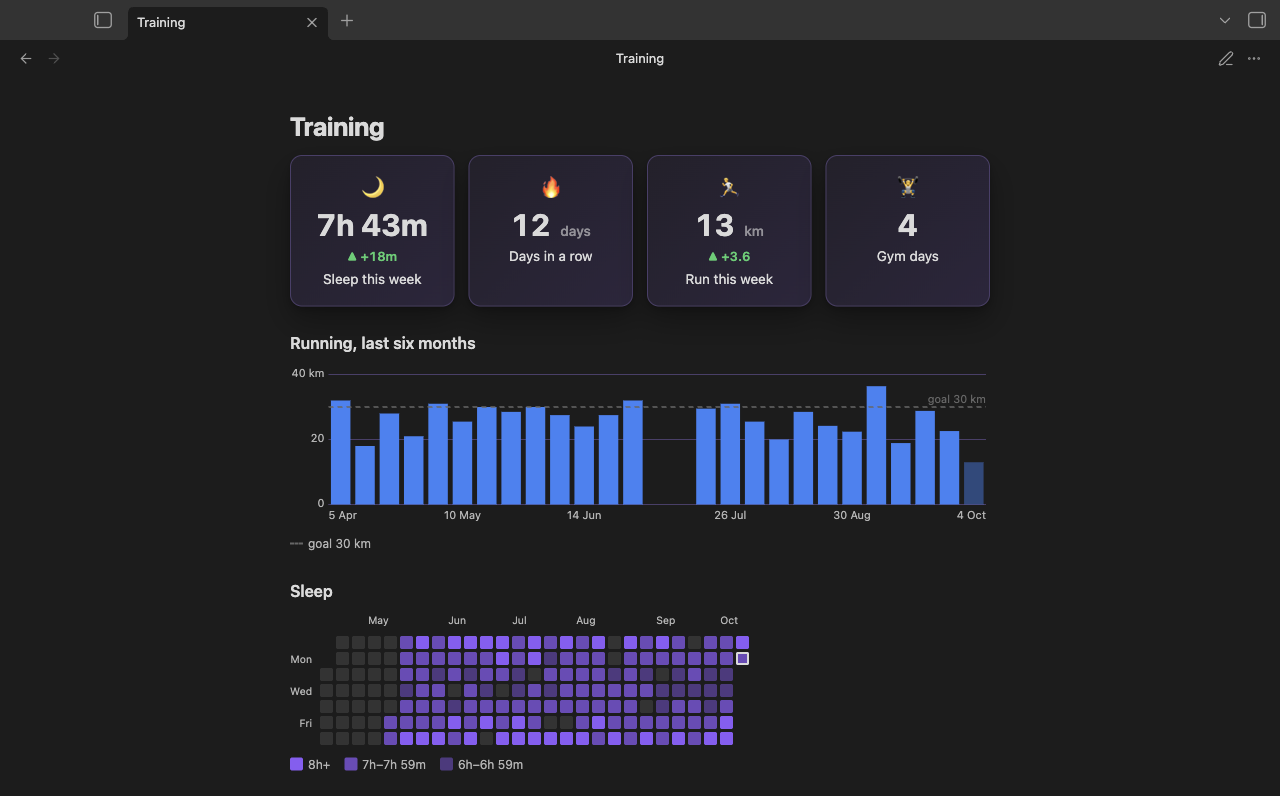
columns: 4
source: Diary
items:
  - { label: Sleep this week, field: sleep, agg: avg, period: week, compare: true, better: up, icon: 🌙 }
  - { label: Days in a row, field: meditate, agg: current_streak, unit: days, icon: 🔥 }
  - { label: Run this week, field: run_km, agg: sum, period: week, compare: true, better: up, unit: km, icon: 🏃 }
  - { label: Gym days, field: gym, agg: sum, period: month, icon: 🏋️ }
source: Diary
field: run_km
type: bar
bucket: week
unit: km
goal: 30
title: Running, last six months
source: Diary
field: sleep
color: purple
bands: [8h, 7h, 6h]
range: 182d
title: Sleep
bucket: weekadds the dailyrun_kminto one bar per week. The dashed line isgoal, and this week’s bar is lighter because the week isn’t over.- A week with no runs leaves an empty slot on the axis instead of a bar at zero.
- Sleep is written
7h 38minin the note, and the card averages the week as7h 43m.bandstakes hours too.
If Obsidian Charts is installed, write the chart block as dashy-chart: Charts owns the chart name then.
5. Races, to the second
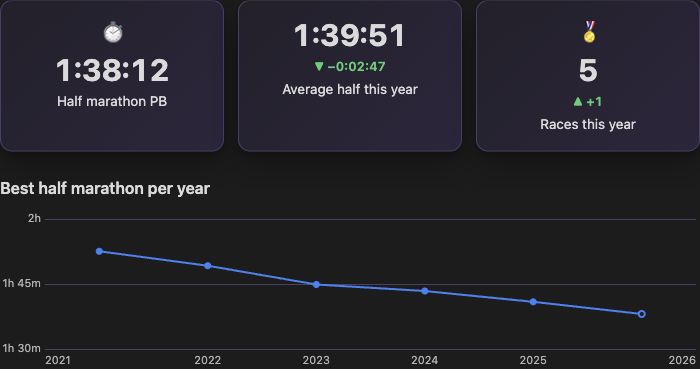
columns: 3
source: Races
items:
  - { label: Half marathon PB, field: time, agg: min, where: "event = half", icon: ⏱️ }
  - { label: Average half this year, field: time, agg: avg, where: "event = half", period: year, compare: true, better: down }
  - { label: Races this year, agg: count, period: year, compare: true, better: up, icon: 🏅 }
source: Races
where: "event = half"
field: time
agg: min
bucket: year
range: 1825d
title: Best half marathon per year
When every time in the folder is written to the second, the cards show a clock, 1:38:12, and so does the change against last year. better: down turns a faster average green. One catch: H:MM always means hours and minutes, so a 5 km time goes in as 0:18:51, not 18:51.
6. Books per year
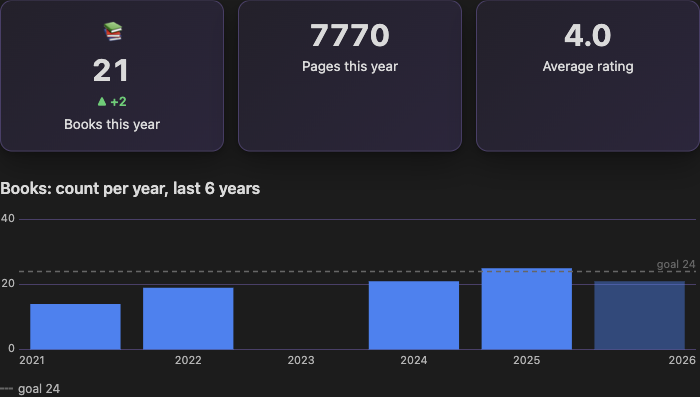
source: Reading
date_field: date_read
period: year
items:
  - { label: Books this year, agg: count, compare: true, better: up, icon: 📚 }
  - { label: Pages this year, field: pages, agg: sum }
  - { label: Average rating, field: rating, agg: avg, precision: 1 }
source: Reading
date_field: date_read
agg: count
bucket: year
type: bar
range: 1825d
label: Books
goal: 24
Book notes are named after the book, so date_read supplies the date. A book still in progress has no date_read and stays out of the count. On 5 October, “this year against last” compares 1 January to 5 October of both years.
Step by step: books per year
7. Birthdays and expiry dates
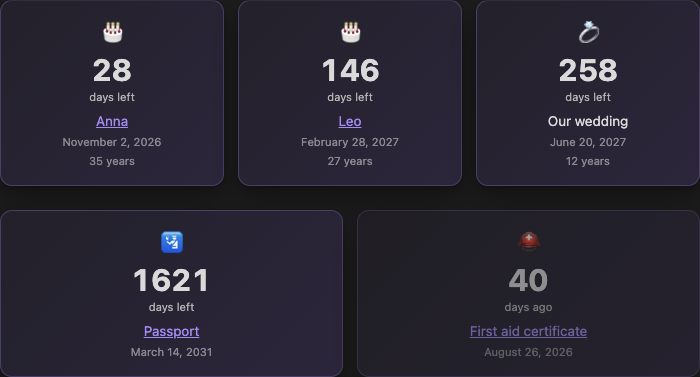
items:
  - { label: Anna, field: birthday, repeat: yearly, source: People, where: "name = Anna", icon: 🎂 }
  - { label: Leo, field: birthday, repeat: yearly, source: People, where: "name = Leo", icon: 🎂 }
  - { label: Our wedding, date: 2015-06-20, repeat: yearly, icon: 💍 }
columns: 2
items:
  - { label: Passport, field: expires, where: "type = passport", icon: 🛂 }
  - { label: First aid certificate, field: expires, where: "type = first-aid", icon: ⛑️ }
The birthday lives in the person’s note (birthday: 1991-11-02). repeat: yearly counts to the next one and shows the age they turn; someone born on 29 February gets the 28th in other years. The passport card reads expires from the passport note, so after a renewal I edit that note and the card follows. The label links to the note the date came from.
Step by step: countdown to a birthday
What it doesn’t do
- It reads frontmatter only. Inline fields like
gym:: trueand checklists in the note body are invisible to it. - No tables. A tile can open a Bases view for that.
- Lines and bars only. Pie and radar charts are Obsidian Charts territory.
- It draws the home note but doesn’t open it on startup. I keep the Homepage plugin for that.
A typo in a key shows a warning in the note with a “did you mean”, and broken YAML shows its line number. Install: Settings → Community plugins → Browse → “Dashy”.
Which property in your daily notes would you put on a page like this, and how do you look at it today?