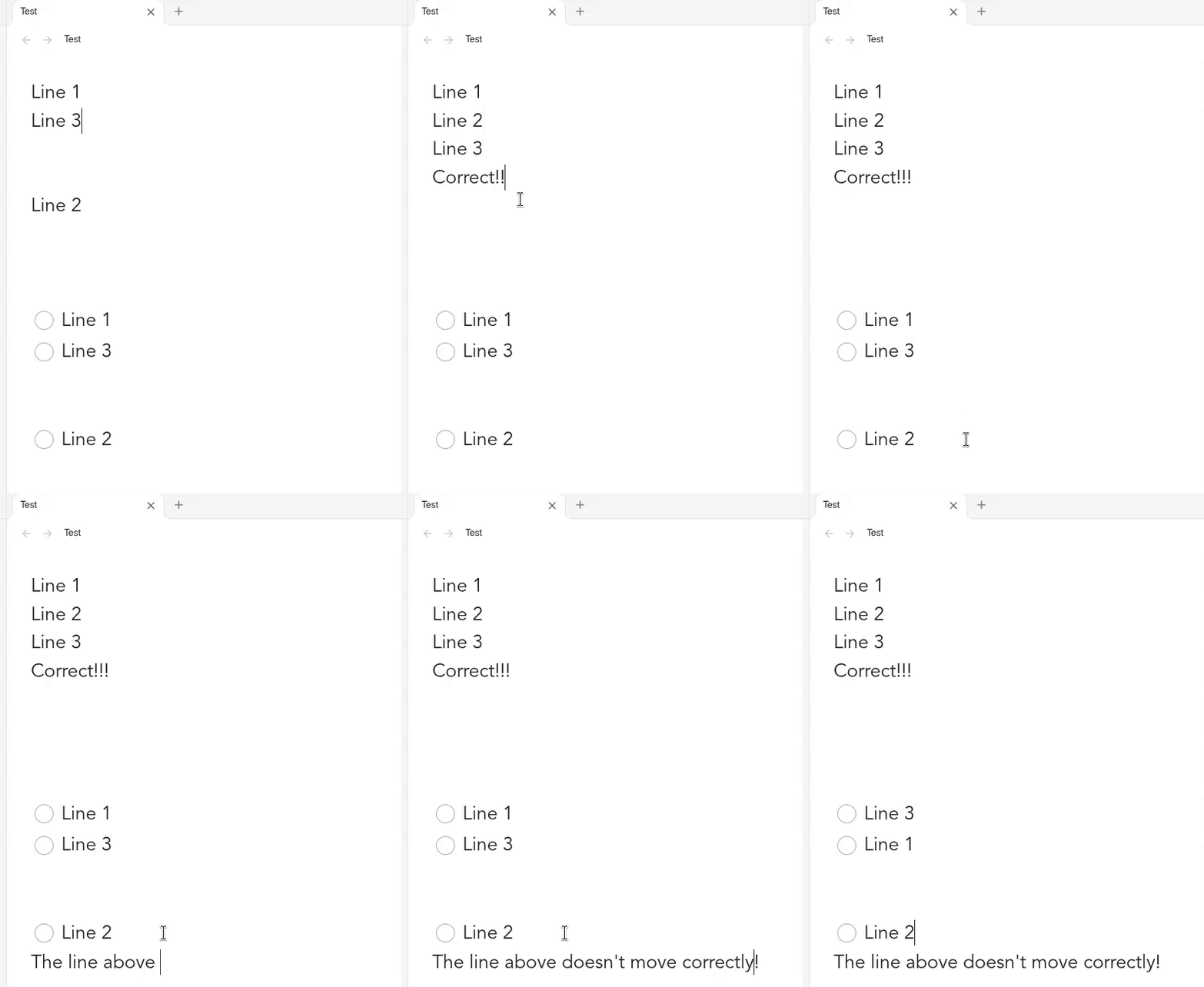
Move Line Up/Down should respect list structure and empty-line groups

Use case or problem

In my workflow, I keep checklist tasks in groups separated by a blank line, for example:

* [ ] Read
* [ ] Work| <- cursor is here

* [ ] Study 1. pom
* [ ] Study 2. pom

* [ ] Drink water

New behavior appears since Obsidian 1.15, with the setting Editor > Smart lists enabled.

When I want to move - [ ] Work into the lower group using the command Move line down (which works where you cursor is placed), it pulls Study 1. pom up into the upper group and leaves the blank line in the wrong place:

* [ ] Read
* [ ] Study 1. pom

* [ ] Work
* [ ] Study 2. pom

* [ ] Drink water

I expected this instead, with the blank line staying between the groups:

* [ ] Read

* [ ] Work
* [ ] Study 1. pom
* [ ] Study 2. pom

* [ ] Drink water

Turning off Smart Lists fixes the move, but it also disables continuing a checklist on Enter, which I need. So I have to choose between correct moves and list continuation.

Proposed solution

Either or both of the following:

Option A: split Smart Lists into independent settings. Smart Lists currently bundles several behaviors. Expose them separately, for example:

  1. Continue list on Enter (a new line after a checklist item starts a new checklist item).
  2. Move list items with their children.
  3. Blank-line handling when moving: treat blank lines as boundaries, or skip over them.

With this split, I could keep Enter-to-continue and turn off the move behavior that breaks my layout.

Option B: a list-aware move command. Add a variant (for example, “Move list item up/down”) that:

  • moves a single list item together with its nested child items, and
  • treats blank lines as part of the list structure

The button move line up/down would then do a simpler version

  • move a single line, even in a list
  • treats blank lines as group boundaries, so it never moves an item across one.

Preferably, these would also move nested child items too, but that would likely be confusing for the split of the features.

Current workaround (optional)

  • Turn off Smart Lists. The move then works as before, but checklist continuation on Enter stops working, as well as the moving of child items as the new changelog describes: Obsidian Changelog - Obsidian
  • Line Mover - Obsidian Plugin can be configured to replace the functionality with its ‘move line up (single line only)’ command.

Related feature requests (optional)

Thanks, @gleam, for taking the time to report this.

I agree with your observations. In previous versions of Obsidian, the Move Line Up/Down commands behaved as you described in your expected result. In my opinion, that previous behavior was much more natural and intuitive.

The current behavior, on the other hand, feels more like a bug than a feature. It changes how users expect a basic and familiar operation like moving a line to work, making the behavior confusing and inconsistent. Users shouldn’t have to wonder how the command will behave each time they use it, especially when it used to work differently in previous versions.

I believe preserving the previous behavior would provide a much more predictable and consistent editing experience.

References:

Screencast From 2026-11-03 17-52-02 (5 FPS)

I personally believe that the best solution would be to have two separate sets of commands, availiable at the same time: one to simply move the line, regardless of the list structure, and another for the smart list moving. Also the commands should be named appropriately, because the current line moving command name doesn’t tell you anything about special list moving behaviour, and it can be very unexpected for the user.

I think that the best discussion of this issue can be found at Separate new Move Line Up/Down logic from Smart Lists setting . There I have also posted workarounds that work for me at the moment and are more practical than those proposed above.

However, it seems that we have some diverging requirements, as I also take issue with the new functionality of auto-indenting or moving child items. Therefore I opened a related FR: Separate commands for moving/indenting a single list item vs. all of it's children.

Hi @CawlinTeffid,

Thanks for the explanation, but I think you’re missing the point of this feature request.

The issue isn’t about Markdown’s loose lists feature or how CommonMark interprets lists. It’s about how Obsidian’s Move Line Up / Move Line Down commands handle line movement.

Moving one line should mean moving exactly one line, not moving an arbitrary number of lines at once based on the surrounding list structure. These commands have traditionally behaved as simple line-movement operations, and users reasonably expect that behavior to remain consistent.

I understand that Smart Lists introduces additional behavior to handle list structures, but that shouldn’t come at the expense of the basic functionality users already rely on. If Obsidian wants to provide smarter list manipulation, it would make much more sense to offer separate commands for that purpose, rather than changing the behavior of an existing, generic line-movement command.

Regarding the proposed workarounds, I don’t find them particularly practical. Having to change list markers (-, *, +) or insert horizontal rules just to make a basic line-movement command behave as expected is hardly a reasonable solution. It forces users to modify their Markdown structure to accommodate an editor command.

Ultimately, this is a UX issue: a command called “Move Line Up” should move one line up. It shouldn’t require users to understand Markdown’s internal list structure or adopt formatting workarounds to get the expected result.

I believe restoring the previous behavior, or providing separate commands for simple line movement and smart list movement, would be a much better solution.

I’m just explaining why the current behavior happens and providing workarounds, not saying the request is invalid.

The conversation got messy.
I created two threads and moved some posts.
The first thread is running conversation/suggestion list on how to improve the current commands:

The second is for asking for toggle different to change the behavior of the current commands or to introduce a separate commands:

Please, continue there.