This is doable, although a chore if you have a lot of tags that you want to change. You can get rid of the border sections if you just want the color. Just an example of what you can do.
/*---- reading view tag ----*/
.tag[href="#ObsidianClipperTest"] {
    color: #ff0080;
    background-color: inherit;
    border: 1px solid #176bef;
    line-height: 2em;
    font-weight: 500;
    padding-top: 1.5px;
    padding-bottom: 3px;
}

/*---- source + live preview tag ----*/
.cm-tag-ObsidianClipperTest {
  color: #ff0080;
  background-color: inherit;
  border-top: 1px solid #176bef;
  border-bottom: 1px solid #176bef;
  line-height: 2em;
  font-weight: 500;
}

.cm-hashtag-begin.cm-tag-ObsidianClipperTest {
  border-left: 1px solid #176bef;
  padding-top: 1px;
  padding-right: 1px;
  padding-bottom: 3.5px;
}

.cm-hashtag-end.cm-tag-ObsidianClipperTest {
  border-right: 1px solid #176bef;
  padding-top: 1px;
  padding-bottom: 3.5px;
}


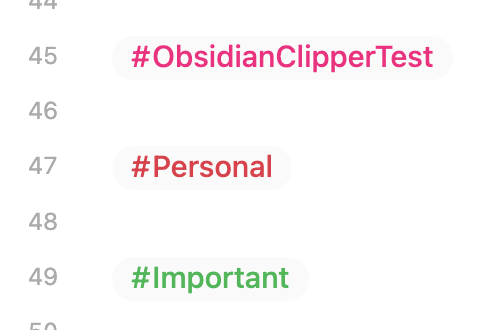
This version from FireIsGood is a bit easier if you are doing multiple tags — you just need to change the tag colors parts at the bottom — but it’s still one-by-one.
/*---- tag formatting ----*/
.markdown-source-view .cm-hashtag {
  background: var(--color-base-10);
  color: var(--tag-color);
  /*border-top: 2px solid;
  border-bottom: 2px solid;*/
  line-height: 2em;
  font-weight: 500;
}
.markdown-source-view .cm-hashtag-begin {
  /*border-left: 2px solid;*/
  padding-top: 1px;
  padding-right: 1px;
  padding-bottom: 3.5px;
}
.markdown-source-view .cm-hashtag-end {
  /*border-right: 2px solid;*/
  padding-top: 1px;
  padding-bottom: 3.5px;
}
.markdown-preview-view .tag {
  background: var(--color-base-10);
  color: var(--tag-color);
  /*border: 2px solid;*/
  line-height: 2em;
  font-weight: 500;
}

/*---- tag colors ----*/
.cm-tag-ObsidianClipperTest, [href="#ObsidianClipperTest"] { --tag-color: #ff0080 }
.cm-tag-Personal, [href="#Personal"] { --tag-color: var(--color-red) }
.cm-tag-Important, [href="#Important"] { --tag-color: var(--color-green) }

Also, keep in mind that tags are case-sensitive; you may want to add [href="#Important"], [href="#important"], etc., to the rules. I was staring at it for a few seconds, wondering why it wasn’t working, before I realized my tag in the note was #important. 