I was going to create a new issue but it surfaced this one, so reviving and appending.
Steps to reproduce
In Live Preview, consecutive square-bracketed text, specifically square bracketed text followed by a link creates an inconsistent display and hides content:
[field1:: foo] [link](link)
[field1:: foo] [[wikilink]]
Did you follow the troubleshooting guide? [Y]
This has been tested in restricted mode as well as with and without double colons (used by the dataview plugin for inline fields).
Similar but unrelated posts:
- (Live Preview) Don't color square bracketed text as a link unless it's part of a link is related to styling not rendering
- Editor / Live Preview breaks for URLs with square brackets refers to square brackets within link text
Expected result
The expectation is to have the markdown or wiki-style link correctly rendered after the metadata field / single square bracketed text.
Actual result
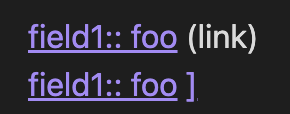
As per screenshot, the text portion of the markdown link is missing from the first markdown link example, and only a trailing square bracket is seen in the wiki-style link example.
Environment
Obsidian Version 1.8.9 (Installer 1.8.4)
macOS 15.3.2
Additional information
I understand how this might be a conflict with reference links (Support Reference Links in Edit mode/Live Preview (reference-style)) but the links are correctly formatted and there is a space between the two items.
Workaround
- Escaping the first bracket in the single square-bracketed text or field will allow the second square-bracketed item to render correctly. eg.
\\[field1:: foo] [[wikilink]] - Adding another character between the two items
There are some instances where the escape character is still rendered (unable to consistently reproduce when this happens, so not officially reporting, but leaving here as a point on record).
The workarounds are not optimal but because there is an option I understand this will deprioritise the issue (even further given first report in 2022), but it would be nice if this could be fixed, please.