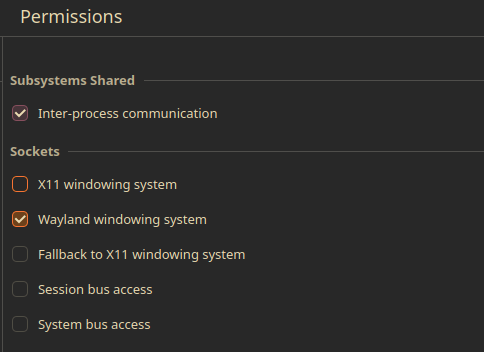
what worked for me was opening flatseal and doing the following. I don’t know if all these steps are necessary
Sockets:
[X11 windowing system] uncheck
[Wayland windowing system] check
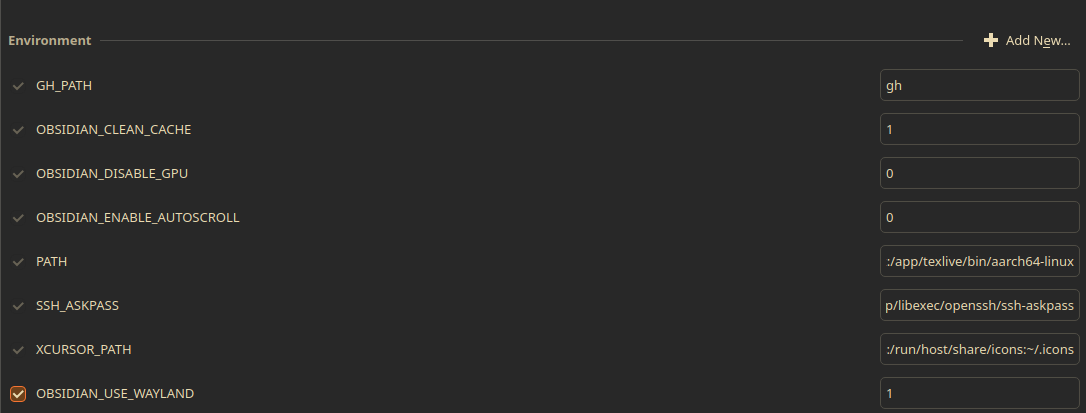
Environment:
click the “Add New” button and enter:
variable: OBSIDIAN_USE_WAYLAND
value: 1
Linux: Zoom Level / Zoom Factor / Scaling is not restored on startup (XWayland, X11) // Maximize too
I recently wrote a plugin to solve this. It manually forces the zoom factor to your preferred value, which you can configure in the plugin settings. It’s currently in the process of being reviewed so it will not appear in the community plugins, but I added instructions to build the plugin yourself for the time being.
I cannot post links here but if you search for obsidian-default-zoom-fixer on Github you’ll find the repo.
Tested on Fedora 42
No downgrade needed. Just the arguments alone solved zoom and window issues.
But how to know when I can revert to the default command-line?
I am using Obsidian 1.10.6-1 on Garuda Linux.
This gives me an error on Ubuntu 24.04.3 LTS (KDE Plasma 6) :
error: Unknown option --enable-features=UseOzonePlatform
Wat works for me, is running flatpak run --socket=wayland md.obsidian.Obsidian from Terminal…
What a mess!
Thanks for the workaround… 
GitHub - mcavallo/obsidian-default-zoom-fixer: Forces a default zoom factor at startup
Are there any plans to fix this?
People still use Xorg and electron/obsidian on wayland have their own issues too, such as not supporting global menu.
No, there aren’t.
Whitenoise suggests a workaround by forcing Obsidian to use Wayland. I am on X11 and it does not work because apparently the flags he mentions cannot magically create a Wayland session if you are logged into plasma/X11.
Mcavallo developed a plug-in that remembers the zoom level, however that plug-in is no longer in Obsidian’s plug-in repository.
I checked with ChatGPT and this works because it is platform-independent, display server-independent and Electron-independent: .markdown-preview-view, .markdown-source-view { zoom: 1.15; }– adjust the zoom level to your liking.
Obsidian 1.11.4+ Installers are bundled with Electron 39 which now defaults to native wayland.
If you are running Wayland in your system, no command line switches are now needed to run in native wayland mode.
This BR remains open for users using X11 or forcing obsidian to use Xwayland (with --ozone-platform=x11).
If you are using the community-made flatpak, you are going to have to check what it does/defaults to.
I updated the first post accordingly.
For those using the (unofficial flatpak): disabling access to X11 and enabling Wayland via flatseal fixes this issue as well
This was a problem for me on Mint X11 since last August, but sometime around October - January the issue resolved itself (sorry, I didn’t record which version fixed it).
However, the problem is back returned sometime during the last few updates (I am using the binary from the Ubuntu repository).
After reading the suggested solutions in this thread, I closed my default Mint X11 session and logged in with a Wayland session, but this wasn’t a solution and the issue remains as described: the zoom level, as set by the slider in the ‘Appearance’ menu, reverts to 100% on restarting the app.
I don’t fancy downloading a third party plugin from Github to address this, no shade on the dev team there 
I am happy to provide more details, but for now I wanted to test the water here and see if the resurgence of this issue was known about or experienced widely.
For perspective, while this bug is frustrating on my 1440p desktop PC screen and HiDPI laptop screen, the app is great and it has greatly improved many aspects of my work and leisure, where I record and cross reference information for future reference, workload planning and for learning new things, so many thanks to the devs for that.
I am not sure which problem you have, maybe it’s not the issue described in this thread.
Please, do follow my updated instructions in the first post. If you still have this problem open a separate BR and make sure you follow the template.
Thanks!
I was referring to the issue with the zoom level slider resetting to 100% each time Obsidian starts.
Reading through the above thread, I was under the impression that this had been resolved - as indeed it was, without any changes or mitigation required on my part - but this is no longer the case for me. It was fixed, but sometime over the last few Obsidian updates it started to happen again.
However, I agree that I should open a separate BR and also include more details of my specific setup. My previous message was very much an off-the-cuff thing, so I will post something more constructive when I have a spare moment.
Thanks again..