HI @lousytrybrian you can use the sum() and length() functions to get what you want.
Something like the following will get you monthly averages:
```dataview
TABLE
		sum(rows.PhonePickups) as total
	,	length(rows.PhonePickups) as count
	,	sum(rows.PhonePickups) / length(rows.PhonePickups) as avg
	,	min(rows.Date) as min
	,	max(rows.Date) as max

FROM
		"DV"
GROUP BY
		date(Date).year + "-" + date(Date).month as date
WHERE
		rows.date
```
This will return data that looks like the following:
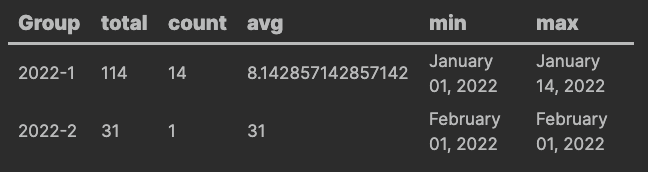
My frontmatter for each document in the grouping looks like the following:
---
PhonePickups: 1
FocusLevel: 7
Date: 2022-01-01
---
You can get weekly averages by using date(Date).weekyear in place of date(Date).weekmonth in the above example, but it’s not quite right for those dates at the beginning of the year at are part of the last week in the previous year.
Play around with the above to see if you can get what you’re looking for.