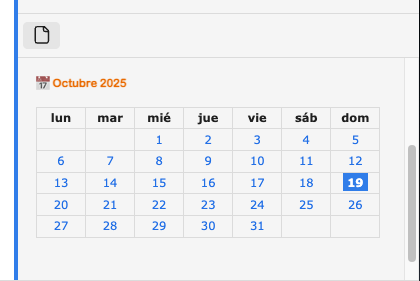
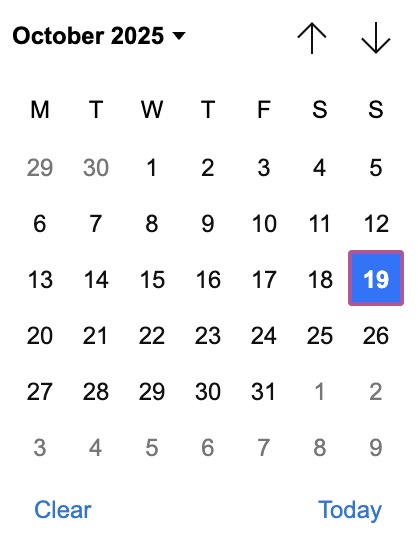
I don’t know about the possibility of directly using Obsidian’s datepicker, but I wrote time ago a dataviewjs snippet that generates a view for the current month, in form of markdown table, making each day a wikilink to the associated daily note.
This is the snippet:
async function getDailyNotesConfig() {
    try {
        const configPath = app.vault.adapter.path.join(app.vault.configDir, 'daily-notes.json');
        const configExists = await app.vault.adapter.exists(configPath);
        if (configExists) {
            const configContent = await app.vault.adapter.read(configPath);
            return JSON.parse(configContent);
        }
    } catch (e) {
        console.log('No daily notes config:', e);
    }
}

const now = new Date();
const y = now.getFullYear();
const m = now.getMonth();
const first = new Date(y, m, 1);
const last = new Date(y, m + 1, 0);
const totalDays = last.getDate();
const today = now.getDate();

const locale = navigator.language || 'en-US';
const monthName = now.toLocaleString(locale, {month:'long'});

// Create title
dv.header(2, `📅 ${monthName.charAt(0).toUpperCase() + monthName.slice(1)} ${y}`);

// Get first day of week from Moment.js locale (used by Obsidian)
const moment = window.moment;
const firstDayOfWeek = moment.localeData()._week.dow; // 0=Sunday, 1=Monday

// Generate weekdays dynamically based on locale and start day preference
const dows = [];
const baseDate = new Date(2024, 0, 7); // Jan 7, 2024 (Sunday)
for (let i = 0; i < 7; i++) {
    const dayIndex = (firstDayOfWeek + i) % 7;
    const day = new Date(2024, 0, 7 + dayIndex); // Start from Sunday and offset
    const dayName = day.toLocaleDateString(locale, { weekday: 'short' });
    dows.push(dayName);
}

// Adjust startMonIdx calculation based on first day of week setting
const rawStartMonIdx = first.getDay(); // 0=Sunday, 1=Monday, etc.
const startMonIdx = (rawStartMonIdx - firstDayOfWeek + 7) % 7;

let table = '| ' + dows.join(' | ') + ' |\n';
table += '| ' + '---:|'.repeat(7) + '\n';

// Create calendar as markdown table
getDailyNotesConfig().then(config => {
    let week = new Array(7).fill('');
    for (let i = 0; i < startMonIdx; i++) {
        week[i] = '';
    }
    let currentWeekDay = startMonIdx;
    for (let day = 1; day <= totalDays; day++) {
        const date = new Date(y, m, day);
        const dailyNotePath = window.moment(date).format(config.format || 'YYYY-MM-DD');
        const fullPath = config.folder ? config.folder + '/' + dailyNotePath : dailyNotePath;

        // Create markdown link
        let cellContent;
        if (day === today) {
            cellContent = `**[[${fullPath}\\|${day}]]**`; // Día actual en negrita
        } else {
            cellContent = `[[${fullPath}\\|${day}]]`;
        }

        week[currentWeekDay] = cellContent;
        currentWeekDay++;
        if (currentWeekDay === 7 || day === totalDays) {
            table += '| ' + week.join(' | ') + ' |\n';
            week = new Array(7).fill('');
            currentWeekDay = 0;
        }
    }

    dv.paragraph(table);
});
The table is a bit too big to put it in a side pane, but you can also use this css snippet:
.calendar-compact,
.workspace-leaf .calendar-compact,
.workspace-leaf-content .calendar-compact {
    font-size: 70% !important;
}

.calendar-compact *,
.workspace-leaf .calendar-compact *,
.workspace-leaf-content .calendar-compact * {
    font-size: inherit !important;
}

.calendar-compact th,
.calendar-compact td {
    padding: 0.3em 0.05em !important;
    text-align: center !important;
    line-height: 1.2 !important;
}

.calendar-compact a {
    text-decoration: none !important;
}

.calendar-compact strong a {
    background-color: var(--interactive-accent) !important;
    color: var(--text-on-accent) !important;
    font-weight: bold !important;
    padding: 0.2em 0.4em !important;
}
After activating the css snippet, you have tu put the property cssclasses in the note, with the value calendar-compact
This is how it looks in the side pane:
The month and week days names are automatically localized to your language. The “today” cell is highlighted.
Limitations
- It only shows the current month. It’s not possible to navigate to other months.
- Clicking in a date opens the daily note, but if the calendar is in the side pane, the daily note will be open there, which is not wanted. Use Ctrl+click (Cmd+click) to open it in the main pane.

 …
… .
.