What I’m trying to do
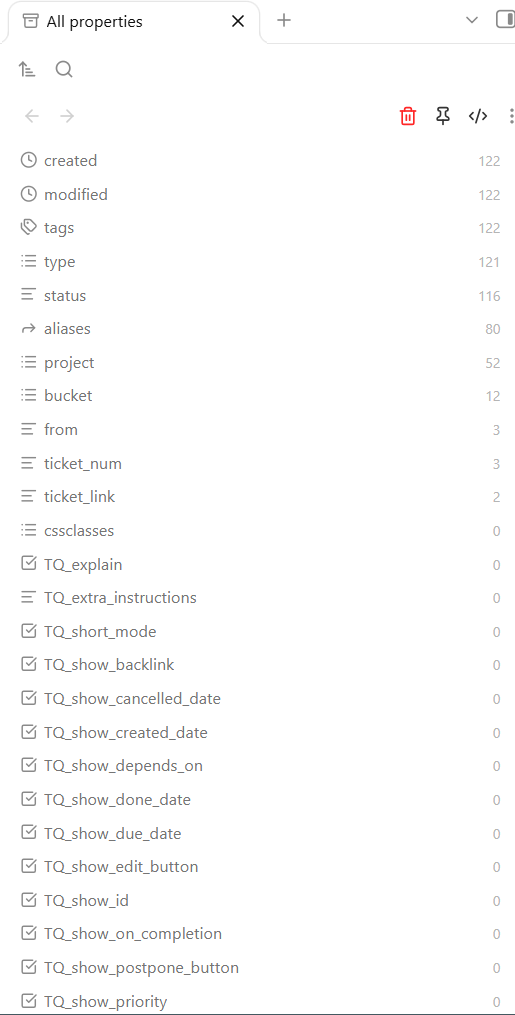
- I want to hide the automatic properties added by the Tasks plugin that begin with TQ_ in 1) the properties plugin view pane and 2) in the Obsidian new property drop-down suggester.
n.b.
- I have mainly been troubleshooting this issue on the Windows version of this vault, but the same issue exists in the Mac version of this vault.
Things I have tried
In the Forum, I searched first “css hide unused properties from properties view” and then a broader “hide unused properties”. Neither search resulted in useful results.
This is a known issue in the Tasks plugin that the devs have said they are working on. See this Github issue to see the FR to hide these properties (even better was the original FR to not add these properties at all, but that was considered a very difficult request to fill and the dev committed to putting hiding on the roadmap).
In that issue, the dev provided 3 potential workarounds:
- Revert Tasks to an earlier release that did not include the functionality that these properties support.
- I don’t want to do this, because I don’t want to lose other functionality that has been added between the suggested release to rollback the TQ_ properties change (7.14.0) and current release (8.6.0). To me, this is the option of absolute last resort.
- Use the “All properties” view to remove the TQ_ properties from the vault.
- Edit the
.obsidian/types.jsonfile to delete all theTQ_*lines.
Workarounds #2 and #3 did not work for me.
2.a. I removed the properties one by one using the properties pane many many times, and every time I reopened Obsidian, they were back in the properties pane.
3.a. I looked in /.obsidian and did not find a file called types.json. I thought, oh, there’s the problem! I added a types.json file based on examples I found in my older vaults that had the file already. I deliberately did not include the TQ_ properties in that file. I saved the file, quit and reopened Obsidian, and the TQ_ properties were still visible. When I reopened types.json, the TQ_ properties had been added automatically to that file.
3.b. So, I kept trying with types.json. After many experiments, I edited the file to what I wanted, then went into Windows File Manager and checked the value “Read-only” in the Properties menu. Now, types.json is not being overwritten (as far as I can tell). Here’s a screenshot (the day I gave up on this method).
Screenshot from today, 10/28, of the
types.jsonfile that was last modified on 10/19
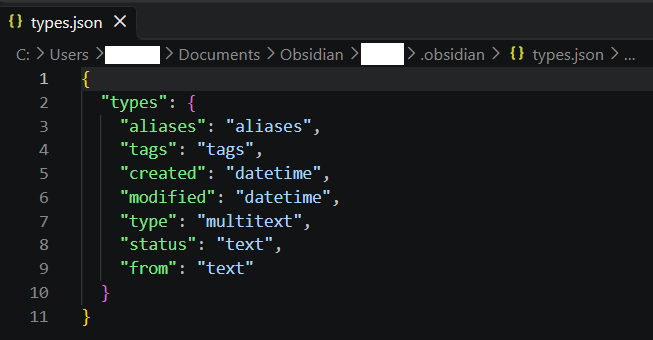
This file has not changed since 10/19 because it is read-only, but the properties still show up in the Properties view pane and in the Properties editor suggester.
Screenshot from today, 10/28, of the Properties view pane
Screenshot from today, 10/28, of the dropdown menu in the Properties view in a note
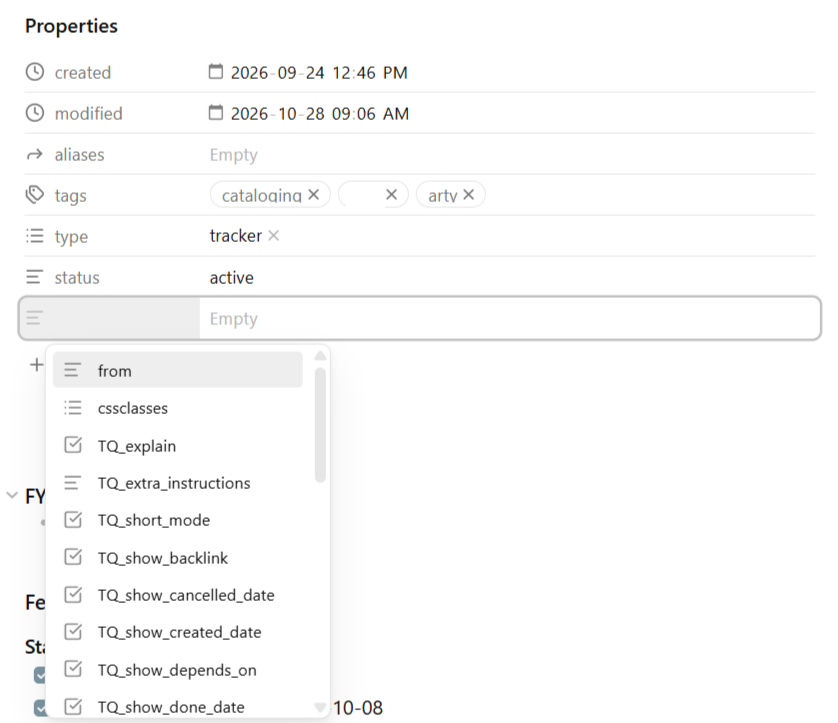
It’s annoying. I want to hide these. The properties in the dropdown prevent me from seeing my own added properties unless I scroll past literally 22 properties that I have never used. Is there CSS that can hide these properties until the dev allows those properties to be disabled in the plugin itself?
I would prefer not to download another plugin purely to hide properties. I especially do not want to download a purely “vibe-coded” plugin.
Thank you for your time and attention! I hope someone out there has some ideas because I’m fresh out!!