Aggregation view
Given the fact that a recipe repository can become quite big over time, I have written a code snippet that allows for searching a recipe based on different criteria in the frontmatter (on top of normal/static views that can be generated through a normal dataview block) rather than browse through hundreds of files. I’ll try to detail all steps of this search function that can be adapted to other types of libraries.
Note frontmatter
In the note frontmatter, i have placed a series of query terms:
---
QueryCourse:
QueryCategory:
QueryCuisine:
QueryIngredient:
QueryTheme:
QueryFavourite:
QueryRating:
---
One can search recipes by:
- course
- Category
- Collection/cuisine type
- ingredient
- theme (tag)
- whether the recipe is marked favourite (true/false argument)
- rating
Each term can accept one or several values but for the time being, it performs only a match (no greater/lower than…)!
I have then placed a button that allows to edit those parameters without going into the frontmatter:
/```button
name Search Library
type command
action MetaEdit: Run MetaEdit
id EditMetaData
/```
A textbox that allows me to see what query terms i have entered:
/```dataviewjs
dv.view("/path/to/dv-views/print_data", {toprint: [dv.current().QueryCourse, dv.current().QueryCategory, dv.current().QueryCuisine, dv.current().QueryIngredient, dv.current().QueryTheme, dv.current().QueryFavourite, dv.current().QueryRating,
dv.current().QueryAddedDate]})
/```
The textbox calls a JS snippet called ‘print_data’ that i will detail in the backend section thereafter.
And the actual search query:
/```dataviewjs
dv.view("/path/to/dv-views/query_recipe", {course: dv.current().QueryCourse, dateadded: dv.current().QueryAddedDate, category: dv.current().QueryCategory, cuisine: dv.current().QueryCuisine, ingredient: dv.current().QueryIngredient, theme: dv.current().QueryTheme, isfavourite: dv.current().QueryFavourite, rating: dv.current().QueryRating})
/```
This section calls a JS snippet called ‘query_recipe’ that i will detail in the backend section thereafter.
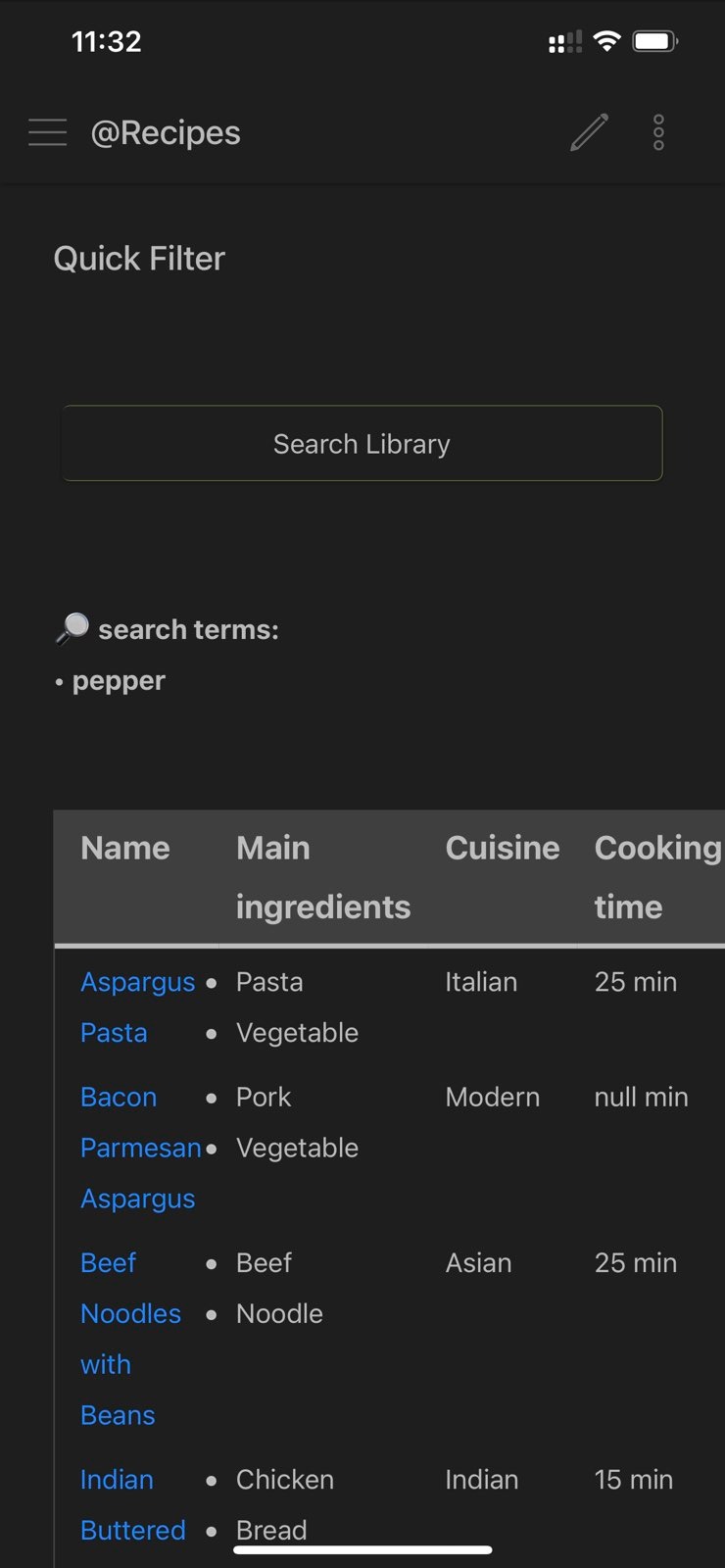
which all renders like the below:
Backend section
Print_data
This is a JS snippet file to be generated (or pasted directly into the note):
let {toprint} = input;

function BuildList(arg1, construct) {

		let ilength = arg1.length
		let TempS = ""

		for (let i = 0; i < ilength; i++) {
			if (Boolean(arg1[i])) {
				if (TempS == "") {
					TempS = arg1[i]
				} else {
					TempS = TempS + construct + arg1[i]
				}
			}
		}
		return TempS
	}

dv.el('b', "🔎 search terms: \n• " + BuildList(toprint, "\n• "));
Query_recipe
This particular section requires the CustomJS plugin. There are two parts to this: the query called from the note and the engine solving the search.
The query called from the note is to be placed in a stand-alone JS file (called query_recipe in my case):
const {recipeFunc} = customJS
const DataType = 'Recipe'
let {course, category, cuisine, ingredient, dateadded, theme, isfavourite, rating} = input;
const iArray = [course, category, cuisine, ingredient, dateadded, theme, isfavourite, rating];
const dArray = ["course", "category", "cuisine", "ingredient", "dateadded", "theme", "isfavourite", "rating"];

return recipeFunc.getTable(dv, DataType, dArray, iArray, 0)
Note that the code references ‘CustomJS’ as mentioned above, to solve the query and print a table with the results.
CustomJS needs to be set but all is explained clearly on the plugin page.
To generate the CustomJS code, just create a new JS file with the below code and the search function should work off the cuff.
class recipeFunc {
	DataCheck(arg1, arg2) {

		var iarg1 = arg1
		if (moment(iarg1).isValid()) {iarg1 = arg1.toString()}
		var iarg2 = arg2
		if (moment(iarg2).isValid()) {iarg2 = arg2.toString()}

		if (!Array.isArray(iarg2) && !Array.isArray(iarg1)) {
			var resultdc = iarg1.search(new RegExp(iarg2, "i")) > -1
		} else if (!Array.isArray(iarg1)) {
			let tempresult = false
			for (let i = 0; i < iarg2.length; i++) {
				tempresult = tempresult || iarg1.search(new RegExp(iarg2[i], "i")) > -1
			}
			var resultdc = tempresult
		} else if (!Array.isArray(iarg2)) {
			let tempresult = false
			for (let i = 0; i < iarg1.length; i++) {
				tempresult = tempresult || iarg1[i].search(new RegExp(iarg2, "i")) > -1
			}
			var resultdc = tempresult
		} else {
			let tempresult = false
			for (let i = 0; i < arg2.length; i++) {
				for (let j = 0; j < arg1.length; j++) {
					tempresult = tempresult || iarg1[j].search(new RegExp(iarg2[i], "i")) > -1
				}
			}

			var resultdc = tempresult
		}

		return resultdc
	}

	Get1stArg(arg3) {
		if (!Array.isArray(arg3)) {
			return arg3
		} else {
			return arg3[0]
		}
	}

	topLevelFilter(pobj, DocType, subType) {
		let result = true
		let folderExcl = (DocType == 'Source') ? '00.01' : '00.';

		result = !pobj.file.path.contains(folderExcl) && this.GetPoint(pobj, "main", "type") !== undefined && this.GetPoint(pobj, "main", "type") !== null && this.GetPoint(pobj, "main", "type").contains(DocType)

		return result

	}

	IsInSearch(pobj, DocType, darray, iarray) {

		let ilength = iarray.length;
		let result = true

		for (let i = 0; i < iarray.length; i++) {

			if (iarray[i] == undefined || darray[i] == undefined) {result = result && true} else {
					if (Boolean(iarray[i])) {
						let pProp = this.GetpProp(pobj, DocType, darray[i])
						if (!Boolean(pProp)) { result = result && false } else {
							result = result && this.DataCheck(pProp, iarray[i])
						}
					} else {result = result && true}
			}
		}
		return result
	}

	getTable(dv, DocType, darray, iarray, tabletype) {

//		let tablet = (darray.contains('tabletype')) ? iarray[0] : 0;

		let page = dv.pages()
		.filter(p => p && this.topLevelFilter(p, DocType, 0))
		.where(p => p && this.IsInSearch(p, DocType, darray, iarray))

		if (page.length === 0) {
			return this.EmptyQueryMessage()
		}

	dv.table(this.GetTableHeaders(DocType, tabletype), page
			.sort(p => p.file.name, `asc`)
			.map(p => this.GetTableMap(DocType, tabletype,p)));
	}

	EmptyQueryMessage() {
		return dv.el('b', '⚠️ Warning:\nNo result matching your query!')
	}

	GetTableHeaders(DataT, TableT) {

		let TempData = ["Name"]

		switch(DataT) {

			case 'Recipe':

				TempData = ["Name", "Main ingredients", "Cuisine", "Cooking time", "Rating (1-5)"]

			break;

		}

		return TempData

	}

	GetTableMap(DataT, TableT, p) {

		let TempData = [p.file.link]

		switch(DataT) {

			case 'Recipe':

				TempData = [p.file.link, this.GetPoint(p, DataT, "category"), this.GetPoint(p, DataT, "collection"), this.GetPoint(p, DataT, "cooking") + " min", this.GetPoint(p, DataT, "rating")]

			break;

		}

		return TempData

	}

	GetpProp(pobj, DocType, dPoint) {

		let result = null

		switch(dPoint) {
			case 'dateadded':
				result = this.GetPoint(pobj, "main", "date")
			break;
			case 'theme':
				result = this.GetPoint(pobj, "main", "tag")
			break;
			case 'course':
				result = this.GetPoint(pobj, DocType, "course")
			break;
			case 'category':
				result = this.GetPoint(pobj, DocType, "category")
			break;
			case 'cuisine':
				result = this.GetPoint(pobj, DocType, "collection")
			break;
			case 'ingredient':
				result = this.GetPoint(pobj, DocType, "ingredient")
			break;
			case 'isfavourite':
				result = this.GetPoint(pobj, DocType, "isfavourite")
			break;
			case 'rating':
				result = this.GetPoint(pobj, DocType, "rating")
			break;
		}
		return result
	}

	GetPoint(pobj, fstline, dPoint) {

		let result = null

		switch(fstline) {

			case 'main':

				switch(dPoint) {
					case 'alias':
						result = pobj.Alias
					break;
					case 'tag':
						result = pobj.Tag
					break;
					case 'date':
						result = pobj.Date
					break;
					case 'type':
						result = pobj.DocType
					break;
					case 'meatatable':
						result = pobj.CollapseMetaTable
					break;
				}

			break;

			case 'Recipe':

			switch(dPoint) {
				case 'course':
					result = pobj.Recipe.Courses
				break;
				case 'category':
					result = pobj.Recipe.Categories
				break;
				case 'collection':
					result = pobj.Recipe.Collections
				break;
				case 'source':
					result = pobj.Recipe.Source
				break;
				case 'preparation':
					result = pobj.Recipe.PreparationTime
				break;
				case 'cooking':
					result = pobj.Recipe.CookingTime
				break;
				case 'ingredient':
					result = pobj.Ingredients
				break;
				case 'isfavourite':
					result = pobj.Meta.IsFavourite
				break;
				case 'rating':
					result = pobj.Meta.Rating
				break;
			}

			break;

		}
		return result
	}
}