Steps to reproduce
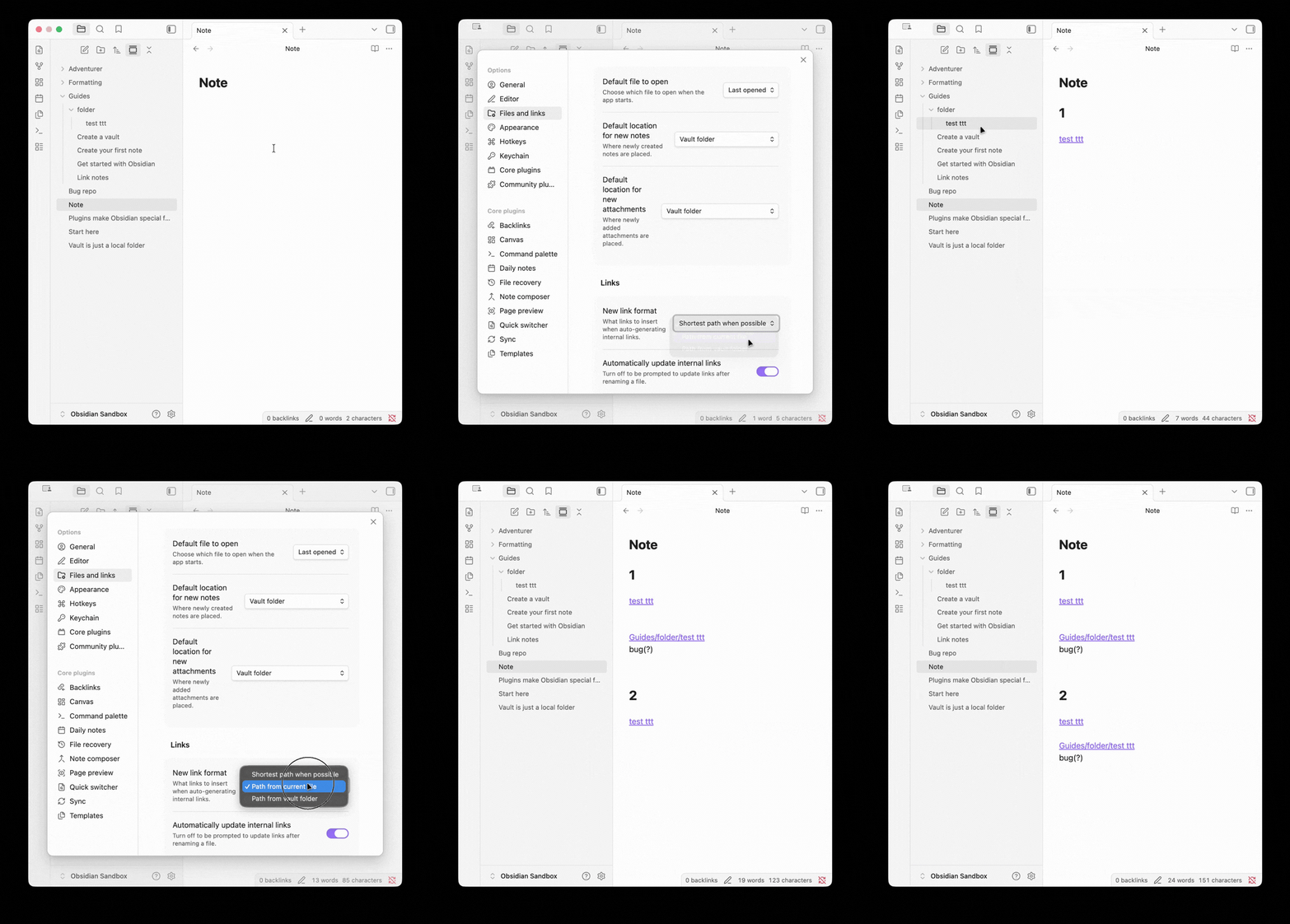
(Please refer to the GIF at the end of this report for a visual demonstration.)
-
Go to Settings > Files and links > New link format, and change it to something other than
Shortest path when possible(e.g.,path from vault folderorpath from current file). -
Open any Markdown file.
-
Drag a file from the left File Explorer and drop it into the active editor.
Did you follow the troubleshooting guide? [Y/N]
Y
Expected result
The automatically generated link should respect the New link format configured in the settings.
Actual result
The generated link ignores the New link format setting. Furthermore, the generated text only contains the file path and loses the custom name (display text).
Environment
SYSTEM INFO:
	Obsidian version: 1.12.4
	Installer version: 1.10.6
	Operating system: Darwin Kernel Version 25.3.0: Wed Jan 28 20:53:31 PST 2026; root:xnu-12377.81.4~5/RELEASE_ARM64_T8122 25.3.0
	Login status: logged in
	Language: en
	Catalyst license: insider
	Insider build toggle: on
	Live preview: on
	Base theme: adapt to system
	Community theme: none
	Snippets enabled: 0
	Restricted mode: off
	Plugins installed: 0
	Plugins enabled: 0

RECOMMENDATIONS:
	none
Additional information