Yeah google docs appears to be generating invalid HTML here
For some reason google docs wraps the entire text (not just the bold text) in <b></b> tags which doesn’t seem like valid semantic HTML.
For example in google docs I have:
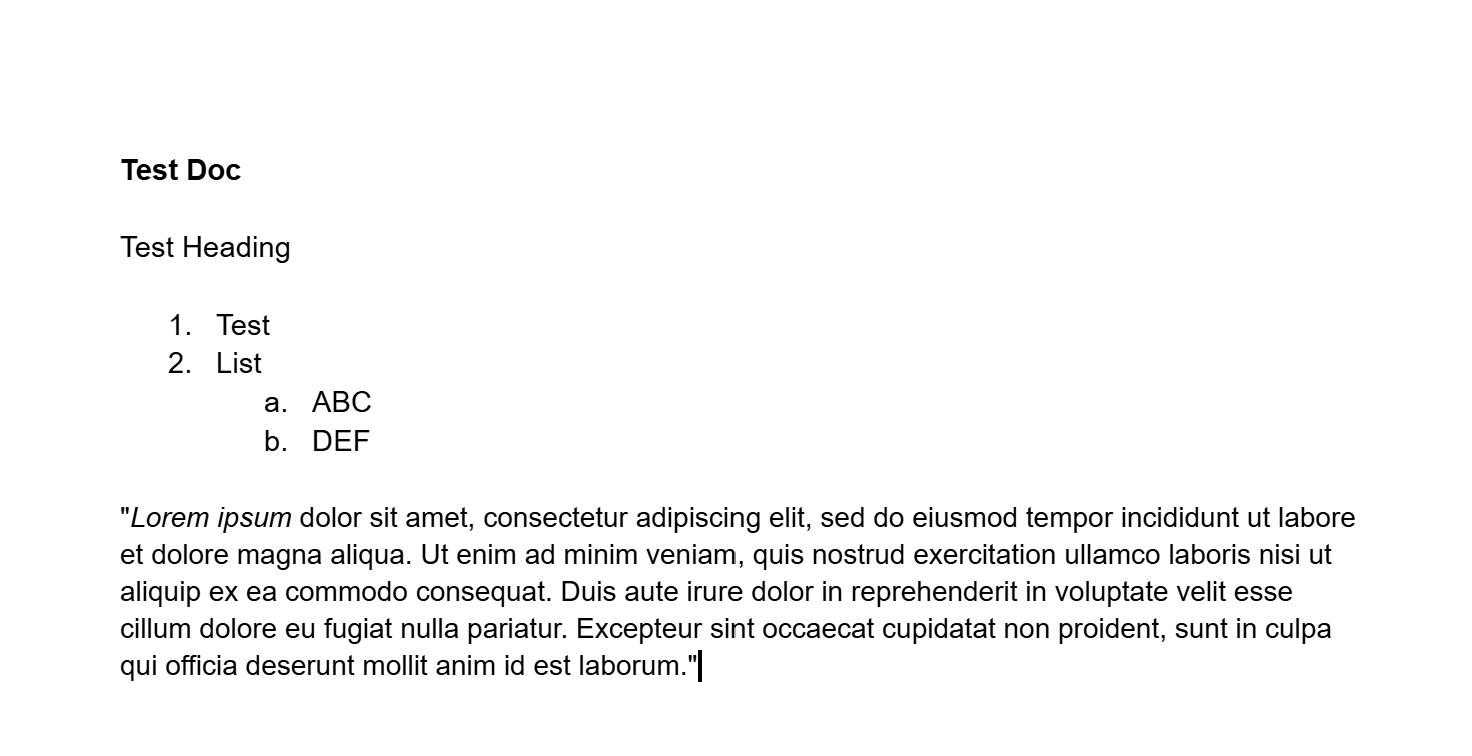
And resulting clipboard when copying is (I removed the inline css styles for clarity):
<html>
<body>
<!--StartFragment-->
<meta charset="utf-8">
<b>
<p dir="ltr">Test Doc</p>
<p dir="ltr">Test Heading</p>
<ol>
<li dir="ltr" aria-level="1">
<p dir="ltr" role="presentation">Test</p>
</li>
<li dir="ltr" aria-level="1">
<p dir="ltr" role="presentation">List</p>
</li>
<ol>
<li dir="ltr" aria-level="2">
<p dir="ltr" role="presentation">ABC</p>
</li>
<li dir="ltr" aria-level="2">
<p dir="ltr" role="presentation">DEF</p>
</li>
</ol>
</ol>
<p dir="ltr">"Lorem ipsum dolor sit amet, consectetur adipiscing elit, sed do eiusmod tempor incididunt ut labore et dolore magna aliqua. Ut enim ad minim veniam, quis nostrud exercitation ullamco laboris nisi ut aliquip ex ea commodo consequat. Duis aute irure dolor in reprehenderit in voluptate velit esse cillum dolore eu fugiat nulla pariatur. Excepteur sint occaecat cupidatat non proident, sunt in culpa qui officia deserunt mollit anim id est laborum."</p>
</b>
<!--EndFragment-->
</body>
</html>
Only one line of text is bold, so wrapping the entire HTML fragment content in <b> tags doesn’t make any sense, and turndown doesn’t know what to do with that. This doesn’t cause problems when pasting into some Rich text editors, because the inline styles will take precedence over the semantic HTML tags. It effects turndown because it ignores inline styles and relies on semantic HTML.
The HTML for the list also seems to be invalid, I get:
<ol>
  <li>Test</li>
  <li>List</li>
  <ol>  <li>ABC</li>
    <li>DEF</li>
  </ol>
</ol>
When valid HTML would be (a sub-list should be placed inside a list item (<li>) of its parent list):
<ol>
  <li>Test</li>
  <li>List
    <ol>  <li>ABC</li>
      <li>DEF</li>
    </ol>
  </li>
</ol>
So turndown also can’t convert the nested list correctly
EDIT: Google docs crazy non-standard HTML seems to be a well-known issue: Simple Copy Paste from google docs yields bold text · Issue #459 · ProseMirror/prosemirror · GitHub (prosemirror isn’t anything related to obsidian, but if you scroll to the bottom you’ll see many other projects encountering the same problem in the linked issues)
EDIT2: Found an excellent rant about this lol: Pasted stuff from Google Docs is always BOLD! WHY!? - Adam Coster