Thanks for the link! very impressive 
2 Likes
Interesting read! I shoulda been a librarian. That was my top suggested vocation based on my hs skills and interests testing.
Anyway, can you suggest good resources for controlled vocabularies?
2 Likes
Something I don’t quite understand @brimwats, what would be the difference between for example your folder “Class & UBC” that is inside your PKB and the one that is outside your PKB?
Is the one outside for files that you can’t include in your PKB in obsidian? I’m trying to understand.
Other than that, thanks a lot for your input, great post!
1 Like
@brimwats I have a similar question too. It’s my understanding that your Obsidian vault is the entire of the 000 PKB folder. Does this folder contain only notes and attachments? What about linking files outsides the PKB folder/vault?
I’ve more or less combined everything now that obsidian mobile exists and I use syncthing. Here’s my current layout:
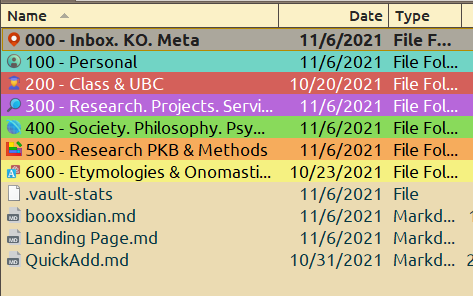
all of these folders are my obsidian vault. I’ve split out a second one for just handling the 10k notes from zotero alone because it got cluttered but I’m thinking about ways of combining them in again
Everything below the 100 level is subcategorized into 10’s and 1’s, if necessary. Each of these areas uses a slightlly different system (Cutter Classification, Johnny Decimal, etc)
For example, here is 400, using cutter classification.
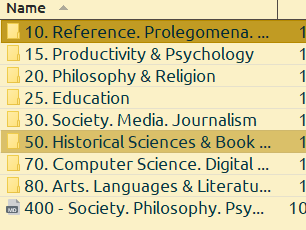
Zotero has exactly similar categorization, and that is because it makes no sense to store 5k PDFs on a mobile phone. Class&UBC on Zotero just holds PDFs that I’ve read for class.
@trubes – what sort of level of complexity are you looking for?
I might recommend
4 Likes
This is so fascinating! I was wondering if you use the same classification system for files on your computer that are not in Zotero or Obsidian? Like no matter where you look, a file on your computer, note in obsidian, article in zotero, etc that is on applied Sciences would always be found in a folder with the tag 60?
2 Likes
yep! I also use it on websites, i.e. Raindrop, Readwise
1 Like
Thanks! I really like the idea. that way no matter where you look, you know exactly where to look since everywhere uses the same system!
1 Like
Perhaps each of these folders could be a MoC instead? Then as we change, the MoC and backlinks can change too
they are! they’re Folder Note MOCs and Zootelkeeper indexes, and Landing pages  — they also incorporate supercharged links!
2 Likes
I just migrated my JD layout into Todoist as well. I think it wil work pretty well. Now to figure out how I want to use the todoist plugin and folder notes to present everything.
1 Like
Many thanks for this article. It is quite helpful as I am currently frustrated by my own indexing system. I hope to apply JD, but like so many I’m sure, the challenge of creating the areas is somewhat daunting. Cheers!
2 Likes
Hi @brimwats, just an off-topic question: ho do you color-code folders in the file explorer? Is it a css snippet or a plugin? Thx!
2 Likes
@nestorito CSS!
    /* folder colours */
	--Fold_: 					var(--bright-blue);
	--Fold0: 					rgba(189, 174, 147, 0.7);
	--Fold0File: 					rgba(189, 174, 147, 0.3);
    --Fold1:		rgba(66, 184, 164, 0.7);
    --Fold1File:		rgba(66, 184, 164, 0.5);
    --Fold2:		rgba(223, 69, 58, 0.7);
    --Fold2File:		rgba(223, 69, 58, 0.5);
    --Fold3:		rgba(216, 121, 213, 0.7);
    --Fold3File:		rgba(216, 121, 213, 0.5);
    --Fold4:		rgba(141, 111, 179, 0.7);
    --Fold4File:		rgba(141, 111, 179, 0.5);
    --Fold5:		rgba(235, 112, 46, 0.7);
    --Fold5File:		rgba(235, 112, 46, 0.5);
    --Fold6:		rgba(227, 173, 38, 0.7);
    --Fold6File:		rgba(227, 173, 38, 0.5);
	--FoldZ: 					#a9a9a9cc;
	--FoldI: 					#1976d2CC;
	--Fold7: 					#c2185bCC;
	--Fold8: 					#00796bCC;
	--Fold9: 					#388e3cCC;
	--FoldA: 					#303f9fCC;
	--FoldB: 					#afb42bCC;
	--FoldZ: 					#7c6f64;
	--FoldM: 					#4fca31cc;
	--FoldText: 				rgb(40, 40, 40);
	--FoldTextActive: white;
}
/* 000 Meta */
/* .nav-folder-title[data-path^="000"] {
    color: var(--FoldText);
    background: var(--Fold0) !important;
    border-bottom: 2px solid var(--FoldText);
}
.nav-folder-children,
.nav-file-title[data-path^="000"] {
    border-left: 2px solid var(--Fold0);
    margin-left: 3px;
}
> .nav-folder-children:hover {
    border-color: var(--dark4);
    margin-bottom: 0;
}
> .nav-file-title {
    background-color: var(--Fold0File);
} */


/* 000 Meta */
.nav-folder-title[data-path^="000"] {
    color: var(--FoldText);
    background: var(--Fold0) !important;
    border-bottom: 2px solid var(--Fold0);
}

.nav-folder-title[data-path^="000"] + .nav-folder-children > .nav-file  {
background-color: var(--Fold0File);
}

.nav-folder-title[data-path^="000"],
.nav-folder-title[data-path^="000"] + .nav-folder-children,
.nav-file-title[data-path^="000"] {
    border-left: 2px solid var(--Fold0);
    margin-left: 3px;
    color: var(--FoldText);
}

/* 100 Personal */
.nav-folder-title[data-path^="100"] {
    color: var(--FoldText);
    background: var(--Fold1) !important;
    border-bottom: 2px solid var(--Fold1);
}

.nav-folder-title[data-path^="100"] + .nav-folder-children > .nav-file  {
background-color: var(--Fold1File);
}

.nav-folder-title[data-path^="100"],
.nav-folder-title[data-path^="100"] + .nav-folder-children,
.nav-file-title[data-path^="100"] {
    border-left: 2px solid var(--Fold1);
    margin-left: 3px;
    color: var(--FoldText);
}

/* 200 Work */
.nav-folder-title[data-path^="200"] {
    color: var(--FoldText);
    background: var(--Fold2) !important;
    border-bottom: 2px solid var(--Fold2);
}

.nav-folder-title[data-path^="200"] + .nav-folder-children > .nav-file  {
background-color: var(--Fold2File);
}

.nav-folder-title[data-path^="200"],
.nav-folder-title[data-path^="200"] + .nav-folder-children,
.nav-file-title[data-path^="200"] {
    border-left: 2px solid var(--Fold2);
    margin-left: 3px;
    color: var(--FoldText);
}


/* 300 Research */
.nav-folder-title[data-path^="300"] {
    color: var(--FoldText);
    background: var(--Fold3) !important;
    border-bottom: 2px solid var(--Fold3);
}

.nav-folder-title[data-path^="300"] + .nav-folder-children > .nav-file  {
background-color: var(--Fold3File);
}

.nav-folder-title[data-path^="300"],
.nav-folder-title[data-path^="300"] + .nav-folder-children,
.nav-file-title[data-path^="300"] {
    border-left: 2px solid var(--Fold3);
    margin-left: 3px;
    color: var(--FoldText);
}

/* 400 Society */
.nav-folder-title[data-path^="400"] {
    color: var(--FoldText);
    background: var(--Fold4) !important;
    border-bottom: 2px solid var(--Fold4);
}

.nav-folder-title[data-path^="400"] + .nav-folder-children > .nav-file  {
background-color: var(--Fold4File);
}

.nav-folder-title[data-path^="400"],
.nav-folder-title[data-path^="400"] + .nav-folder-children,
.nav-file-title[data-path^="400"] {
    border-left: 2px solid var(--Fold4);
    margin-left: 3px;
    color: var(--FoldText);
}

/* 500 Research PKB */
.nav-folder-title[data-path^="500"] {
    color: var(--FoldText);
    background: var(--Fold5) !important;
    border-bottom: 2px solid var(--Fold5);
}

.nav-folder-title[data-path^="500"] + .nav-folder-children > .nav-file  {
background-color: var(--Fold5File);
}

.nav-folder-title[data-path^="500"],
.nav-folder-title[data-path^="500"] + .nav-folder-children,
.nav-file-title[data-path^="500"] {
    border-left: 2px solid var(--Fold5);
    margin-left: 3px;
    color: var(--FoldText);
}

/* 600 Etymologies & Onomastics */
.nav-folder-title[data-path^="600"] {
    color: var(--FoldText);
    background: var(--Fold6) !important;
    border-bottom: 2px solid var(--Fold6);
}

.nav-folder-title[data-path^="600"] + .nav-folder-children > .nav-file  {
background-color: var(--Fold6File);
}

.nav-folder-title[data-path^="600"],
.nav-folder-title[data-path^="600"] + .nav-folder-children,
.nav-file-title[data-path^="600"] {
    border-left: 2px solid var(--Fold6);
    margin-left: 3px;
    color: var(--FoldText);
}

body:not(.is-grabbing) .nav-file-title.is-active:hover, body:not(.is-grabbing) .nav-folder-title.is-active:hover, .nav-file-title.is-active, .nav-folder-title.is-active {
    color: var(--FoldTextActive);
}
3 Likes
@brimwats — first comment on this post, even though I have re-read and referenced the main post multiple times, after you put me onto the path of obsessively learning about knowledge organization, and so on. Thanks for adding another item into my obsessions, Bri. 
Just today (2023-02-18), reading again on Dewey Decimal on Wikipedia. I came to be aware of classification based on discipline vs. on subject/phenomenon. Oh my gosh, mind blown again. Familiar with these but never thought of making the differentiation!!
Now back to my obsession to learn and think about phenomena v discipline as I continue working on my taxonomy. 
3 Likes
For some reason, I never read about Dewey Decimal on Wikipedia. I always just went to https://johnnydecimal.com/ Mindblowing! I’ll work on my taxonomy 
2 Likes
Jus to be clear—I was not promoting Dewey Decimal system per se. It has its biases and problems (Bri et al. I believe have mentioned them in their posts above.) And there are systems that have (tried to) improve upon it or reworked altogether. Including the Universal Decimal Classification system. Now, I’m looking at Integrative Levels Classification which seems to be a more recent and perhaps somewhat more experimental kind of classification system.
Anyway, what a rabbit hole!
3 Likes
Well, people do dedicate their lives to the study of knowledge organization! I hope I won’t have to, thanks to their work…
Thanks for pointing that out; I haven’t heard of Integrative Levels Classification, and I don’t have that much stuff to organize in files as of now, anyway. Still… checking new horizons now and then to see what can be improved.
1 Like
After a few years with Obsidian, I’m now feeling brave enough to think about this topic.
@brimwats, thank you so much for preparing this incredibly detailed and helpful overview. In my own effort to understand these topics, I have also encountered the “INTERNATIONAL STANDARD CLASSIFICATION OF EDUCATION” from Unesco.
I’m hoping to get your thoughts on this and how it may fit in with what you describe here.
Thanks!
1 Like