+1 to a simple CTRL/CMD+F to search the current base output. I don’t need additional filtering or complexity, just a simple search of the current screen that works in the same way as it would in a standard markdown file.
If I have bases generate a list of projects and my boss asks about a specific one, I don’t want to go editing and messing up my base filters, I simply want to quickly find that project within the list so I can click on it.
Shocked that you can’t search the output of a Base with ctrl/cmd+f.
Filtration via the “Filter” control changes the contents in the Base code block. This is especially bad in a git controlled Vault, or a Vault being used by multiple people. The standard search control in Obsidian should be able to search a Base that is currently rendered, even if part of the Base is off-screen.
I feel like this should be on top of the bases roadmap. Not being able to search in all view fields is extremely limiting. Love the bases feature, and hope this will be released. It’s making working with large views very hard.
I’ve created a technique for implementing such “toggle-able filters”. It’s a bit clumsy, but I offer it here for what it’s worth.
Example:
Suppose some of the notes we want to examine are work-related. When we’re not on work time, we want those notes removed from view.
Here’s how we do it:
On each work-related note, add the checkbox property work-related.
Prepare a note in which the base will be embedded, with the checkbox property show work-related.
Add the following filter group to the base, ANDed with any other filters or filter groups:
3.0. Any of the following are true:
3.1. where !this.hasProperty("show work-related")
3.2. or this["show work-related"] == true
3.3. note["work-related"] != true
I can then toggle the showing of all work-related notes by checking or unchecking the show work-related property on the page embedding the base.
There is a drawback to this technique: The display does not always update appropriately as the 'show-` properties are changed. When that happens, though, closing the app and reopening it solves the problem.
Common md documents in Obsidian can quickly find words or sentences by searching through Hotkey Ctrl + F.
However, Obsidian Base does not support these Hotkeys.
Proposed solution
It’s not about searching the entire Obsidian Vault, it’s about searching inside the Obsidian Base document
It would be nice to have the same function as Filter, but it can be done quickly with Hotkey and apply these search conditions to Base if necessary.
1.Ctrl+F Hotkey would be nice to allow Filter Search to be turned on right away and to set up whether or not to keep these filters in Base.
2.Filter presets can be saved
It would be nice to minimize the procedure of manually entering conditions into the filter so that the filter can be changed with a few clicks.
A bit more simplified workaround I ended up using:
create a filter in a view: formula.name.toString().lower().containsAny("")
write your search between "" in containsAny("")
when you done with the search, replace your search with "" in containsAny("")
Here formula.name is a custom property of type formula I used in a view, it can be any property you might want to search for, e.g. file.basename. It’s convenient because you don’t have to lookup this formula each time you want to search; and it does not create a separate column in a view; it’s always present once it’s added. It works because when containsAny("") is set to an empty string it’s effectively like turning off that filter.
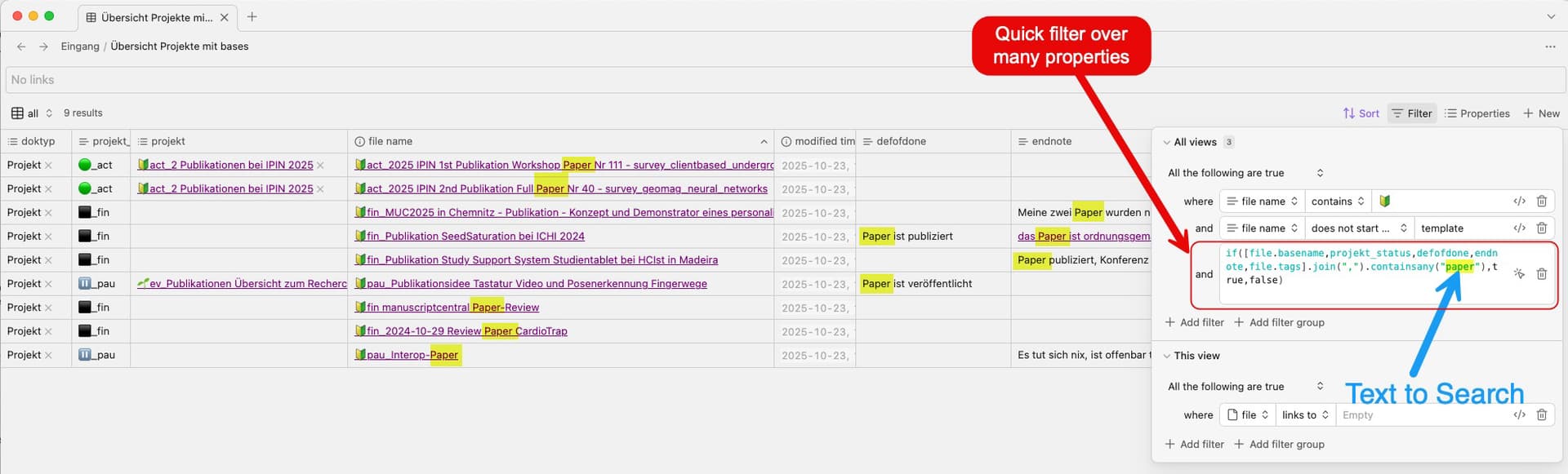
Here’s a solution for filtering across many columns without needing a custom property:
Create an Advanced Filter and paste the following code (example with my properties projekt, ProjektStatus, definintionOfDone).
Remember to replace my property names in the example with the ones used in your own base:
This builds a list of all the properties you want to search through. The join(“,”) method concatenates them into one long (invisible) string, and containsany() simply checks whether the given search string is found anywhere within that combined text.
You can also include your tags in the search by simply adding file.tags to the list, as shown in the example — they will be joined into the same string and searched together with all other properties.
To disable the filter, enter an empty string in containsany("")
To search for any text across all columns, enter the desired text: containsany("StringToSearch")
This approach works well when you need a quick, global search across multiple properties in a base—without having to define extra custom properties.
You only need to enter the search string once — it will automatically be matched against all specified properties in the list.
Screenshot of my filter:
(In the screenshot, I highlighted the search term for better visualization — in reality, it won’t be highlighted inside the actual filter.)
Currently Bases Filter functionality is mainly developed for ‘set views’ where users set a particular filter and embed it somewhere.
Live filtering as it’s done in Datacore or in Querydash plugin is very imporant for searching or selection of music, etc.
Filter terms would relate to all currently set “main filter” properties or better, allow boxes or columns for particular properties to filter by (as in Querydash).
When exploring a Base view, I often need to quickly filter by a property (for example: type of note).
Currently, the only way to do this is to create an additional view with a more specific filter. This multiplies views unnecessarily, especially when the filter is temporary.
I need a way to filter dynamically inside the existing Base view, without creating new saved views.
Proposed solution
Introduce Excel-style filtering directly in Base:
Clicking on a column header in a Base view should show all distinct values available for that property.
Users can select one or multiple values.
The Base view updates instantly and temporarily, without saving a new view.
The filter can be cleared at any time.
This would allow quick, exploratory filtering while keeping the Base interface clean.
Current workaround (optional)
Creating additional Base views with predefined filters.
This works but becomes cluttered and is not suited for quick, temporary filtering.
Related feature requests (optional)
None found so far, but this request conceptually overlaps with any feature aiming to improve interactive filtering in Base.
This has become more and more essential as my bases usage has grown. I just need a quick search on the page, without having to edit the filters every time.
Just stumbled upon this as I needed the same functionality. I combined the above query with a property on the page itself.
Property is called “Search”
Filter is if([file.basename,file.tags,Category].join(“,”).containsany(this.Search + “”),true,false)
If you type a query in the search property it will filter bases on filename, tags or Category (this is a property I created, adjust as needed)
Then when you’re done remove your search query. Admittedly this is only really useful if your base is near the top of the page, otherwise scrolling would be a pain