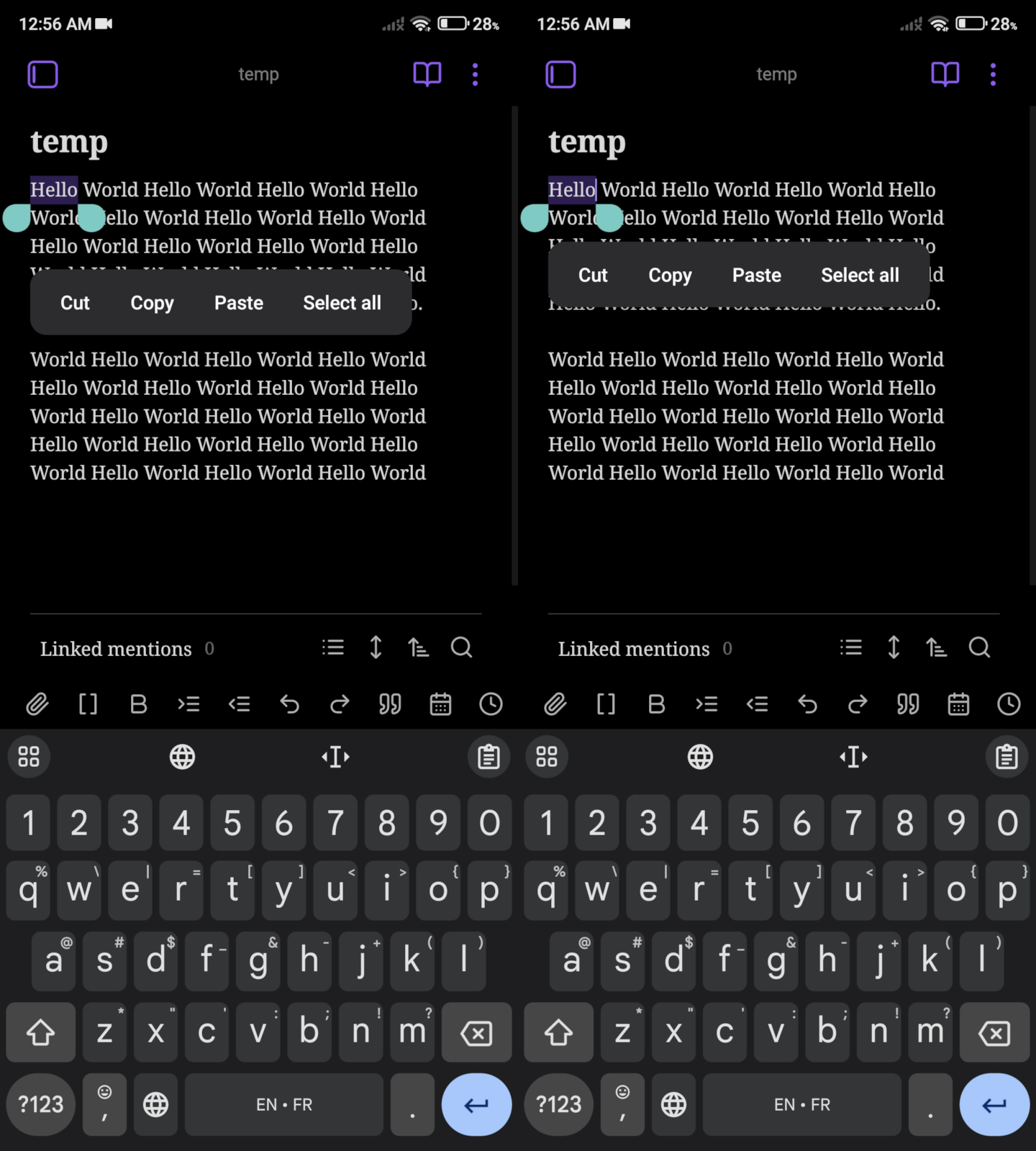
This issue is not solved: [BUG] Selection handles not appearing on mobile
I’m having the exact same issue in v1.6.7.
This issue is not solved: [BUG] Selection handles not appearing on mobile
I’m having the exact same issue in v1.6.7.
I can’t reproduce.
Please open a new bug report and make sure you read and follow the template. Thanks.
Are there people still affected by this problem?
Which phone do you have? Make and model and OS version.
Do you know which Android WebView version you have installed? can you updated it from the google play store?
I’m on Xiaomi Mi A2, Android 10 with Obsidian 1.8.10 and experienced this bug. Webview 135.0.7049.111.
A related issue that I encountered is that it’s not possible to place the end handle at the start of a line; it will always jump to the end of the previous line. Please let me know if a separate ticket is desired.
I was able to reproduce the issue of placement of the end handle in the Chrome web browser at an html document. Since whitespace is not meaningful in html I can believe it’s not possible to add a newline to the selection.
I found that Obsidian has source mode as well, and I was able to include a terminating newline in a selection using it.
A remaining point of confusion is that the end handle still appears at the end of the preceding line.
For me, Obsidian is hardly usable on Android. I have a Samsung S24.
Here are the reasons:
When I select text, the markers jump back and forth – it’s almost impossible to select a longer piece of text.
Furthermore, Android context commands never appear.
When I select the first word at the beginning of the text on the left, it opens the left side menu of Obsidian every time.
The keyboard always covers the bottom line of text, which bothers me the most.
When I type text, words are often simply swallowed or typed letters disappear, or words are suddenly joined together. This behavior has nothing to do with Android, because it only happens in Obsidian.
I use a different app on my phone to quickly type texts and edit the details on my PC. When I use Obsidian on my phone, it always takes me forever.
Made an account just to say I’m experiencing all of these issues on my OnePlus 13R. I’ve tried different plugins and no plugins, as well as various themes. I use Obsidian Sync for creative writing when I’m not at my desk. Android/Windows.
Say I write a chapter of a story and want to copy paste it.
If I use select all from context at the top of a long document, it will not work the majority of the time.
Select all from the bottom of the document (after I scroll through the entire thing) does work a majority of the time. Feels as if the text must be loaded first?
Dragging the select handles from either the top or the bottom of a long document, let’s say 1k+ words, makes the select handles and the context menu disappear after about 3-5 paragraphs. 100% reproducible. There is no way to bring them back save for canceling the selection and starting over. On my phone, it is outright impossible to select an entire long document this way as the handles and menu will always disappear.
Double tapping to select a single word in a paragraph to change or delete the word deletes previous text as well, maybe 1-3 words before the selected word or perhaps a certain number of characters. This is the jumbled/garbled words issue. Reproducible a vast majority of the time on my phone. Seems to disappear immediately after having the issue but reappear a short time later, perhaps related to switching documents or the above mentioned text loading. I’m a writer. I change words constantly. The only fix I’ve found is to tap the undo button almost every single time to revert Obsidian’s over-zealous deletion/edit, then repeat the selection. The second edit never produces the bug.
If I had an alternative to Obsidian Sync for easy swapping between Windows and Android, I would use it. I’ve yet to find one, so right now I’m stuck either dealing with them or using google docs, which I don’t much enjoy. I prefer Obsidian (when it works). These issues are so easily reproducible I’m inclined to believe it’s a hardware or android problem if they can’t be reproduced in a test environment, but as of now, they only happen when I use Obsidian.
This bug also occurs in AnkiDroid and the Livio apps, so it’s probably a Chrome issue as pieterjanv pointed above.
Easily reproducible by long pressing on the first word then dragging the handles.
(Annoying forum limitations…)
Here’s AnkiDroid’s debug info if it helps:
AnkiDroid Version = 2.23.1 (3f3133b496b531383e9a6494f5a7704634935308)
Backend Version = 0.1.62-anki25.09.2 (25.09.2 3890e12c9e48c028c3f12aa58cb64bd9f8895e30)
Android Version = 13 (SDK 33)
ProductFlavor = full
Device Info = Xiaomi | POCO | mondrian | mondrian_global | 23013PC75G | qcom
Webview User Agent = Mozilla/5.0 (Linux; Android 13; 23013PC75G Build/TKQ1.220905.001; wv) AppleWebKit/537.36 (KHTML, like Gecko) Version/4.0 Chrome/143.0.7499.115 Mobile Safari/537.36
ACRA UUID = 4afc3b3f-e93f-4a66-bc71-2b9476ef9eb0
FSRS = 5.1.0 (Enabled: true)
Crash Reports Enabled = true
I just noticed that the popup appears lower when double tapping vs when pressing & holding:
Pressing → holding → dragging, seems to make the popup appear lower too.
Made account to come here and say that I’m having a lot of trouble trying to select text on Android in editing or source mode. For some reason the problem goes away in reading mode.
The text handles sometimes don’t appear, sometimes appear but are super hard to move, show and erratic. Select all doesn’t select all.
Same on Samsung A54. I cannot say if the recent One UI update changed anything, I’m a recent user on Android.
1) The problem:
I can only select a few lines of text, and then I need to scroll, and find the handle again to extend the selection. (Meaning: I can’t select and drag the selection box on a full long text).
I got used to it, but it comes with bugs: the handles disappearing randomly.
2) How do I manage to solve the bugs in the meantime:
Config info: I have no plugins and tried with the default theme.
3) My current workaround for better productivity:
If I need to select long texts, I use another app that opens markdown files. The handles allow to select the full paragraphs by a single drag, which Obsidian doesn’t allow on my device yet.
With that said, Obsidian is the best note-taking app I’ve used in years on computer, and I’m happy to use on Android too.
Often the Copy section plugin has helped me, not to select but to copy big sections that would be painful to select manually.
Thank you very much!! It helps a lot (and it’s even customizable!).
Another lifesaver worth trying.
Very useful, thanks!!
This has never worked well for me across multiple Pixels for as many years as I’ve used Obsidian mobile. I just thought that’s how the app is so I didn’t think to lodge an issue post. I’m currently on a Pixel 9. It’s the same as everyone else says: very difficult to drag and select long sections (as you can in most apps) and the drag handles disappear. The action buttons (copy, paste) disappear as well although they sometimes come back if you tap the selected text - although in normal Android behavior this will UNselect the text, so it isn’t very intuitive.
I wonder @WhiteNoise are you attempting to reproduce in a virtual Android environment? Maybe it’s different on the actual devices. No idea!
this thread is the result of a merge from different older threads (hence why say multiple times I can’t reproduce). We can reproduce.
It seems that on some devices the issue is more prominent than others.