Add support for link types

There is already a syntax that is used to add properties to links that is used for image width or link to a PDF specific page, so it could also be used for key-value associated with a link. I prefer a key-value system because not everyone will be interrested by colors or weights or a limited set of relation kind, I feel it’s important to offer flexibility there for people to have their own attribute.

Yes, exactly. A generic key-value system would be great. Further above in this thread, I’ve advocated an inline syntax that supports multiple type elements per link (delimited by double colons) as well as key:value elements, e.g.:

[[based on::extends::LINK_ID]]
[[evidenced by::weight:10::LINK_ID]]

Here’s an example screenshot to further illustrate this (the link type colors come from a global definition to avoid repetition within the notes):

20231128-Keypoints-01-LinkTypes

1 Like

@bojangles - this resonates and it only took 178 responses for me to get here :slight_smile:

In today’s parlance considering our upcoming database future, each link:

  • is an object (just like a note)
  • has properties (hopefully, just like a note)
  • has inheritance (a parent note and its properties)
  • has offspring (anywhere it is instantiated)
  • is unique at each instantiation - so it has it’s own context ( @bojangles template )
  • has time properties - created, modified (will they be static or dynamic?)
  • has place properties - where created - a note in either a local vault or a published place
  • has “who and how” properties - me or code creating or modifying it and by what manner and UI gesture
  • can be reusable - a templated link, if you will

We have at least four players (objects) in the linking game: note, link, offspring, and place. Each has it’s own set of properties.

The game starts with creating a link in a local vault (instantiation). What would that UI gesture look like?

2 Likes

New-timer to this discussion, though I relate to your concerns. Perhaps this will help to disambiguate that which is not inherently ambiguous, reveal that which is extant in each note, etc. and ease your saltiness!
GraphLinkTypeDemo

Share & Showcase Thread
Github Link

I’ve been working on this - let me know what y’all think!

4 Likes

I followed the link but it seems to only affect the visual representation in the node graph. I for one don’t use that graph at all. I really want the note model itself used by obsidian to associate links with an optional type/attributes, so that those can used in queries, in search, or any other plugin via the obsidian API.

Even if a plugin were to implement all those features, it would still not live in the core and so other plugins won’t be able to use those informations. So unless it makes its way into the core, it will belong to the realm of metadatas.

1 Like

Yeah, I get what you mean - it would be awesome if they were to implement them into the core.

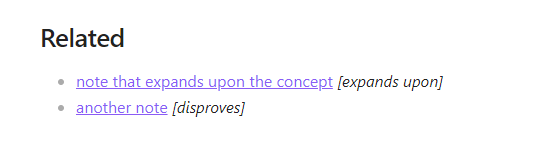
For anyone looking for anything resembling the OP idea - that is, naming relationships between notes, here’s a dataviewJS script that does something resembling that.

It lists all notes that link to this note, while also stating their relationship.

var list = dv.pages('[[]]').sort(p => p.file.path, 'desc').map(p => p.file.link + " _" + p.file.outlinks.filter(
	outlink => outlink.path == dv.current().file.path
).map(link => dv.func.default(link.subpath, 'no annotation')) + "_")

dv.header(2, "Related")
dv.list(list)

To use this feature, link your notes like this:
[[note#your-relationship]]

For example:
[[concept#disproves]]

P.S I do not think I have to explain that it overrides the standard use-case of using # as linking to specific headers in a note. It’s a sacrifice I’m willing to make for myself at least.

1 Like

How to Make Personal Knowledge Graph in Obsidian | by Volodymyr Pavlyshyn | Medium now it is possible with graph type links plugin

2 Likes

@vop super interesting graph view!, an excellent example of how link types can improve the general experience.

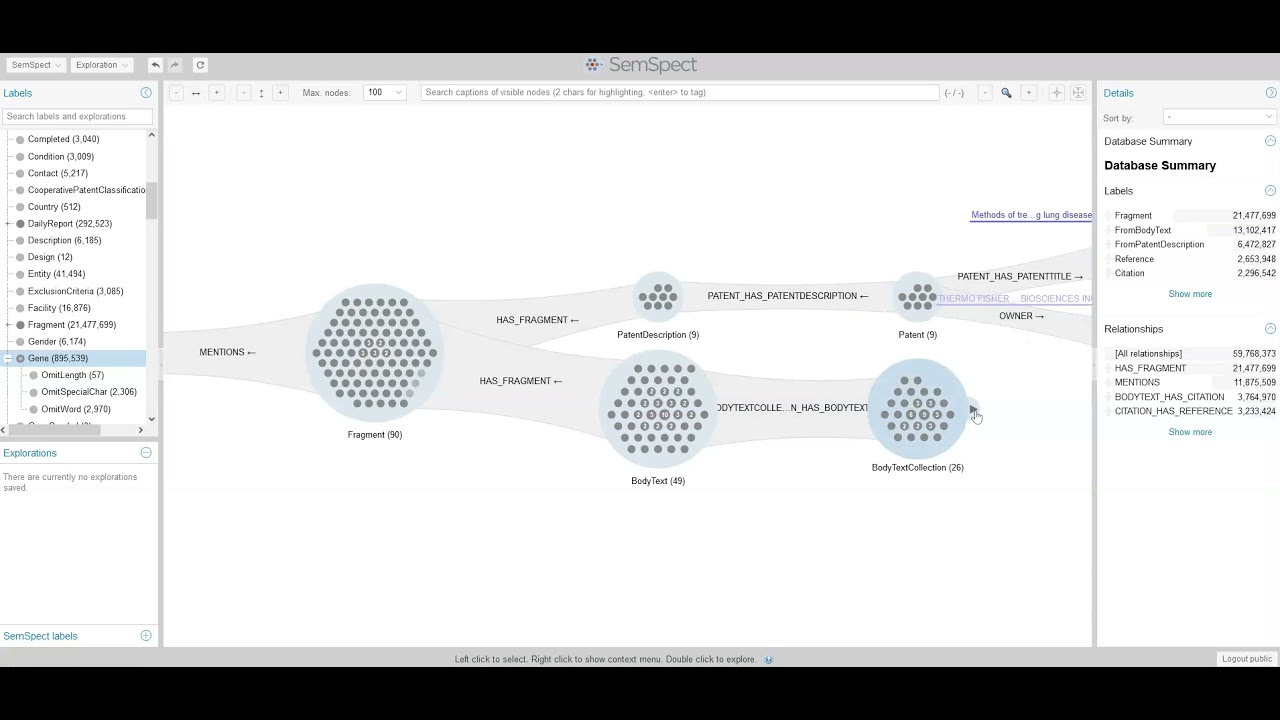
As food for thought or inspiration for a plugin, I leave this video about graph exploration:

It makes use of link-types. For example, a link type that describes a Category, shows concepts on the left, and so on..

1 Like

I’d love to have at least basic link typing, just a way to make a note point toward another as parent or as child, this would greatly simplifies the note taking process.

Hello. Just bumping because this is the absolute most important feature that would change my life if implemented into core.
And I have been wishing for this since I started using Obsidian in early 2023 (I just don’t use the forums here - I just also visited the forums just to write this).
1 Like

Without “filter by link type”, Obsidian is unusable.

All that’s needed is for the “Graph Link Types” extinction to implement “filter by link type” functionality somehow.

Ideally, Obsidian should have had this feature natively from day one. Without this, the graph-view is just a fancy scam designed by people who in no wise actually mind-map their thoughts.

2 Likes

Obsidian is not a mind-mapping software. This isn’t to say this feature request itself is doomed in the long run, but it does mean your outrage and feeling scammed is absurd. Even if this is implemented, it will not become a mind-mapping software. It will still be a note-taking app with easy linking, but with some nifty features to present those links in the graph.

1 Like

As I understand it, that’s exactly @christ-is-real’s point: Obsidian is no mind-map software and a simple graph view as it is currently implemented makes the graph view less useful and more like a mind-map tool (but with notes instead of thoughts). At least, there is the linking direction. But a logical connection between notes would make it much more useful semantically. I understand that this would diverge from the markdown standard but one could think of an additional semantification of links in the metadata (aka »properties«).

4 Likes

I’ve been implementing my own graph-link solution that uses inline dataview tags. Then you can query these from a dataview perspective to see the structured metadata/properties for each incoming edge/link. Granted, this doesn’t integrate with the graph view at all.

1 Like

Hey everyone, new user here (so please be nice)! I’d also love to see this feature.

Here’s my use case: I’m learning a new language, and I was looking for a tool to help me organize new words I come across so I could learn them more easily.

There’s various properties I want to record for each word (such as different forms), but also related words (think “to sing” → “song”, “voice”, “music”, …) and (crucially) meta-information such as word class, inflectional paradigm and so on.

For related words, “plain” links are fine, but for meta-information I’d like typed links.

(BTW: some of you might say “Obsidian is not intended for this”. If so, fair enough; I’m open for alternate suggestions. That said I also don’t believe in overly narrow pre-conceived ideas of what a tool should be.)

Thanks, @vop! That’s perfect!

Wouldn’t the most elegant, simple and yet functional solution be for Obsidian to automatically derive relationship names from property keys?

Let’s say we have four notes with the following properties:

Note Property key Property value
Fruits child [[Apples]], [[Oranges]]
related [[Vegetables]]
Apples sibling [[Oranges]]
parent [[Fruits]]
Oranges sibling [[Apples]]
parent [[Fruits]]
Vegetables - -

In a local graph view, they would show up as:

If implemented, this could supercharge everyone’s Graph view while requiring zero setup or retroactive organization!

I’m not sure whether this was voiced here already—you can’t expect one to read 194 responses :sweat_smile:

Seems like this would be fairly easy to implement while being disproportionately useful!

I’m very hesitant to rely on a third-party solution for something so fundamental.


I understand that, in my example, showing both the parent and child relationship is redundant: a single relationship would suffice. But this would require for Obsidian to understand what a family structure is. So that if, let’s say, I insert in [[Oranges]] a parent property set to [[Fruits]], there would automatically appear a child property in [[Fruits]] set to [[Oranges]]. But this is a topic for another request:

4 Likes

DeepSeek summary of the main ideas and workarounds shared in this thread:

TLDR

(Ranked by community sentiment and practicality, best → worst)

Core Ideas Proposed

  1. Syntax Extensions

    • [[TargetNote::RelationshipType]] (e.g., [[Germany::capital_of]])
    • Most intuitive, aligns with existing aliases/headings syntax.
    • Allows inline use + autocomplete; minimal friction.
  2. Graph View Enhancements

    • Edge labels on hover, color-coding, and directional arrows.
    • Solves core visualization pain points without syntax changes.
  3. YAML Frontmatter Integration

    parent: [[ParentNote]]
    supports: [[NoteA]]
    
    • Centralized metadata; avoids “markdown pollution.”
    • Limited to note-level relationships (not inline).
  4. Semantic Triples (RDF-style)

    • Subject--Predicate->Object embedded in notes (e.g., << [[Alice]] married_to [[Bob]] >>).
    • Powerful for reasoning but complex and non-standard.
  5. Link Notes as Entities

    • Dedicated notes describing relationships (e.g., “Marriage.md” linking spouses).
    • Creates intermediary nodes that clutter the graph.

Available workarounds

  1. Breadcrumbs + Juggl

    • Define hierarchies (parent/child) and style graph edges.
    • Most feature-complete solution today.
  2. Dataview Inline Properties

    • key:: value syntax (e.g., supports:: [[Note]]).
    • Queryable but not natively visualized.
  3. Conventions & Hacks

    • Filename prefixes: @friend_John.md.
    • Emoji links: [[Note🟢]] (“approved”).
    • Low-tech but portable and immediate.
  4. External Tools

    • Export to Neo4j/GraphViz for advanced graphs.
    • Fragments workflow; not integrated.
  5. Embedded Syntax Tricks

    • Headings as context: ### Causes → [[Note]].
    • Fragile and not standardized.
2 Likes

+1
It’s always these small things that are missing in obsidian. i end up needing 30 plugin even though i should only need 3

1 Like