Use case or problem
I mostly use notes as a checklist, and it’d be nice if there was a quick shortcut for it in the right-click menu rather than having to type out & copy/paste the checkbox markdown every time.
Proposed solution
Adding a “New checklist” shortcut below the “New note” one in the right-click menu.
Current workaround (optional)
Manually doing it each time, which is a bit annoying.
Related feature requests (optional)
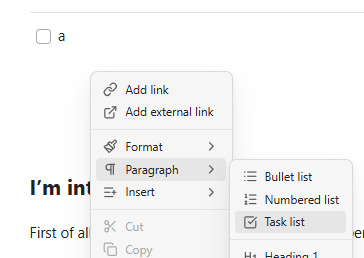
In the right-click context menu while in a note, there’s a Task list option under Paragraph:
There’s also the Toggle checkbox status command that has a default hotkey set of cmd/ctrl-L.
You can use these links to create new notes that start with a list.
create list (unique)
create list (no name)
[create list (unique)](obsidian://unique?content=-%20%5B%20%5D%20)

[create list (no name)](obsidian://new?content=-%20%5B%20%5D%20)
You can customize these links to your needs like which folder, which vault, whether to create new note or append to old note, append to daily note (yes/no), opens to new tab (yes/no).
Unfortunately you cannot use dynamic templates (yet) and you just need to update content=xxx manually. Also you cannot use dynamic templates for the file name without using 3rd party plugins. Commonly if you want file names to be my note YYYY-MM-DD then you need to use QuickAdd. Obsidian URI is similar to QuickAdd but QuickAdd is much more versatile.